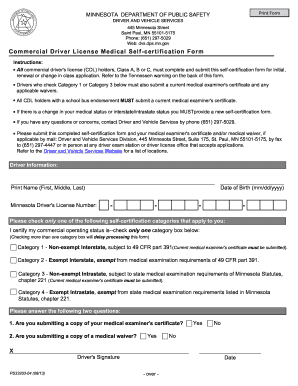
Ic e ns e Medical Self -cer tif ication Form Instructions: All commercial driver's license (CDL) holders, Class A, B or C, must complete and submit this self-certification form for initial, renewal or change in class application. Refer to the Tennessen warning on the back of this form. Drivers who check Category 1 or Category 3 below must also submit a current medical examiner's certificate and any applicable waivers. All CDL holders with a school bus endorsement MUST submit a current medical ex.

How it works
  • Open form

    Open form follow the instructions

  • Easily sign form

    Easily sign the form with your finger

  • Share form

    Send filled & signed form or save

How to fill out the MN DPS PS33203 online

This guide provides clear and supportive instructions on completing the MN DPS PS33203 form for commercial driver license medical self-certification. By following these steps, you will be able to successfully fill out the form online and ensure that your information is submitted accurately.

Follow the steps to complete the MN DPS PS33203 form online.

  1. Click the ‘Get Form’ button to access the online form and open it in the designated editor.
  2. Provide your driver information by entering your full name, including first, middle, and last name.
  3. Input your Minnesota driver's license number accurately in the specified field.
  4. Enter your date of birth in the format mm/dd/yyyy, ensuring it is correct.
  5. Select only one self-certification category that applies to your commercial operating status by checking the appropriate box.
  6. Answer the two questions about your medical examiner's certificate and any medical waiver you may be submitting by checking 'Yes' or 'No'.
  7. Sign the form to certify that the information provided is accurate and complete.
  8. Date the form at the designated section.
  9. Once you have completed all the fields, review the information for accuracy, then save your changes. You can choose to download, print, or share the completed form as needed.

Complete your MN DPS PS33203 form online today for efficient processing.

Get form

Experience a faster way to fill out and sign forms on the web. Access the most extensive library of templates available.

Related content

CDL forms, documents and resources | Minnesota...

Form nameCommercial driver's license medical self-certification form (PS33203), Use this...

Learn more
Questions & Answers

Get answers to your most pressing questions about US Legal Forms API.

Contact support

Can I upload my DOT physical online?

Yes, many states now allow you to upload your DOT physical information online. This feature simplifies the process and ensures your records are up to date. If you are looking for a platform that offers secure document handling, consider using uslegalforms to manage your MN DPS PS33203 submissions effectively.

To be exempt from a DOT medical card, you typically need to meet specific criteria that vary by state. In some cases, you may be exempt if you operate below certain weight limits or vehicle classifications. Always consult the MN DPS PS33203 guidelines or a legal expert to understand your eligibility.

To submit your medical certificate to the DMV in New York, you can do so online or by mail. Submit a copy of the certificate along with any required forms through their online portal or by sending them directly to the DMV office. Proper submission ensures your compliance with the MN DPS PS33203 requirements.

To document a DOT physical, obtain a form from an approved medical examiner. After the exam, you will receive a copy of your medical certificate, which you need to keep for your records. If you require forms or guidance, uslegalforms can assist you in accessing the necessary resources tailored to MN DPS PS33203.

In Oklahoma, you have a 90-day grace period after your DOT medical card expires. During this time, you can still operate your commercial vehicle while you work on renewing your MN DPS PS33203. Make sure to complete the renewal process promptly to avoid any penalties.

DPS stands for the Department of Public Safety in Minnesota. It oversees various transportation-related services, including licensing and vehicle regulations. For those dealing with MN DPS PS33203, understanding the role of DPS is crucial to ensure compliance with state requirements.

Yes, you can have a picture of your DOT medical card. It serves as a convenient way to keep an electronic copy of your MN DPS PS33203 documentation. However, ensure that the image is clear and legible if you need to share it with employers or authorities.

If your medical card expires while holding a CDL, you will likely face consequences such as a suspension of your driving privileges. The MN DPS PS33203 outlines the necessary actions to take if this occurs. Prompt action on renewals is vital to prevent interruptions in your ability to drive commercially. Always prioritize staying current with your medical certifications.

Yes, if your medical card expires, you may risk losing your CDL. Maintaining compliance with the MN DPS PS33203 is essential for your commercial driving status. It is best to renew your medical card before it expires to avoid any penalties. Being proactive about your documentation will help you keep your CDL in good standing.

In Minnesota, you can usually renew an expired CDL up to two years from the expiration date. However, driving with an expired CDL is not permitted, and it could lead to fines or other penalties. The MN DPS PS33203 emphasizes the importance of timely renewals to avoid disruptions in your driving privileges. Always check your renewal date and act promptly.

Get This Form Now!

Use professional pre-built templates to fill in and sign documents online faster. Get access to thousands of forms.

If you believe that this page should be taken down, please follow our DMCA take down process here.

MN DPS PS33203 Form

This form is available in several versions. Select the version you need from the drop-down list below.

Get MN DPS PS33203