Loading
Get Az Dor 131 2023-2026
How it works
-

Open form follow the instructions
-

Easily sign the form with your finger
-

Send filled & signed form or save
How to fill out the AZ DoR 131 online
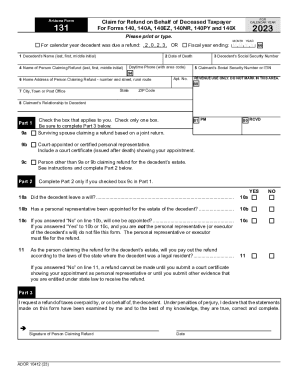
This guide provides a step-by-step overview of how to accurately complete the AZ DoR 131 form online, which is used to claim a refund on behalf of a deceased taxpayer. By following these instructions, users can ensure that they fill out the form correctly and efficiently.
Follow the steps to successfully complete the AZ DoR 131 form online.
- Click ‘Get Form’ button to access the AZ DoR 131 form and open it in your chosen editor.
- Enter the decedent’s name in the first field. Please provide the last name, then the first name, and the middle initial.
- Fill in the date of death in the designated field. Use the format MM/DD/YYYY.
- Input the claimant’s name, again starting with the last name, followed by the first name and middle initial.
- Provide a daytime phone number with area code for any follow-up communications.
- Enter the complete home address of the person claiming the refund, including number and street, rural route if applicable.
- Select the city, town, or post office associated with the address provided.
- Specify the state where the claimant resides.
- In the next section, fill out the claimant's zip code.
- Indicate the claimant’s relationship to the decedent by checking one of the boxes that apply.
- Complete Part 2 if the appropriate box in Part 1 was checked. Answer the questions regarding the decedent's will and the appointment of a personal representative.
- In Part 3, acknowledge the request for a refund and sign the declaration confirming the statements are true.
- After completing the form, review the information for accuracy. Save any changes made, and choose to download, print, or share the completed document.
Complete your AZ DoR 131 form online today for a smooth refund process.
Related links form
The Arizona Department of Revenue's (ADOR) Education & Outreach District serves as a liaison between the department and the state's cities, towns and municipalities. Our division consists of three areas: City Services Team, Education Unit, Compliance Programs and Specialty Tax Program Teams.