Loading
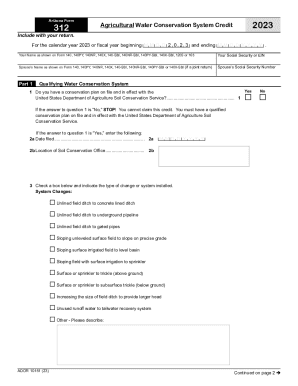
Get Az Form 312 2023-2026
How it works
-

Open form follow the instructions
-

Easily sign the form with your finger
-

Send filled & signed form or save
How to fill out the AZ Form 312 online
Filling out the AZ Form 312 is a crucial step for those seeking the Agricultural Water Conservation System Credit in Arizona. This guide provides clear and supportive instructions to help users complete the form online with ease.
Follow the steps to effectively fill out the AZ Form 312 online.
- Press the ‘Get Form’ button to access the AZ Form 312 and open it in the online editor.
- Enter your name exactly as it appears on your tax return forms (140, 140PY, 140NR, etc.) in the designated field.
- In Part 1, answer the first question regarding having a conservation plan on file. If 'No,' stop here, as you are not eligible for the credit.
- Select the appropriate box to indicate the type of changes made to your water conservation system and describe any other changes if necessary.
- Move to Part 2 and input the total amount of qualifying expenses for the current taxable year. Continue by entering any reimbursements received on the next line.
- In Part 3, list any available credit carryovers from previous taxable years, including originating years, original amounts, and amounts previously used.
- In Part 4, re-enter the current year’s credit from Part 2 and carryover amounts to calculate the total available credit.
Complete your AZ Form 312 online today to ensure you maximize your agricultural water conservation credits.