Loading
Get Az Dor Form 301 2023-2026
How it works
-

Open form follow the instructions
-

Easily sign the form with your finger
-

Send filled & signed form or save
How to fill out the AZ DoR Form 301 online
Filling out the AZ DoR Form 301 online is essential for claiming nonrefundable individual tax credits in Arizona. This guide will provide you with clear, step-by-step instructions to effortlessly complete the form and ensure you receive the credits you are entitled to.
Follow the steps to successfully complete the AZ DoR Form 301 online.
- Click ‘Get Form’ button to access the AZ DoR Form 301 in your online editor.
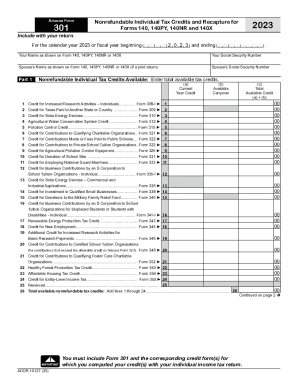
- Start by entering your name and social security number as they appear on your primary tax form (Form 140, 140PY, 140NR, or 140X). If you are filing a joint return, include your partner’s name and social security number as well.
- In Part 1, list the total available tax credits from the various categories provided. Enter the current year credit and any available carryover for each specific tax credit, referring to the corresponding forms as necessary.
- Calculate the total available nonrefundable tax credits by adding up all the credit amounts listed in Part 1. Ensure that the total is accurately reflected on the designated line.
- In Part 2, provide your social security number again and begin entering the tax amounts, including taxes calculated from your primary form, any recapture taxes, and details regarding tax credits utilized this year.
- Once all necessary amounts are entered, including recapture totals and nonrefundable tax credits used, ensure that you total these amounts accurately as per the instructions.
- Review all entered information for accuracy. Once confirmed, you can save your changes, download a copy of the completed form, or share it as needed for your filing process.
Complete your documents online today to ensure a smooth filing experience!
The Arizona Charitable Tax Credit is a set of two nonrefundable individual income tax credits for charitable contributions to Qualifying Charitable Organizations (QCOs) and Qualifying Foster Care Charitable Organizations (QFCOs).