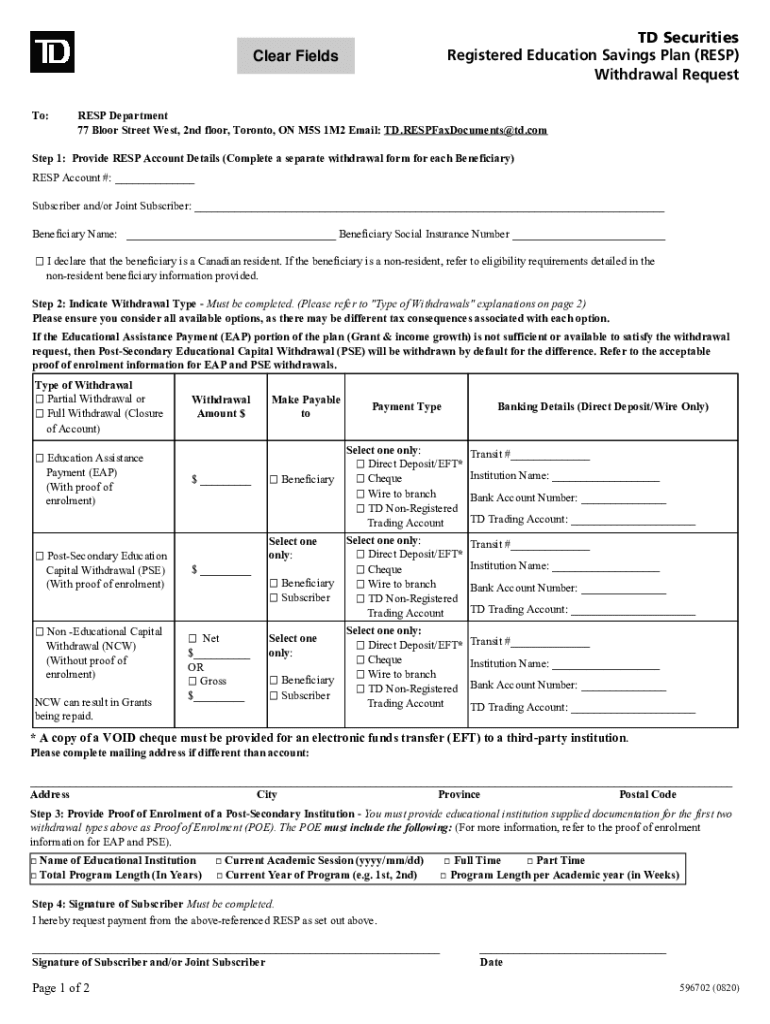
Ep 1: Provide RESP Account Details (Complete a separate withdrawal form for each Beneficiary) RESP Account #: Subscriber and/or Joint Subscriber: Beneficiary Name: Beneficiary Social Insurance Number I declare that the beneficiary is a Canadian resident. If the beneficiary is a non-resident, refer to eligibility requirements deta.

Open form follow the instructions

Easily sign the form with your finger

Send filled & signed form or save
How to fill out the Canada TD Securities 596702 online
This guide provides clear and comprehensive instructions to help you fill out the Canada TD Securities 596702 form online efficiently. Follow the steps outlined below to ensure accurate completion of each section of the Withdrawal Request for the Registered Education Savings Plan.
Follow the steps to complete your form successfully.
- Press the ‘Get Form’ button to access the form, which will open it in your preferred editing interface.
- Begin by providing the RESP account details. Complete a separate form for each Beneficiary. Fill in the RESP account number, along with the names of the Subscriber and Beneficiary. Indicate the Beneficiary’s Social Insurance Number and confirm their residency status by checking the appropriate box.
- Select the type of withdrawal you wish to request. Options include Partial Withdrawal, Full Withdrawal, Educational Assistance Payment (EAP), Post-Secondary Educational Capital Withdrawal (PSE), and Non-Educational Capital Withdrawal (NCW). Be sure to read the definitions and implications of each withdrawal type carefully before making your selection.
- Specify the withdrawal amount. Indicate whether you want the amount to be calculated as net or gross. Ensure you provide accurate details to avoid delays.
- Select who the payment should be made payable to, either the Beneficiary or Subscriber, ensuring only one option is selected.
- Complete the banking details for the payment method you have chosen. Indicate whether it is for Direct Deposit, Cheque, Wire, or TD Non-Registered Trading Account. Provide the necessary transit number and bank account details for direct payment.
- If you are requesting EAP or PSE withdrawals, include the required proof of enrolment documentation that meets the outlined criteria. Ensure all relevant information from the educational institution is attached.
- Finally, the Subscriber must sign and date the form, confirming the request for payment. Make sure all sections are filled out correctly before submission.
- Review all entries for accuracy, then save your changes and proceed to download, print, or share the completed form.
Complete your documentation online with confidence and efficiency.
Experience a faster way to fill out and sign forms on the web. Access the most extensive library of templates available.
Related content
by L Reynolds · 2017 · Cited by 16 — Aleman, K.J. and Porter, T.D. (2016)...
... Investment Trust Company. $6,410,818,308. TOTAL INVESTMENTS IN AFFILIATED INVESTMENT...
Get answers to your most pressing questions about US Legal Forms API.
Does TD Waterhouse still exist?
TD Waterhouse Canada Inc. is a Canadian financial services corporation headquartered in Toronto, Ontario. It is a wholly owned subsidiary of Toronto-Dominion Bank. The company does business through several divisions, namely TD Direct Investing, TD Wealth Financial Planning, and TD Wealth Private Investment Advice.
How do I contact TD Asset Management Advisor?
If you are unable to resolve the issue following the self-serve prompts, you can contact our Client Services team for assistance, Monday to Friday from 8am to 6pm (ET) at 1-800-588-8054 or email tdadvisor@td.com.
How do I contact TD Investment?
To get started, call our licensed representatives – Monday to Friday 7 am to 10 pm ET at 1-800-465-5463. Online Trading and Investing -- TD Direct Investing td.com https://.td.com › investing › direct-investing td.com https://.td.com › investing › direct-investing
How do I cash out my RESP?
To withdraw money from the RESP, the subscriber should contact their RESP promoter. Once the beneficiary has enrolled full‑time or part‑time in a qualifying post‑secondary educational program, the subscriber can request an EAP to withdraw money from the RESP to help pay for the beneficiary's studies. Pay for education using the Registered Education Savings Plan canada.ca https://.canada.ca › services › benefits › paying-edu... canada.ca https://.canada.ca › services › benefits › paying-edu...
How long do you have to withdraw from TD RESP?
Once the 13 weeks have passed, any amount of EAP can be withdrawn. RESP Withdrawal Rules & Limits | TD Canada Trust td.com https://.td.com › personal-investing › learn › resp-w... td.com https://.td.com › personal-investing › learn › resp-w...
How do I contact TD stock?
Download the TD App English1-800-465-5463 416-982-7686Mandarin1-800-838-3223 option 2 416-982-8863 604-654-8888Toll-free from Hong Kong00-1-800-963-541TTY (Text Telephone)1-866-966-6061Toll-free from Mexico00-1-800-514-78015 more rows
What number is 1 866 222 3456?
Can I contact anyone for help with EasyWeb? You can call TD Canada Trust EasyLine at 1-866-222-3456. If you are not an EasyWeb customer, visit us or call 1-800-640-2150for registration information.
Does TD Bank sell US Treasury bonds?
We offer government bonds including Canadian federal, provincial, strip and U.S. Also available are corporate bonds. Fixed Income Investments – TD Direct Investing td.com https://.td.com › direct-investing › investment-types td.com https://.td.com › direct-investing › investment-types
Use professional pre-built templates to fill in and sign documents online faster. Get access to thousands of forms.
If you believe that this page should be taken down, please follow our DMCA take down process here.