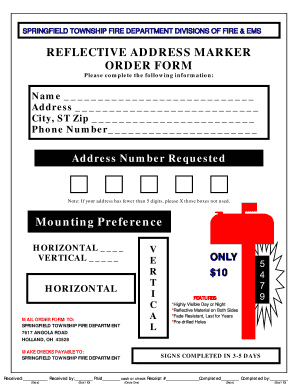
Mber Address Number Requested Note: If your address has fewer than 5 digits, please X those boxes not used. Mounting Preference HORIZONTAL VERTICAL HORIZONTAL V E R T I C A L SIGNS COMPLETED IN 3-5 DAYS.
Open form follow the instructions
Easily sign the form with your finger
Send filled & signed form or save
Tips on how to fill out, edit and sign OH Reflective Address Marker Order Form - Springfield Township online
How to edit OH Reflective Address Marker Order Form - Springfield Township
Check out a standalone service to manage all of your paperwork with ease. Find, edit, and complete your OH Reflective Address Marker Order Form - Springfield Township in a single interface with the help of smart instruments.
The times when people needed to print forms or even write them by hand are over. Today, all it takes to get and complete any form, such as OH Reflective Address Marker Order Form - Springfield Township, is opening a single browser tab. Here, you will find the OH Reflective Address Marker Order Form - Springfield Township form and customize it any way you need, from inserting the text straight in the document to drawing it on a digital sticky note and attaching it to the document. Discover instruments that will simplify your paperwork without additional effort.
Just click the Get form button to prepare your OH Reflective Address Marker Order Form - Springfield Township paperwork easily and start editing it instantly. In the editing mode, you can easily complete the template with your details for submission. Simply click on the field you need to modify and enter the information right away. The editor's interface does not need any specific skills to use it. When finished with the edits, check the information's accuracy once more and sign the document. Click on the signature field and follow the instructions to eSign the form in a moment.
Use Additional instruments to customize your form:
- Use Cross, Check, or Circle instruments to pinpoint the document's data.
- Add text or fillable text fields with text customization tools.
- Erase, Highlight, or Blackout text blocks in the document using corresponding instruments.
- Add a date, initials, or even an image to the document if necessary.
- Make use of the Sticky note tool to annotate the form.
- Use the Arrow and Line, or Draw tool to add graphic elements to your file.
Preparing OH Reflective Address Marker Order Form - Springfield Township forms will never be puzzling again if you know where to look for the suitable template and prepare it easily. Do not hesitate to try it yourself.
How to sign the PA BCO-10 form electronically
airSlate SignNow makes it easy to add a legally-binding electronic signature to your PA BCO-10 form from any device.
- Open the completed PA BCO-10 form in the editor.
- Click My Signature and choose your preferred signature type.
- Place the signature in the designated field and click Done.
- Download or send the signed document directly from the platform.
How to edit OH Reflective Address Marker Order Form - Springfield Township
Check out a standalone service to manage all of your paperwork with ease. Find, edit, and complete your OH Reflective Address Marker Order Form - Springfield Township in a single interface with the help of smart instruments.
The times when people needed to print forms or even write them by hand are over. Today, all it takes to get and complete any form, such as OH Reflective Address Marker Order Form - Springfield Township, is opening a single browser tab. Here, you will find the OH Reflective Address Marker Order Form - Springfield Township form and customize it any way you need, from inserting the text straight in the document to drawing it on a digital sticky note and attaching it to the document. Discover instruments that will simplify your paperwork without additional effort.
Just click the Get form button to prepare your OH Reflective Address Marker Order Form - Springfield Township paperwork easily and start editing it instantly. In the editing mode, you can easily complete the template with your details for submission. Simply click on the field you need to modify and enter the information right away. The editor's interface does not need any specific skills to use it. When finished with the edits, check the information's accuracy once more and sign the document. Click on the signature field and follow the instructions to eSign the form in a moment.
Use Additional instruments to customize your form:
- Use Cross, Check, or Circle instruments to pinpoint the document's data.
- Add text or fillable text fields with text customization tools.
- Erase, Highlight, or Blackout text blocks in the document using corresponding instruments.
- Add a date, initials, or even an image to the document if necessary.
- Make use of the Sticky note tool to annotate the form.
- Use the Arrow and Line, or Draw tool to add graphic elements to your file.
Preparing OH Reflective Address Marker Order Form - Springfield Township forms will never be puzzling again if you know where to look for the suitable template and prepare it easily. Do not hesitate to try it yourself.
Experience a faster way to fill out and sign forms on the web. Access the most extensive library of templates available.
Related content
Contact your local fire chief to place an address sign order or download a copy of the...
Online learning & accommodations for students and faculty/staff. If you are at higher risk...
Sandusky County Ems Log. Sandusky County Ems LogSandusky Township Fire & EMS, Fremont...
Get answers to your most pressing questions about US Legal Forms API.
What is the phone number prefix for Springfield Ohio?
Area codes 937 and 326 are telephone area codes in the North American Numbering Plan (NANP) assigned to a numbering plan area (NPA) that encompasses much of the southwestern part of the U.S. state of Ohio, including Dayton and Springfield.
What is the phone number for Springfield Ohio Code Enforcement?
For structural issues, tall grass/weeds and junk vehicles (on property) contact City Code Enforcement at 937-324-7385. For junk vehicles (on street) contact the Police Department, non-emergency at 937-324-7680.
How do I report a concern in Springfield Ohio?
If you are experiencing a Police or Fire emergency, dial 9-1-1. For Police non-emergency concerns, call 937-324-7680.
Can I have chickens in Springfield Ohio?
With the adoption of a new Zoning Resolution, residents in all residential districts may keep chickens (per section 11.113 of the Zoning Resolution) as an accessory to their home. A zoning certificate (permit) must be obtained by the property owner prior to the keeping of chickens.
Does Springfield Ohio have a noise ordinance?
No person owning or occupying a single family dwelling in any unincorporated area of Springfield Township zoned for residential use shall generate or permit to be generated by means of a radio, phonograph, television, tape or disc player, loudspeaker or any other sound amplifying device or by any horn, drum, piano, or ...
Who is the fire chief in Springfield Township?
Springfield Township Fire Chief, Rick Browe leads one of the busiest fire departments in Hamilton County. He was appointed Chief in 2023 upon serving as Assistant Chief for the township 26 years.
Use professional pre-built templates to fill in and sign documents online faster. Get access to thousands of forms.
If you believe that this page should be taken down, please follow our DMCA take down process here.