Loading
Get For Online Registrations, Visit Our Web Site At Www - Add
How it works
-

Open form follow the instructions
-

Easily sign the form with your finger
-

Send filled & signed form or save
How to use or fill out the For Online Registrations, Visit Our Web Site At Www - Add online
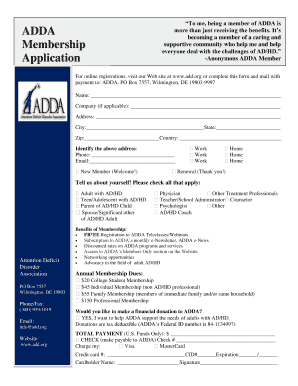
Filling out the membership application for the Attention Deficit Disorder Association (ADDA) online can be a straightforward process. This guide will provide you with a clear, step-by-step approach to ensure that you complete the application accurately and efficiently.
Follow the steps to complete your online registration
- Click ‘Get Form’ button to obtain the form and open it in the editor.
- Begin by entering your name in the designated field. Ensure that all spelling is correct to avoid any issues with your membership registration.
- If applicable, provide your company name in the specified field. This is optional for those registering as individuals.
- Fill in your complete address, including street address, city, state, zip code, and country. Each of these fields is important for communication from ADDA.
- Enter your phone number and email address. This information is critical for receiving updates and information regarding your membership.
- Select whether you are a new member or renewing your membership by checking the appropriate box.
- In the 'Tell us about yourself' section, select all applicable options that describe your relationship to AD/HD by checking the boxes next to each option.
- Choose your membership type by selecting the corresponding box for either College Student Membership, Individual Membership, Family Membership, or Professional Membership.
- If you wish to make a financial donation to ADDA, check the appropriate box to indicate your support.
- Indicate your total payment amount in U.S. funds. Ensure the figure is accurate according to the membership level chosen.
- If paying by check, provide the check number in the designated field. If paying by credit card, fill in your card details, including number, CID, expiration date, and the cardholder's name.
- Finally, review all entered information for accuracy. Once confirmed, you can save your changes, download the completed form, print it out, or share it as needed.
Complete your application online today to become a part of the ADDA community!
I'll show you how to register a domain name to kickstart your website's digital transformation. Choose a domain name. ... Check for domain availability. ... Choose a domain name registrar. ... Purchase and register. ... Add domain ID protection. ... Renew your domain name.
Industry-leading security and compliance
US Legal Forms protects your data by complying with industry-specific security standards.
-
In businnes since 199725+ years providing professional legal documents.
-
Accredited businessGuarantees that a business meets BBB accreditation standards in the US and Canada.
-
Secured by BraintreeValidated Level 1 PCI DSS compliant payment gateway that accepts most major credit and debit card brands from across the globe.