Loading
Get Ar Dor Ar4 2023-2026
How it works
-

Open form follow the instructions
-

Easily sign the form with your finger
-

Send filled & signed form or save
How to fill out the AR DoR AR4 online
Filling out the AR DoR AR4 form is an essential step for individuals reporting interest and dividends in Arkansas. This guide will walk you through each section of the form to ensure accuracy and completeness.
Follow the steps to complete the AR DoR AR4 form online.
- Click the ‘Get Form’ button to access the AR DoR AR4 document and open it in your chosen editor.
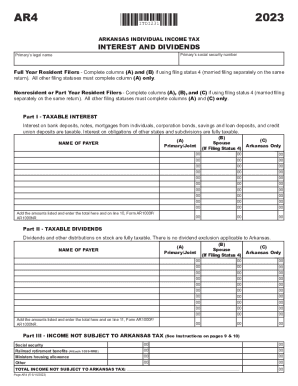
- Begin by entering the primary person’s social security number and legal name at the top of the form.
- For full year resident filers, complete columns (A) and (B). If you are a nonresident or part-year resident filer, fill in columns (A), (B), and (C) as needed.
- In Part I - Taxable Interest, provide the name of the payer for taxable interest in column (A) and record the amounts. Repeat in column (B) if applicable and follow the instructions for entering totals on lines specified.
- In Part II - Taxable Dividends, similarly fill in the name of the payer in column (A) for any dividends received. Follow the same process for column (B) if filing jointly and ensure to add the total as directed.
- Proceed to Part III, where you will list any income not subject to Arkansas tax, including social security and any other applicable incomes. Ensure all relevant amounts are recorded accurately.
- After completing all sections, review the form for accuracy, make any necessary corrections, and finalize it according to your needs.
- Finally, save your changes, and choose to download, print, or share the completed form as required.
Complete your AR DoR AR4 form online today for efficient processing.
The AR1000RC5 form is used by families to receive a $500 tax credit for individuals with developmental disabilities. It is submitted with your state income taxes.