Loading
Form preview
  • US Legal Forms
  • Other Templates
  • More Forms
  • More Multi-State Forms
  • Form M-942 Rev 908 Instructions For Monthly Tax Return

Get Form M-942 Rev 908 Instructions For Monthly Tax Return

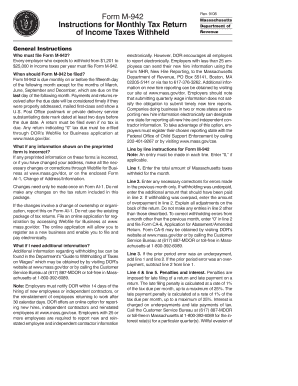
Hold from $1,201 to $25,000 in income taxes per year must file Form M-942. When should Form M-942 be filed? Form M-942 is due monthly on or before the fifteenth day of the following month except for the months of March, June, September and December, which are due on the last day of the following month. Payments and returns received after the due date will be considered timely if they were properly addressed, mailed first-class and show a U.S. Post Office postmark or private delivery service subs.

How it works

  1. Open form

    Open form follow the instructions

  2. Easily sign form

    Easily sign the form with your finger

  3. Share form

    Send filled & signed form or save

How to fill out the Form M-942 Rev 908 Instructions For Monthly Tax Return online

Filling out Form M-942 Rev 908 is a crucial responsibility for employers who withhold income taxes. This guide provides clear and detailed instructions on how to accurately complete the form online, ensuring compliance with Massachusetts tax regulations.

Follow the steps to successfully complete the Form M-942 online.

  1. Click the ‘Get Form’ button to obtain the Form M-942 and open it in your chosen editor.
  2. Enter your federal identification number in the designated field at the top of the form. This number is essential for identifying your business.
  3. Fill in the business name, address, city/town, state, and ZIP code. Ensure that all details are accurate and up-to-date.
  4. Specify the number of employees from whom taxes were withheld for the reporting period. This information is important for understanding your tax obligations.
  5. Indicate the month and year for which you are filing the return. This ensures that the form covers the correct period.
  6. In line 1, enter the total amount of Massachusetts taxes withheld for the reporting month.
  7. If applicable, in line 2, enter any necessary corrections for errors made in the previous month. Provide clear explanations of the adjustments on the back of the return.
  8. For line 3, calculate the total amount due. If there was an underpayment, add lines 1 and 2. If there was an overpayment, subtract line 2 from line 1.
  9. Complete lines 4 and 5 to include penalties and interest if applicable, referencing the provided guidelines for calculations.
  10. In line 6, sum lines 3, 4, and 5 to determine the total amount due for payment.
  11. Sign and date the return, certifying that the information is true and complete. Also, make any necessary payment payable to the Commonwealth of Massachusetts.
  12. Finally, save your changes, download, print, and share the completed form as needed.

Complete your Form M-942 online today to stay compliant with Massachusetts tax requirements.

Get form

Experience a faster way to fill out and sign forms on the web. Access the most extensive library of templates available.
Get form

Related content

1040 (2023) | Internal Revenue Service
Getting tax forms and publications. Getting tax publications and instructions in eBook...
Learn more
FFIEC 031 June
Jun 30, 2003 — The Reports of Condition and Income are to be prepared in accordance with...
Learn more
2016 Instruction 1040
Dec 15, 2016 — See What's New in these instructions. THIS BOOKLET DOES NOT CONTAIN...
Learn more

Related links form

Provant Pge Kp Healthaccountservices Com Standardized Prior Authorization Form Instructions - Well Sense... Wellsense Manchester Nh

Questions & Answers

Get answers to your most pressing questions about US Legal Forms API.

Contact support

FUTA Tax. The FUTA tax is more commonly known as the unemployment tax, and only employers have to pay this tax, not employees. The tax rate is 6% of the first $7,000 of taxable income an employee earns annually.

Sign in to your online account. Go to OPM Retirement Services Online · Click Federal Tax Withholdings in the menu to view, stop, or change your current federal ... If you are already receiving benefits or if you want to change or stop your withholding, you'll need a Form W-4V from the Internal Revenue Service (IRS).

Individuals and businesses can make estimated tax payments electronically through MassTaxConnect. It's fast, easy, and secure. In addition, extension, return, and bill payments can also be made. Visit the MassTaxConnect video tutorial, How to Make an Estimated Payment.

Who must pay estimated tax. Individuals, including sole proprietors, partners, and S corporation shareholders, generally have to make estimated tax payments if they expect to owe tax of $1,000 or more when their return is filed.

For employees, withholding is the amount of federal income tax withheld from your paycheck. The amount of income tax your employer withholds from your regular pay depends on two things: The amount you earn. The information you give your employer on Form W–4.

What Is Withholding Tax? The term withholding tax refers to the money that an employer deducts from an employee's gross wages and pays directly to the government.

Withholding refers to income tax withheld from wages by employers to pay employees' personal income taxes.

Massachusetts. At year end you are required to file reconciliation Form M-3 Reconciliation of Massachusetts Income Taxes Withheld for Employers with the state. The form is due by January 31 following the taxable year.

Get This Form Now!

Use professional pre-built templates to fill in and sign documents online faster. Get access to thousands of forms.
Get form
If you believe that this page should be taken down, please follow our DMCA take down processhere.
Get Form M-942 Rev 908 Instructions For Monthly Tax Return
Get form
  • Adoption
  • Bankruptcy
  • Contractors
  • Divorce
  • Home Sales
  • Employment
  • Identity Theft
  • Incorporation
  • Landlord Tenant
  • Living Trust
  • Name Change
  • Personal Planning
  • Small Business
  • Wills & Estates
  • Packages A-Z
  • Affidavits
  • Bankruptcy
  • Bill of Sale
  • Corporate - LLC
  • Divorce
  • Employment
  • Identity Theft
  • Internet Technology
  • Landlord Tenant
  • Living Wills
  • Name Change
  • Power of Attorney
  • Real Estate
  • Small Estates
  • Wills
  • All Forms
  • Forms A-Z
  • Other Templates
  • Legal Hub
  • About Us
  • Help Portal
  • Legal Resources
  • Blog
  • Affiliates
  • Contact Us
  • Delete My Account
  • Site Map
  • Industries
  • Forms in Spanish
  • Localized Forms
  • State-specific Forms
  • Forms Kit
  • Real Estate Handbook
  • All Guides
  • Notarize
  • Incorporation services
  • For Consumers
  • For Small Business
  • For Attorneys
  • USLegal
  • FormsPass
  • pdfFiller
  • signNow
  • altaFlow
  • DocHub
  • Instapage
Form Packages
  • Adoption
  • Bankruptcy
  • Contractors
  • Divorce
  • Home Sales
  • Employment
  • Identity Theft
  • Incorporation
  • Landlord Tenant
  • Living Trust
  • Name Change
  • Personal Planning
  • Small Business
  • Wills & Estates
  • Packages A-Z
Form Categories
  • Affidavits
  • Bankruptcy
  • Bill of Sale
  • Corporate - LLC
  • Divorce
  • Employment
  • Identity Theft
  • Internet Technology
  • Landlord Tenant
  • Living Wills
  • Name Change
  • Power of Attorney
  • Real Estate
  • Small Estates
  • Wills
  • All Forms
  • Forms A-Z
  • Other Templates
Customer Service
  • Legal Hub
  • About Us
  • Help Portal
  • Legal Resources
  • Blog
  • Affiliates
  • Contact Us
  • Delete My Account
  • Site Map
  • Industries
  • Forms in Spanish
  • Localized Forms
  • State-specific Forms
  • Forms Kit
Legal Guides
  • Real Estate Handbook
  • All Guides
Prepared for you
  • Notarize
  • Incorporation services
Our Customers
  • For Consumers
  • For Small Business
  • For Attorneys
Our Sites
  • USLegal
  • FormsPass
  • pdfFiller
  • signNow
  • altaFlow
  • DocHub
  • Instapage
Social Media
Call us now toll free:
+1 833 426 79 33
As seen in:
© Copyright 1999-2026 airSlate Legal Forms, Inc. 17 Station Street, Ste. 203, Brookline, MA 02445
  • Your Privacy Choices
  • Terms of Service
  • Privacy Notice
  • Content Takedown Policy
  • Bug Bounty Program