Loading
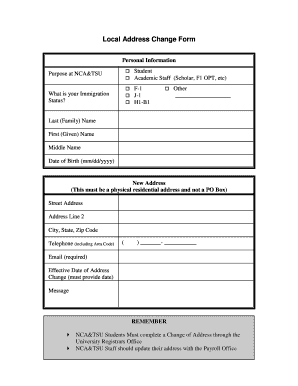
Get Local Address Change Form - Ncat
How it works
-

Open form follow the instructions
-

Easily sign the form with your finger
-

Send filled & signed form or save
How to fill out the Local Address Change Form - Ncat online
Filling out the Local Address Change Form - Ncat online is a straightforward process designed to assist users in updating their residential address. This guide provides step-by-step instructions to ensure your application is completed accurately and efficiently.
Follow the steps to complete the Local Address Change Form online.
- Click ‘Get Form’ button to obtain the form and open it in the editor.
- Identify your personal information. Fill in whether your purpose at NCA&TSU is as a Student or Academic Staff (Scholar, F1 OPT, etc). Ensure to check the appropriate box.
- Indicate your immigration status by selecting the correct option: F-1, J-1, H1-B1, or Other. If choosing 'Other', please specify in the provided line.
- Enter your full name, starting with your last (family) name, followed by your first (given) name, and then your middle name.
- Input your date of birth in the format mm/dd/yyyy.
- Provide your new physical residential address. This section includes fields for Street Address, Address Line 2 (if applicable), City, State, and Zip Code. Note that a PO Box is not acceptable.
- Fill in your telephone number, including the area code, in the designated format.
- Enter your email address, as this is a required field.
- Specify the effective date of the address change. Ensure that you provide an accurate date.
- If needed, utilize the message section to provide additional information.
- After completing all fields, review the form for accuracy. Save changes if necessary, and download, print, or share the form as required.
Complete your Local Address Change Form - Ncat online today to ensure your address is updated promptly.
The email will have the subject line, “Direct Deposit Notice” and will be sent from depnote@ncat.edu. For your protection, a password is used. The password format is to lowercase the first four letters of your last name with the last four digits of your Banner ID number.
Industry-leading security and compliance
US Legal Forms protects your data by complying with industry-specific security standards.
-
In businnes since 199725+ years providing professional legal documents.
-
Accredited businessGuarantees that a business meets BBB accreditation standards in the US and Canada.
-
Secured by BraintreeValidated Level 1 PCI DSS compliant payment gateway that accepts most major credit and debit card brands from across the globe.