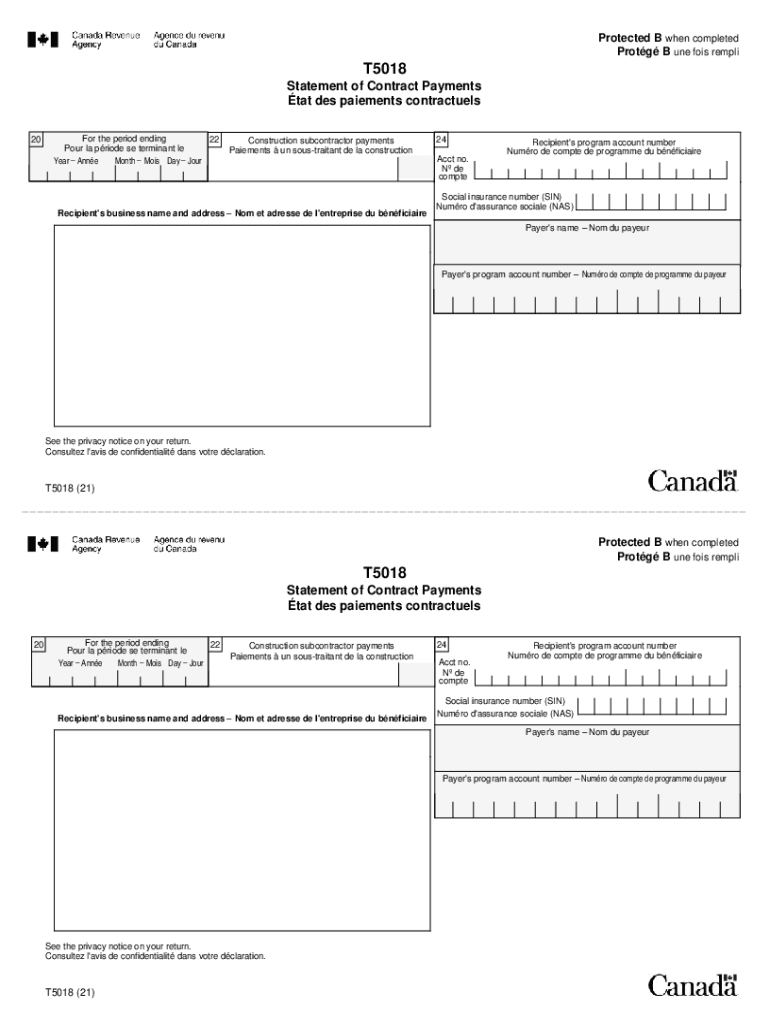
Ois Day Jour Year Ann e Construction subcontractor payments Paiements un sous-traitant de la construction 24 Acct no. N de compte Recipient's business name and address Nom et adresse de l'entreprise du b n ficiaire Recipient's program account number Num ro de compte de programme du b n ficiaire Social insurance number (SIN) Num ro d'assurance sociale (NAS) Payer's name Nom du payeur Payer's program account number Num ro de compte de programme du payeur See.
Loading

Open form follow the instructions

Easily sign the form with your finger

Send filled & signed form or save
How to fill out the Canada T5018 online
The Canada T5018 form, known as the Statement of Contract Payments, is essential for reporting payments made to construction subcontractors. This guide provides clear and supportive instructions on how to complete this form online, ensuring compliance and accuracy.
Follow the steps to successfully complete the Canada T5018 online.
- Press the ‘Get Form’ button to obtain the Canada T5018 form and open it in a suitable editing platform.
- Identify the reporting period by entering the month, day, and year in Box 20. This indicates the last day of your reporting period.
- In Box 22, enter the total amount of payments made to the subcontractor during the reporting period. Make sure to include any applicable goods and services tax or sales tax.
- For Box 24, provide the recipient's program account number or social insurance number. Ensure this is correct to avoid issues with reporting.
- Fill in the recipient's business name and address. This information must be accurate to facilitate proper record-keeping.
- Enter the payer's name in the designated field, as this identifies who made the payments to the subcontractors.
- Finally, do not include your business number in the copies given to subcontractors. Review all entered information for accuracy, then save your changes, download, print, or share the completed form as necessary.
Complete your Canada T5018 form online today to ensure all your construction payments are accurately reported.
Experience a faster way to fill out and sign forms on the web. Access the most extensive library of templates available.
Related content
Aug 28, 2019 — ... Canada and Puerto Rico. United Kingdom Payroll Tax Updates for...
I bolster this with a socio-legal analysis that takes account of gradual changes in...
January 1, 2021 – December 31, 2021. January 1, 2022 – December 31, 2022. In order to...
Get answers to your most pressing questions about US Legal Forms API.
How do I report T5018 on my tax return?
Enter the total number of T5018 slips that you are filing with the T5018 Summary. Add the amounts in box 22 of all T5018 slips. Report the total on line 82. Enter the name and telephone number of a contact person that the CRA can call to get or clarify information you reported on the T5018 Summary.
What is the T5018 deduction?
A T5018 slip identifies the total contract payments made to a recipient by a contractor in a calendar year or fiscal period. The T5018 reporting requirement is part of the CRA's effort to promote compliance in the construction industry and to reduce activity in the underground economy.
What is the difference between a T4A and T5018?
The T4A Detail report defaults to the last calendar year period, where the T5018 Detail report defaults to the last fiscal year. You can change the dates under the Report period. Use the Contractor filter option to view information that pertains to specific contractors.
What is T5018 form in Canada?
A T5018 slip identifies the total contract payments made to a recipient by a contractor in a calendar year or fiscal period. The T5018 reporting requirement is part of the CRA's effort to promote compliance in the construction industry and to reduce activity in the underground economy.
How much do you have to report on T5018?
What payments do you report on the slips? Report all payments of $500 or more you make in the reporting period to subcontractors for construction services. Only report mixed services and payments for goods if there is a service component of $500 or more in the reporting period.
How do I upload my T5018 to CRA?
You can use the CRA's Web Forms application at canada.ca/taxes-iref to save, print, and send your T5018 slips and summaries electronically – for free!
Use professional pre-built templates to fill in and sign documents online faster. Get access to thousands of forms.
If you believe that this page should be taken down, please follow our DMCA take down process here.