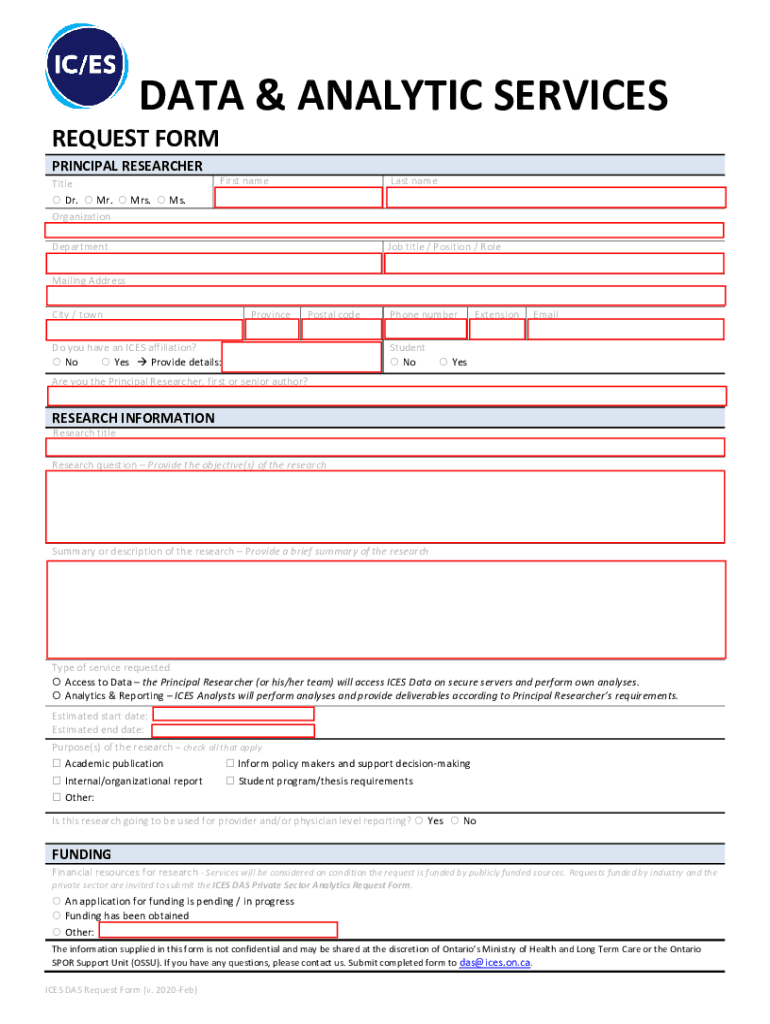
/ town Province Postal code Do you have an ICES affiliation? No Yes Provide details: Phone number Student No Extension Email Yes Are you the Principal Researcher, first or senior author? RESEARCH INFORMATION Research title Research question Provide the objective(s) of the research Summary or description of the research Provide a brief summary of the research Type of service requested Access to Data the Principal Researcher (or his/her team) will acc.
Loading

Open form follow the instructions

Easily sign the form with your finger

Send filled & signed form or save
How to fill out the Canada ICES Data & Analytic Services Request Form online
The Canada ICES Data & Analytic Services Request Form is a crucial document for researchers seeking access to data and analytics services. This guide provides a clear, step-by-step approach to assist users in completing the form accurately and efficiently.
Follow the steps to fill out the form correctly.
- Click ‘Get Form’ button to obtain the form and open it for completion.
- In the 'Principal Researcher' section, provide your title by selecting from the options (Dr., Mr., Mrs., Ms.), then enter your organization name, last name, first name, job title, and department. Fill in your mailing address, including city or town, province, and postal code.
- Indicate whether you have an ICES affiliation by selecting 'Yes' or 'No'. If 'Yes', provide the necessary details. Enter your phone number, extension, and email address.
- Respond to the question regarding your role by selecting 'Yes' or 'No' to confirm if you are the Principal Researcher, first, or senior author.
- Proceed to the 'Research Information' section. Enter the research title and detailed research question, outlining the objectives clearly. Provide a brief summary or description of the research.
- Select the type of service requested by choosing either 'Access to Data' or 'Analytics & Reporting'. If choosing Analytics & Reporting, clarify your requirements in the designated area.
- Fill in the estimated start date and estimated end date for the research.
- Indicate the purpose(s) of the research by checking all applicable options, such as academic publication, policy-making support, internal report, thesis requirements, or others.
- State whether the research will be used for provider and/or physician level reporting by selecting 'Yes' or 'No'.
- In the 'Funding' section, specify the financial resources for research. Indicate if an application for funding is pending, has been obtained, or if there are other funding conditions.
- Review the note regarding the confidentiality of the information provided, then submit the completed form to das@ices.on.ca.
Complete your ICES request form online today to access vital data and analytic services.
Experience a faster way to fill out and sign forms on the web. Access the most extensive library of templates available.
Related content
by MJ Schull · 2019 · Cited by 78 — ... (ICES Data and Analytic Services Projects). Go...
by US Immigration · Cited by 7 — The requested funding will fill critical operational...
Prior Authorization Request Form, is available in the Healthcare Services section of this...
Get answers to your most pressing questions about US Legal Forms API.
What is the registered persons database for ICES?
The RPDB (database) provides basic demographic information about anyone who has ever received an Ontario Health Insurance Plan (OHIP) card. OHIP cards include a unique Health Card Number (HCN) to identify a person's age, sex and address, including postal code. The postal codes used at ICES come mainly from HCNs.
What does ICES stand for Canada?
International Credential Evaluation Service (ICES)
What is ICES data?
The records in ICES data reflect Ontarians' day-to-day interactions with the healthcare system. These include: Physician claims submitted to the Ontario Health Insurance Plan. Medical drug claims submitted to the Ontario Drug Benefit Program. Discharge summaries of hospital stays and emergency department visits.
How do I access my Ices data?
Public sector researchers may request access to data or analytic services by submitting an ICES DAS Public Sector Request Form to das@ices.on.ca. For help in completing the form, see the DAS Request Form Information Sheet or for further information, email us or call 1-888-480-1327 (toll-free).
What is ices Canada?
The International Credential Evaluation Service (ICES) is the provincially mandated credential evaluation service in British Columbia. We are also a member of the Alliance of Credential Evaluation Services of Canada (ACESC).
What is the ICES egg and larvae database?
The Eggs and Larvae database aims to store, and make available, data collected by ichthyoplankton surveys for use by ICES and the wider marine community. It provides an overview of available fish egg and larvae survey data, and a unified portal for access to the ichthyoplankton survey data.
Use professional pre-built templates to fill in and sign documents online faster. Get access to thousands of forms.
If you believe that this page should be taken down, please follow our DMCA take down process here.