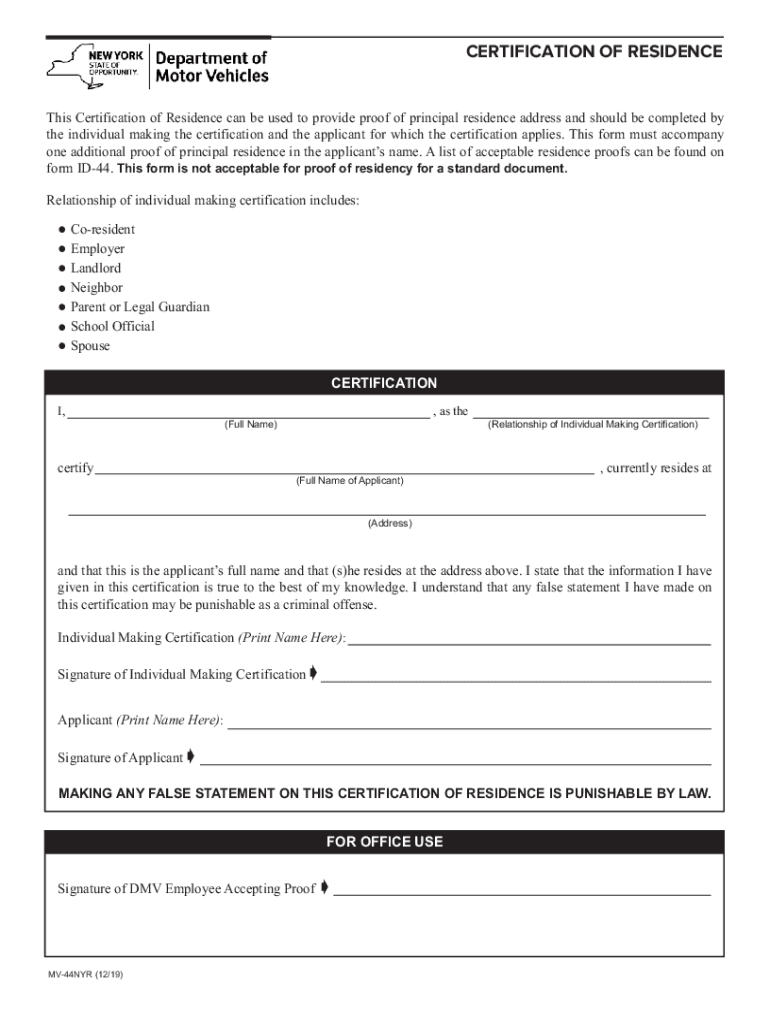
Icant for which the certification applies. This form must accompany one additional proof of principal residence in the applicant s name. A list of acceptable residence proofs can be found on form ID-44. This form is not acceptable for proof of residency for a standard document. Relationship of individual making certification includes: Co-resident Employer Landlord Neighbor Parent or Legal Guardian School Official Spouse t CERTIFICATION I, , as the (Relationship o.

Open form follow the instructions

Easily sign the form with your finger

Send filled & signed form or save
How to fill out the NY DMV MV-44NYR online
The NY DMV MV-44NYR is a critical document for certifying a user's principal residence. This guide provides clear, step-by-step instructions on how to accurately complete the form online, ensuring that you meet all requirements.
Follow the steps to complete the NY DMV MV-44NYR form online.
- Click ‘Get Form’ button to access the MV-44NYR form and open it in the editor.
- In the section titled 'CERTIFICATION,' begin by entering your full name in the provided space.
- Specify your relationship to the applicant by selecting from the listed options (e.g., co-resident, landlord, parent). You can type your relationship in the designated field.
- Next, fill in the full name of the applicant whose residency is being certified.
- Provide the applicant's complete current address in the address field.
- Read the certification statement carefully, ensuring that all information you have entered is accurate.
- Print your name in the section labeled 'Individual Making Certification (Print Name Here).'
- Sign your name in the 'Signature of Individual Making Certification' section, followed by the applicant printing and signing their name as well.
- Finally, review all entered information for accuracy and completeness before proceeding to save changes.
- You can save the document, download, print, or share the completed form as needed.
Start filling out the NY DMV MV-44NYR form online today!
Experience a faster way to fill out and sign forms on the web. Access the most extensive library of templates available.
Related content
File name: mv44NYR.pdf ; Form ID: MV-44NYR ; Purpose: Used with an application for an...
DMV Certificate of Residence (MV-44NYR). Assisted Living or Nursing Home Statement. Credit...
RCC Full Form What Is RCC Advantages & Disadvantages of … WebMaterial. RCC. Brand...
Get answers to your most pressing questions about US Legal Forms API.
How do I schedule an appointment at the California DMV?
Their online appointment system is available 24/7 or you can schedule your appointment by phone. Simply call 1-800-777-0133 during normal business hours. You can check your local DMV office location and their business hours.
What is the form for California ID?
Driver License or Identification Card Application (DL 44 or DL 44c) The DL44 is a form everyone should become familiar with because submitting one is a requirement for getting a California drivers license. The form can also be used to replace a lost license or renew a license before it expires.
What is the difference between a REAL ID and an enhanced ID in NY?
The most significant difference between the two documents is that an EDL allows you to cross a U.S. border coming from Canada, Mexico, and some Caribbean countries, by land or sea, while a REAL ID does not. However, if you are crossing an international border by plane, you will still need a passport.
Can you walk into NYS DMV without appointment?
Although not required, we strongly encourage making a reservation to be certain you will be allowed entry into the office.
How to get a california drivers license?
How to Apply for a New California Drivers License Schedule an Appointment. The DMV is notorious for its long lines. ... Complete the Driver License Application. ... Provide Your Personal Information. ... Fingerprints and Photos. ... Pay the License Fee. ... Take the Vision Exam. ... Pass the Written Test. ... Get Your License (or Permit)
Can I print out a DL 44 form?
The DL 44 form is the application for a driver's license in California. You can either fill it out at the DMV or print it out and fill it in advance.
What is a MV 44 form NY?
MV-44. Purpose: Use to apply for a learner permit, driver license or non-driver ID. Also use to renew your license or non-driver ID. Application for Permit, Driver License or Non-Driver ID Card.
Use professional pre-built templates to fill in and sign documents online faster. Get access to thousands of forms.
If you believe that this page should be taken down, please follow our DMCA take down process here.