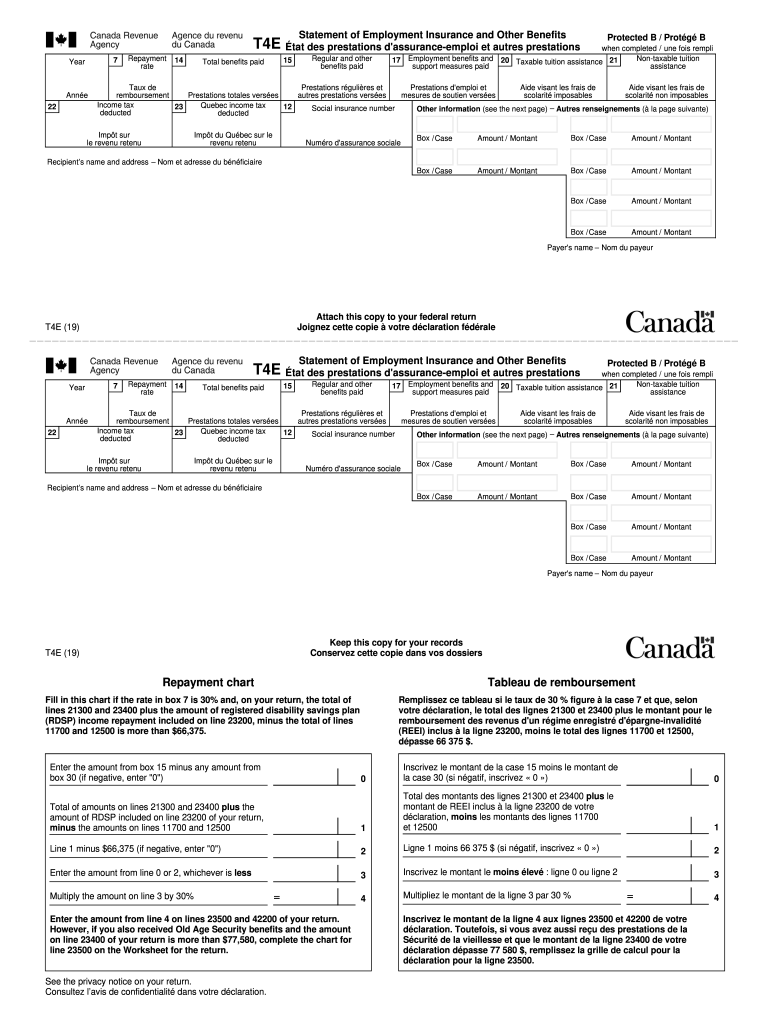
Fits paid 17 Employment benefits and support measures paid Protected B / Prot g B when completed / une fois rempli Non-taxable tuition 20 Taxable tuition assistance 21 assistance Taux de Prestations r guli res et Prestations d'emploi et Aide visant les frais de Aide visant les frais de remboursement Prestations totales vers es autres prestations vers es mesures de soutien vers es scolarit imposables scolarit non imposables Income tax Quebec income tax 23 12 Social insurance numb.

Open form follow the instructions

Easily sign the form with your finger

Send filled & signed form or save
How to fill out the Canada T4E online
The Canada T4E is a crucial document that outlines Employment Insurance and other benefits received in a given year. This guide will walk you through the process of filling out the T4E form online, ensuring that you understand each component clearly.
Follow the steps to accurately complete your Canada T4E form.
- Click ‘Get Form’ button to obtain the form and open it for editing.
- Begin by entering the recipient’s name and address in the designated fields. Ensure that all information is accurate, as this will be used for official correspondence.
- Fill in the payer's name in the appropriate section. This usually refers to the organization or governing body that provided the benefits.
- In box 7, indicate the repayment rate applicable to you, which may be required based on your total income.
- Provide the total benefits received in boxes 14 and 15. Box 14 should reflect the regular and any other benefits, while box 15 might include work-sharing benefits.
- Complete sections for any taxable tuition assistance in boxes 20 and 21, outlining the amounts received and the related tax credits.
- Report any income tax withheld in box 23. If applicable, ensure to detail any Quebec income tax deducted separately.
- Finally, review all entered information for accuracy. Once completed, save your changes and prepare the document for submission. You can download, print, or share the file as necessary.
Start completing your T4E form online today to ensure all your benefits are accurately reported.
Experience a faster way to fill out and sign forms on the web. Access the most extensive library of templates available.
Related content
Oct 7, 2015 — If you are a U.S. citizen or green card holder living in Canada, you still...
2019, 2019 IEEE Tenth International Conference on Technology for Education (T4E)...
(Bridgeland / Greenview / Zoo / YYC ). T3E Calgary (Lakeview / Glendale / Killarney /...
Get answers to your most pressing questions about US Legal Forms API.
What is the difference between T4 and T4E Canada?
T4A (P) is the statement of Canada pension plans benefits. T4E is the statement of employment insurance and other benefits. T4RIF is the statement of income from registered retirement income fund. T4RSP is the statement of registered retirement saving plan.
What is T4 in Canada?
What is a T4 slip. A T4 slip identifies all of the remuneration paid by an employer to an employee during a calendar year. You can get a Form T4 slip in a PDF or PDF fillable/saveable format to file on paper.
Where can I find T1 general?
If you have a CRA "My Account," you can find your T1 for the current year, as well as the past 11 years that you filed, by looking under the “Tax Returns View” section. If you look for anything older, you will need to contact the CRA directly at 1-800-959-8281 to request a copy.
What is a tax return called in Canada?
A T4 is necessary to file your tax return in Canada; it's a summary of the income you've earned as well as the tax you paid during the specific tax year. Each job you have worked will issue you a separate T4 - which means you could have multiple during a given tax year.
What is a T4E form Canada?
Definition of a T4E T4Es are for 1 calendar year, from January 1 to December 31. You must file this slip with your income tax return for that tax year. The T4E indicates: the gross amount of benefits paid. the income tax deducted.
What is T4A slip Canada?
What is a T4A slip. A T4A slip identifies amounts paid during the calendar year for certain types of income from many different sources including self-employed commissions and RESP educational assistance payments. You can get a Form T4A in a PDF or PDF fillable/saveable format to file on paper.
Which tax forms do I need Canada?
Canadian tax checklist. T4 slips (Employment income) Employment insurance benefits (T4A or T4E) COVID-19 relief payments or repayments (T4A) Interest, dividends, mutual funds (T3, T5, T5008) T2202 Tuition and Enrollment Certificate. Old Age Security and CPP benefits (T4A-OAS, T4AP) Other pensions and annuities (T4A)
How do I check my tax return in Canada?
E-file – If you electronically file your return could be processed in as little as eight business days but wait at least three weeks before you call. You can follow up on your refund on the Internet by accessing My Account, or by telephone by calling the CRA at 1-800-959-8281.
How do I access T4E Canada?
T4E slips for 2022 tax year Your repayments will also show on the same T4E tax slip. These amounts need to be reported on your tax return. You may also get your T4E information from My Service Canada Account. If you repaid CERB amounts, find out how to claim the benefit repayment on your tax return.
How do I find old tax returns in Canada?
You can access any previous tax year tax slips in Compensation Web Applications (accessible only on the Government of Canada network) using Phoenix self-service and MyGCPay or, for tax years prior to Phoenix, under CWA pay stubs and archived tax slips.
Use professional pre-built templates to fill in and sign documents online faster. Get access to thousands of forms.
If you believe that this page should be taken down, please follow our DMCA take down process here.