Loading
Get Copart 4821-3590-3255 2016-2026
How it works
-

Open form follow the instructions
-

Easily sign the form with your finger
-

Send filled & signed form or save
How to fill out the Copart 4821-3590-3255 online
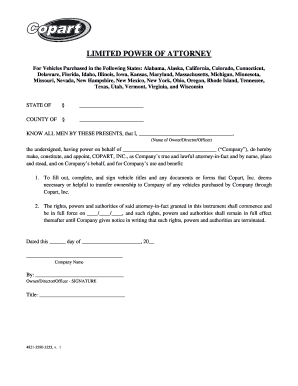
Filling out the Copart 4821-3590-3255 form online is a straightforward process designed to help companies authorize Copart, Inc. to manage vehicle title transfers on their behalf. This guide provides clear, step-by-step instructions to ensure users can complete the form accurately and efficiently.
Follow the steps to complete the Copart 4821-3590-3255 form.
- Click the ‘Get Form’ button to access the Copart 4821-3590-3255 online and open it in the editing interface.
- In the designated section, fill in the name of the owner, director, or officer, clearly indicating the representative who is signing on behalf of the company.
- Next, enter the name of the company that is being represented in this form, ensuring accuracy to avoid any future discrepancies.
- Locate the date section where you will specify the effective date for the powers granted in this form by entering the month, day, and year.
- In the final section, make sure to fill in the name of the company and obtain the necessary signature from the owner, director, or officer. Also, include their title for clarity.
- Once all fields are completed, review the entire form for accuracy. After ensuring the validity of the information, save your changes, and utilize options to download, print, or share the completed form as necessary.
Complete your documents online with confidence and ease.
You can usually initiate a bank-to-bank wire transfer in person at your bank or financial instruction's local branch or through your online bank account. You'll usually need to provide the recipient's full name, contact information, and bank account details such as routing and transfer numbers.