Loading
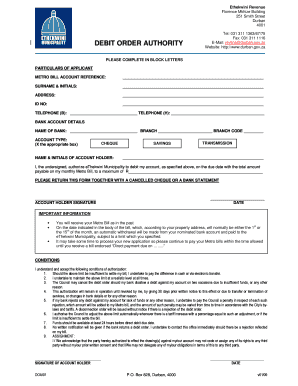
Get Za Ethekwini Debit Order Authority Application 2009-2026
How it works
-

Open form follow the instructions
-

Easily sign the form with your finger
-

Send filled & signed form or save
How to fill out the ZA Ethekwini Debit Order Authority Application online
Filling out the ZA Ethekwini Debit Order Authority Application online can streamline your billing payments and ensure timely transactions. This guide will walk you through each step of the process, making it easy and straightforward.
Follow the steps to complete your application efficiently.
- Press the ‘Get Form’ button to obtain the form and open it in the preferred editing environment.
- In the section labeled 'Particulars of Applicant', fill in your Metro Bill account reference number accurately.
- Enter your surname and initials in the next field, ensuring you use block letters.
- Provide your complete address in the designated area.
- Input your ID number in the provided field.
- Fill in your telephone number (business and home) in the appropriate spaces.
- For 'Bank Account Details', specify the name of your bank, branch, and branch code as required.
- Indicate your account type by marking the appropriate box: Cheque, Savings, or Transmission.
- Enter the name and initials of the account holder.
- Authorize the eThekwini Municipality to debit your account by specifying the total amount payable on your monthly Metro Bill, ensuring it does not exceed your maximum limit.
- Sign the document to confirm your authorization.
- Date the application to validate it.
- Remember to attach a cancelled cheque or a bank statement as instructed before submission.
- Once completed, you can save your changes, download the form, print it, or share it as necessary.
Start completing your ZA Ethekwini Debit Order Authority Application online today!
Your bank will process the debit orders assuming that the collecting party has a valid mandate in place. These debit orders can be reversed immediately if disputed within 40 days.