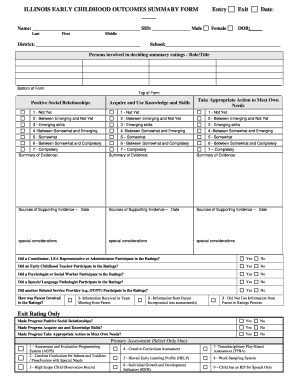
Process Exit Rating Only Made Progress Positive Social Relationships? Yes No Made Progress Acquire use and Knowledge Skills? Yes No Made Progress Take Appropriate Action to Meet Own Needs? Yes No Primary Assessment (Select Only One) 1 - Assessment and Evaluation Programming System (AEPS) 2 - Carolina Curriculum for Infants and Toddlers / Preschoolers with Special Needs 3 - High Scope Child Observation Record 4 - Creative Curriculum Assessment 7- Transdisciplinary Play-Based Assessme.
Open form follow the instructions
Easily sign the form with your finger
Send filled & signed form or save
How to fill out the IL Early Childhood Outcomes Summary Form online
Filling out the Illinois Early Childhood Outcomes Summary Form is an important task for anyone involved in assessing the developmental progress of young children. This guide will provide you with clear steps to effectively complete this form online.
Follow the steps to fill out the form accurately and efficiently
- Press the ‘Get Form’ button to access the form and open it for online completion.
- Begin by entering the child's name including their last, first, and middle name where indicated. Fill in the date of birth (DOB) and the school's district. Ensure the details are accurate for proper identification.
- In the section titled 'Persons involved in deciding summary ratings,' list the roles and titles of individuals who contributed to the ratings process. This helps provide clarity on who participated in assessing the child's outcomes.
- For each developmental area — Positive Social Relationships, Take Appropriate Action to Meet Own Needs, and Acquire and Use Knowledge and Skills — use the rating scale provided. Select a rating from 1 (Not Yet) to 7 (Completely) that accurately reflects the child's current abilities.
- In the 'Summary of Evidence' sections, provide a brief overview of the evidence supporting the ratings you assigned in the previous step. Include relevant examples or observations that justify your decisions.
- Complete the 'Sources of Supporting Evidence' fields by documenting dates and sources of information, such as assessments or observations that were used to inform your ratings.
- Address any 'Special Considerations' that may affect the child's developmental progress. This could include any unique circumstances that should be noted in the assessment.
- Indicate whether a Coordinator, LEA Representative, or Administrator participated in the ratings by selecting 'Yes' or 'No.' Repeat this process for each role specified in the form.
- Detail how parents were involved in the ratings by selecting the appropriate option that describes the level of parent participation during the team meeting and assessment process.
- For exit ratings, confirm whether the child made progress in each developmental area by selecting 'Yes' or 'No.' This is an important aspect of tracking growth over time.
- Select the Primary Assessment tool used from the provided list, ensuring that the most relevant method for evaluation is chosen.
- Lastly, fill in the details for who entered the information into the Student Information System (SIS) and the date of entry. Once all information is complete, you can save changes, download, print, or share the form as required.
Complete your documentation online by following these steps to ensure a thorough assessment process.
Experience a faster way to fill out and sign forms on the web. Access the most extensive library of templates available.
Related content
Provide assurance that the Preschool Student Evaluation Summary Report has sufficient...
This page includes a summary of 3 child outcomes definitions, national data analysis, and...
by L Klein · 2006 · Cited by 67 — This issue brief explores lessons from research and...
Get answers to your most pressing questions about US Legal Forms API.
What is the purpose of child outcomes?
The purpose of child outcomes is to evaluate and support the overall development of children during their early years. These outcomes guide educators and parents in identifying areas of strength and need for each child. The IL Early Childhood Outcomes Summary Form is designed to facilitate this understanding, ensuring that everyone involved in a child's education can contribute to their success.
Why is the cos process needed?
The COS process is crucial for assessing and supporting a child's developmental journey. It helps educators and parents make informed decisions about interventions or services that a child may need. Using the IL Early Childhood Outcomes Summary Form enhances this process, providing a standardized approach to monitoring and fostering child's growth.
What is the child outcome rating scale?
The child outcome rating scale is a tool used to evaluate a child's skills on a systematic scale. This scale offers various levels that reflect a child's performance in different developmental areas. With the IL Early Childhood Outcomes Summary Form, you can effectively utilize this rating scale, making it easier to understand and communicate a child's progress.
What does the child outcomes summary measure?
The child outcomes summary measures a child's growth across key developmental areas such as social-emotional skills, physical abilities, and learning capacity. This measurement provides a clear overview of where a child excels and where additional support may be beneficial. The IL Early Childhood Outcomes Summary Form serves as a vital tool in accurately quantifying these essential aspects of early childhood development.
What is cos documentation?
COS documentation, or Child Outcomes Summary documentation, records observations related to a child's development. This process gathers evidence about a child's skills and behaviors, which informs the summary ratings. Utilizing the IL Early Childhood Outcomes Summary Form streamlines this documentation, ensuring a thorough, organized, and reliable record.
What are examples of child outcomes?
Examples of child outcomes include the ability to take turns in play, recognizing shapes, or communicating needs effectively. These outcomes represent critical milestones in a child's early development. By employing the IL Early Childhood Outcomes Summary Form, you can track these milestones and celebrate achievements with clarity.
What is the child outcome summary rating?
The child outcome summary rating is a comprehensive evaluation that reflects a child's abilities in various developmental domains. This rating offers a snapshot of a child's growth over time, providing essential information for educators and parents. The IL Early Childhood Outcomes Summary Form is instrumental in ensuring these ratings accurately capture a child's developmental progress.
What do the child outcomes summary ratings convey?
The child outcomes summary ratings communicate a child's progress in key developmental areas. These ratings provide insights into how well a child is developing skills in areas such as social-emotional, cognitive, and physical domains. By utilizing the IL Early Childhood Outcomes Summary Form, educators and parents can pinpoint strengths and identify areas for improvement.
What is the child outcome score?
The child outcome score reflects a child's progress in key developmental areas. When using the IL Early Childhood Outcomes Summary Form, this score helps educators and parents understand how well a child is developing compared to expected milestones. It provides a clear snapshot of a child's abilities and guides future support.
What are examples of outcomes?
Examples of outcomes may include a child's ability to express their needs verbally, their understanding of basic numbers, or their capacity to play cooperatively with others. These indicators are vital for assessing growth and development. Using the IL Early Childhood Outcomes Summary Form, stakeholders can track these outcomes and foster enriched learning opportunities for children.
Use professional pre-built templates to fill in and sign documents online faster. Get access to thousands of forms.
If you believe that this page should be taken down, please follow our DMCA take down process here.