Loading
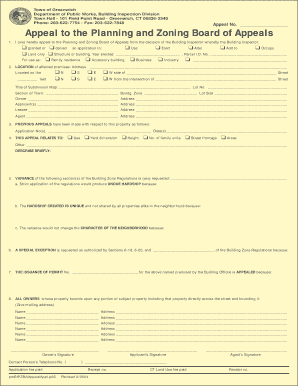
Get Application For Appeal To Pzba. Dpw Building Inspection Division
How it works
-

Open form follow the instructions
-

Easily sign the form with your finger
-

Send filled & signed form or save
How to fill out the Application For Appeal To PZBA. DPW Building Inspection Division online
Navigating the Application for Appeal to the Planning and Zoning Board of Appeals (PZBA) can be challenging. This guide provides step-by-step instructions to assist you in completing the form accurately and efficiently in an online format.
Follow the steps to complete your application successfully.
- Click ‘Get Form’ button to obtain the application form and open it for editing.
- Begin by filling out the appeal number section at the top of the form, if applicable.
- In the first section, specify whether you are appealing a decision that granted or denied an application by the Building Inspector. Circle the corresponding options for use, erect, alter, add to, occupy, and indicate whether it pertains to land only or structure/building.
- Provide the location details of the affected premises, including the street address and directional indicators (N, S, E, W) relative to nearby intersections.
- Fill in the owner, applicant, lessee, and agent information with the respective addresses.
- If applicable, list any previous appeals related to the property by including the application numbers and dates.
- Indicate what the appeal relates to, marking the appropriate boxes, and providing a brief description.
- Request a variance by specifying the sections of the Building Zone Regulations you wish to appeal. Provide clear explanations for undue hardship and the uniqueness of your case.
- If requesting a special exception, clearly state the sections of the Building Zone Regulations that authorize this request.
- Describe the reasons for appealing the issuance of the permit, then fill out the owner’s contact information.
- List all property owners who bound any portion of the subject property, including mailing addresses.
- Finally, ensure that all required signatures are obtained from the owner, applicant, and any agents.
- Remember to print the completed form on legal-sized paper. Ensure any colored backgrounds are printed in color as required. After signing, have it notarized.
- Make copies of the application and supporting documents, and prepare to file these in triplicate along with the appropriate filing fee.
- Once everything is ready, submit your application to the Planning and Zoning Board of Appeals in person, as submissions are not accepted through email.
Complete your application online today and ensure all details are accurately filled out for successful submission.
Industry-leading security and compliance
US Legal Forms protects your data by complying with industry-specific security standards.
-
In businnes since 199725+ years providing professional legal documents.
-
Accredited businessGuarantees that a business meets BBB accreditation standards in the US and Canada.
-
Secured by BraintreeValidated Level 1 PCI DSS compliant payment gateway that accepts most major credit and debit card brands from across the globe.