Loading
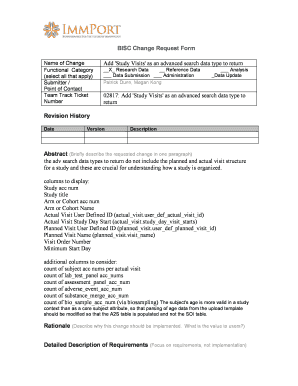
Get Bisc Change Request Form Add 'study Visits' As An Advanced ... - Immport Niaid Nih
How it works
-

Open form follow the instructions
-

Easily sign the form with your finger
-

Send filled & signed form or save
How to fill out the BISC Change Request Form Add 'Study Visits' as an advanced data type online
This guide provides a comprehensive overview of how to fill out the BISC Change Request Form to add 'Study Visits' as an advanced search data type. Whether you are new to document management or need a refresher, this step-by-step approach will help you navigate the form efficiently.
Follow the steps to complete the BISC Change Request Form
- Press the ‘Get Form’ button to access the form and open it in your online platform.
- In the 'Name of Change' field, clearly state 'Add Study Visits as an advanced search data type.' This specifies the change you are requesting.
- In the 'Functional Category' section, select all applicable categories to classify the change. Make sure to choose relevant options like 'Research Data' and 'Reference Data.'
- Provide your details in the 'Submitter / Point of Contact' section, including your name and any colleagues involved, such as 'Patrick Dunn' and 'Megan Kong.'
- Enter the specific 'Team Track Ticket Number.' This ensures your request is connected to the appropriate workflow.
- Next, present a concise 'Abstract' that describes the requested change. Focus on how the absence of planned and actual visit structures impacts study organization.
- In the 'Rationale' section, explain the value of this change for users and how it improves data management and understanding of study organization.
- List 'Detailed Description of Requirements' and specify data requirements, format, and content pertinent to the request.
- Attach any relevant use cases or workflows that support your request, clearly describing input and output descriptions.
- Finally, review all entries for accuracy. Once confirmed, you can save your changes, download the completed form, print it, or share it as needed.
Complete and submit your BISC Change Request Form online to enhance your document management experience.
Industry-leading security and compliance
US Legal Forms protects your data by complying with industry-specific security standards.
-
In businnes since 199725+ years providing professional legal documents.
-
Accredited businessGuarantees that a business meets BBB accreditation standards in the US and Canada.
-
Secured by BraintreeValidated Level 1 PCI DSS compliant payment gateway that accepts most major credit and debit card brands from across the globe.