Loading
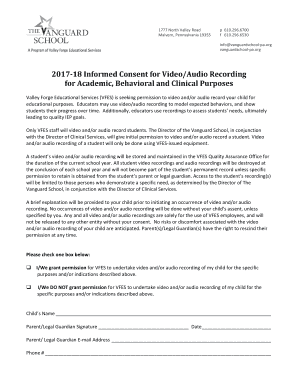
Get Pa Valley Forge Educational Services Informed Consent For Video/audio Recording For Academic 2017-2026
How it works
-

Open form follow the instructions
-

Easily sign the form with your finger
-

Send filled & signed form or save
How to fill out the PA Valley Forge Educational Services Informed Consent For Video/Audio Recording For Academic online
Filling out the PA Valley Forge Educational Services informed consent form for video/audio recording is a crucial step in ensuring that the rights and privacy of your child are respected. This guide will walk you through each section of the form, providing clear and supportive instructions to help you complete it successfully.
Follow the steps to efficiently complete the informed consent form online.
- Click ‘Get Form’ button to access the form and open it in your preferred document editor.
- Read through the introduction to understand the purpose of the video/audio recording. This section highlights how recordings may be used for educational assessments and IEP goals.
- In the consent section, you will see two options. Select one by checking the appropriate box indicating whether you grant permission for video/audio recordings of your child.
- Provide your child's name in the designated field. Make sure to enter the complete name accurately as it will be associated with the consent.
- Sign the form in the 'Parent/Legal Guardian Signature' field, indicating your consent or declination regarding the video/audio recordings.
- Fill in the date of signing next to your signature to confirm when the consent was given.
- Enter your email address in the provided space, ensuring that you provide an address that you check regularly for updates from Valley Forge Educational Services.
- Lastly, include your phone number, making it easy for the school to reach you if necessary for any clarifications or follow-ups.
- Once all fields are completed, review the information for accuracy before proceeding to save.
- Save your changes, then download, print, or share the completed form as needed. Ensure a copy is kept for your records.
Complete your form online today to ensure your child's educational experience is supported effectively.
Related links form
If you believe your privacy has been invaded or that the video is defamatory or harassing, you may file a complaint with the Philippine National Police (PNP) Cybercrime Division, or a relevant local law enforcement agency. You may also opt for a civil lawsuit to claim damages.