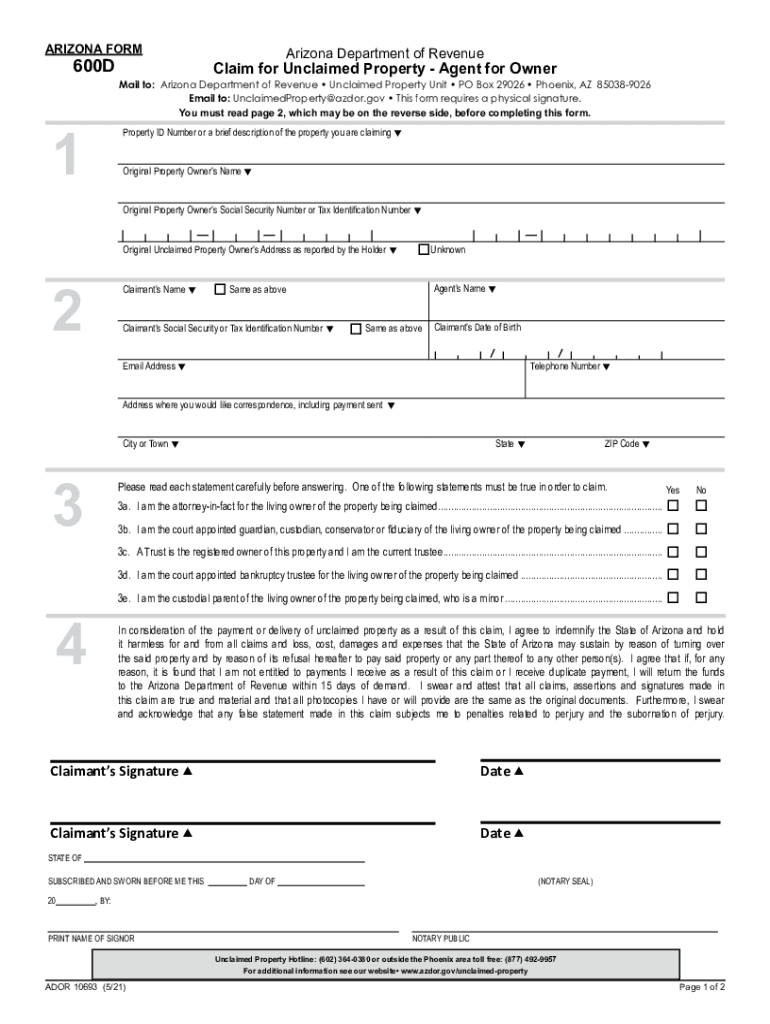
, AZ 85038-9026 Email to: UnclaimedProperty azdor.gov This form requires a physical signature. You must read page 2, which may be on the reverse side, before completing this form. Property ID Number or a brief description of the property you are claiming Original Property Owner s Name Original Property Owner s Social Security Number or Tax Identification Number Original Unclaimed Property Owner s Address as reported by the Holder 2 Claimant s Name Unknow.
Loading

Open form follow the instructions

Easily sign the form with your finger

Send filled & signed form or save
How to fill out the AZ 600D online
Filling out the AZ 600D form is an essential step for individuals seeking to claim unclaimed property on behalf of a living owner. This guide provides a clear and supportive overview of the necessary steps to successfully complete and submit the form online.
Follow the steps to accurately complete the AZ 600D form online.
- Click ‘Get Form’ button to access the form and open it in your preferred browser.
- In Section 1, enter the Property ID Number or provide a brief description of the property you are claiming. While this section is optional, it is recommended to include the details if available for a more efficient search.
- Complete the fields for the Original Property Owner’s Name, Social Security Number or Tax Identification Number, and their Address as reported by the Holder. If any information is unknown, you may leave those sections blank.
- In Section 2, provide your Claimant’s Name, including if you are the same as the original property owner. Ensure you include your Claimant’s Social Security Number or Tax Identification Number, and provide your current contact information including Date of Birth, Email Address, Telephone Number, and Address for correspondence.
- Section 3 requires you to declare your authority to act on behalf of the property owner. Mark the appropriate box that applies to your situation, ensuring that at least one statement is true.
- In Section 4, read the declarations carefully and ensure you physically sign and date the form. If you opt for notarization, ensure that the Notary section is filled out appropriately.
- After completing all sections, review your entries for accuracy and completeness. Check that all necessary supporting documents are attached, including proof of identity and ownership.
- Finally, save your changes, download a copy, print the completed form, and submit it via mail or email as specified in the form instructions.
Complete your AZ 600D form online today and take the first step to claim your unclaimed property.
Experience a faster way to fill out and sign forms on the web. Access the most extensive library of templates available.
Related content
Updated as of 12/14/2021 2:32:33 PM. Agency Payroll Guide I.C. Page 23 of 33 ... Approved...
OPTI 600D: Diffractive Optical Elements: Theory and Design. Contact Information...
The EOS 600D is a high-performance, digital single-lens reflex camera featuring a...
Get answers to your most pressing questions about US Legal Forms API.
What is the phone number for unclaimed property in Arizona?
You may call our office at (602) 364-0380 between 8 a.m. and 5 p.m. Monday through Friday to request a claim form. Send an email to our office. Owners FAQ | Arizona Department of Revenue azdor.gov https://azdor.gov › unclaimed-property › owners-file-claim azdor.gov https://azdor.gov › unclaimed-property › owners-file-claim
What is Arizona Form 600?
This form should only be used to claim property of which you are the original owner. If you are claiming property as the heir or beneficiary of a deceased owner (Form 600B), the agent of an entity (Form 600C) or the agent of a living owner (Form 600D), you must complete the appropriate form. Arizona Form 600 A: Claim for Unclaimed Property - Original Owner azdor.gov https://azdor.gov › sites › default › files azdor.gov https://azdor.gov › sites › default › files
Use professional pre-built templates to fill in and sign documents online faster. Get access to thousands of forms.
If you believe that this page should be taken down, please follow our DMCA take down process here.