Loading
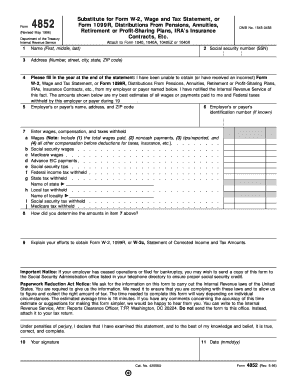
Get Form 4852 (rev. May 1996). Substitute For Form W-2, Wage And Tax Statement, Or Form 1099r
How it works
-

Open form follow the instructions
-

Easily sign the form with your finger
-

Send filled & signed form or save
How to use or fill out the Form 4852 (Rev. May 1996). Substitute For Form W-2, Wage And Tax Statement, Or Form 1099R online
Filling out Form 4852 is crucial for individuals who have not received their Form W-2 or Form 1099R. This guide will provide you with clear steps to complete this form accurately and efficiently, ensuring your tax information is properly reported.
Follow the steps to fill out Form 4852 online.
- Click ‘Get Form’ button to obtain the form and open it in the editor.
- In the first section, enter your name as it appears on your tax return, ensuring to include your first, middle, and last names.
- Provide your Social Security number (SSN) in the designated field to ensure correct identification.
- Proceed to fill in your address. Include your number, street, city, state, and ZIP code accurately.
- Indicate the tax year for which you are filing this form in the space provided at the end of the statement.
- Input the name, address, and ZIP code of your employer or payer. If known, provide their identification number as well.
- In the next section, report the wages and compensation amounts in the fields provided. Include all relevant categories such as total wages, tips, and other compensations before any deductions.
- Explain how you arrived at the totals reported in the previous step. Detail your calculations or estimates clearly.
- Describe the efforts you made to obtain your W-2 or 1099R forms, including any communication with your employer.
- Sign and date the form in the appropriate sections at the bottom to certify the information provided is accurate.
- Once completed, save your changes, download the filled form, print it, or share it as needed.
Complete your tax documents online today for a smooth filing experience.
If you're waiting for your W-2, here are the steps you can take to find it. Step 1: Check online. ... Step 2: Ask your employer. ... Step 3: Contact the IRS. ... Step 4: File Form 4852 with your tax return. ... Step 5: Request a Wage and Income Transcript. ... Step 6: Amend your return (maybe)
Industry-leading security and compliance
US Legal Forms protects your data by complying with industry-specific security standards.
-
In businnes since 199725+ years providing professional legal documents.
-
Accredited businessGuarantees that a business meets BBB accreditation standards in the US and Canada.
-
Secured by BraintreeValidated Level 1 PCI DSS compliant payment gateway that accepts most major credit and debit card brands from across the globe.