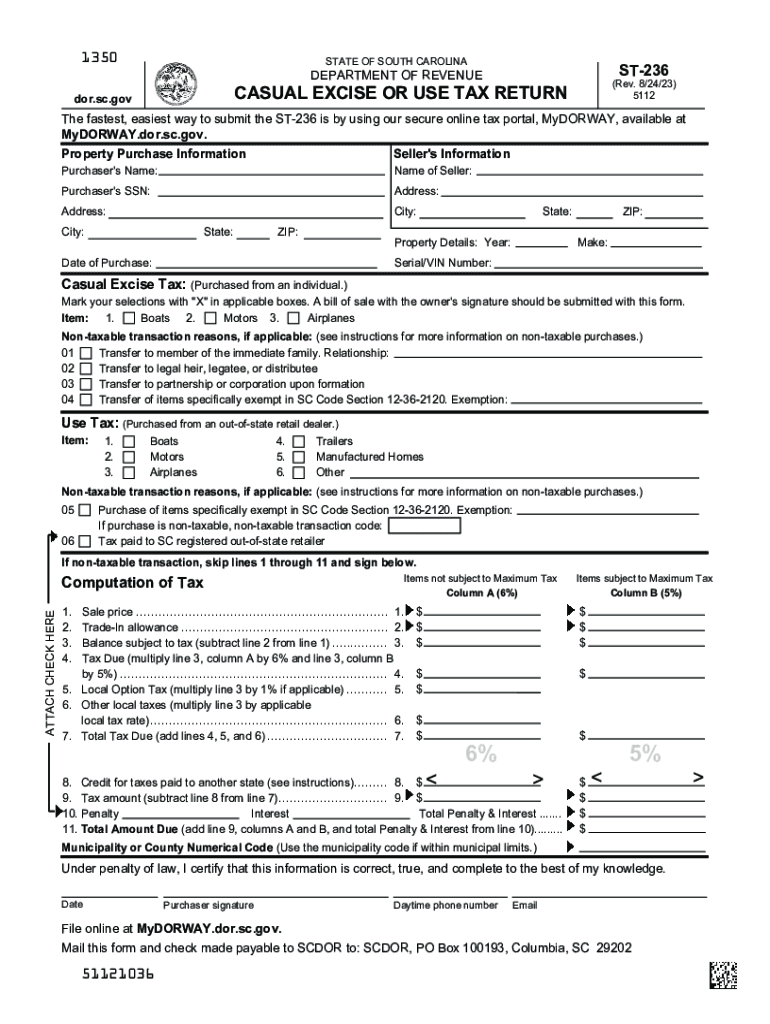
1350STATE OF SOUTH CAROLINAST236DEPARTMENT OF REVENUE(Rev. 8/24/23) 5112CASUAL EXCISE OR USE TAX RETURNdor.sc.govThe fastest, easiest way to submit the ST236 is by using our secure online tax portal,.
Loading

Open form follow the instructions

Easily sign the form with your finger

Send filled & signed form or save
How to fill out the SC ST-236 online
The SC ST-236 is a Casual Excise or Use Tax Return form used in South Carolina for reporting taxes on certain purchases like boats, motors, and airplanes. This guide will provide you with clear, step-by-step instructions to successfully complete this form online.
Follow the steps to fill out the SC ST-236 online:
- Click the ‘Get Form’ button to access the SC ST-236 and open it in your online document editor.
- Provide the seller's information by entering the seller's name, address, city, state, and ZIP code.
- Fill in the purchaser's information, including the purchaser's name, social security number, address, city, state, and ZIP code.
- Enter the property details, such as the year, make, serial or VIN number, and the date of purchase.
- Mark the applicable boxes for the Casual Excise Tax section, indicating the type of purchase (e.g., boats, motors, airplanes).
- If applicable, provide reasons for any non-taxable transactions by selecting the appropriate codes.
- In the computation of tax section, follow the instructions to calculate the total tax due, including any local option tax and other local taxes.
- If taxes were paid to another state, input this information in the designated field for credit.
- Complete the certification section by signing and entering your daytime phone number and email.
- Once all fields are filled out, review the form for accuracy before saving changes, downloading, printing, or sharing the completed form.
Complete your SC ST-236 online today for a seamless tax reporting experience.
Experience a faster way to fill out and sign forms on the web. Access the most extensive library of templates available.
Related content
Form NumberST-236. Form NameAffidavit for Delivery of Tangible Personal Property to the...
The nonprofit organization should complete and file Form ST-387 Application for Sales Tax...
Jun 30, 2015 — The public reporting burden for this collection of information is...
Get answers to your most pressing questions about US Legal Forms API.
How do I get a refund tax deduction?
In ance with the Income Tax Act 1961, taxpayers will have to file their return within the 31st July of an assessment year to claim the refund. Applying for an IT refund requires filling up the income tax refund form, as well as submitting necessary documents like utility forms and pre-filled ITR.
Why am i getting mail from sc department of revenue?
Common reasons the SCDOR may send you a notice: You have a balance due. You are due a larger or smaller refund. We have a question about your return or need additional information or documents.
How do I claim my SC car tax refund?
Complete the refund request form below and submit it to SCDMV, Motor Carrier Services, P.O. Box 1498, Blythewood, South Carolina 29016-0027. Upon receipt of the required documentation, your refund will be processed. You should receive a refund check from DMV within four to six weeks.
How do I get sales tax exemption in SC?
You must apply for most Sales & Use Tax exemptions on MyDORWAY. Review the table below for details about applying for each exemption. Apply for an exemption. You must apply for the following exemptions on MyDORWAY.
How do I file a tax refund claim?
Log in with your username and password on our website at onlineservices.cdtfa.ca.gov. Click on the account for which you want to request a refund, and select the More link under the I Want To section. Then select the Submit a Claim for Refund link, and follow the prompts.
How do I claim my SC sales tax refund?
The easiest way to apply for a refund is through our free online tax portal, MyDORWAY, at MyDORWAY.dor.sc.gov. You can also use MyDORWAY to submit amended returns and attach your documentation. You can also request a refund by completing a paper version of the ST-14.
What makes a boat tax exempt in SC?
Note: All marine equipment, registered as of January 1st of each year, which include boats and motors valued at $500 or less is exempt from property taxes.
Is SC tax refund taxable?
South Carolina does not tax any state Income Tax refund included in federal gross income.
Use professional pre-built templates to fill in and sign documents online faster. Get access to thousands of forms.
If you believe that this page should be taken down, please follow our DMCA take down process here.