Loading
Get Ga Form 3961 2018-2026
How it works
-

Open form follow the instructions
-

Easily sign the form with your finger
-

Send filled & signed form or save
How to fill out the GA Form 3961 online
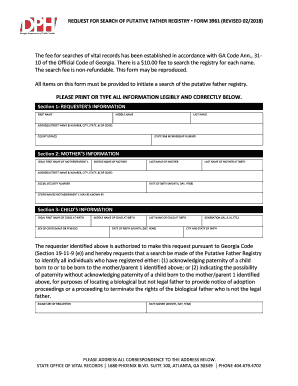
Filling out the GA Form 3961, a request for search of the putative father registry, is an important step in locating biological fathers for legal proceedings. This guide provides clear, step-by-step instructions to help users navigate the form online.
Follow the steps to complete the GA Form 3961 with ease.
- Click ‘Get Form’ button to access the form and open it in the editor.
- Begin by filling out Section 1, which requests the requester’s information. This includes your first name, middle name, last name, address (street name & number, city, state, & zip code), county or DFACS, and your state bar membership number if applicable.
- Next, proceed to Section 2, which requires the mother’s information. Enter the legal first name, middle name, last name, maiden name (last name at birth), complete address, social security number, date of birth (month, day, year), and any other names the mother may be known by.
- Then, fill out Section 3 for the child's information. Provide the legal first name, sex of the child (male or female), middle name, last name at birth, date of birth, generation (e.g., JR., II, III), and the city and state of birth.
- After completing the sections, confirm that all items on the form are provided to initiate a search of the putative father registry. Underline that this request is authorized under Georgia Code Section 19-11-9 (e) by placing your signature and the date signed (month, day, year).
- Finally, ensure all correspondence is directed to the provided address: State Office of Vital Records, 1680 Phoenix Blvd. Suite 100, Atlanta, GA 30349. You may save your changes, download the form, print it, or share it, depending on your needs.
Start filling out your documents online today to ensure a smooth process.
The Putative Father Registry is a list of the names of men who have acknowledged paternity of a child by completing the Paternity Acknowledgment form or have indicated the possibility of paternity without acknowledging paternity of the child.