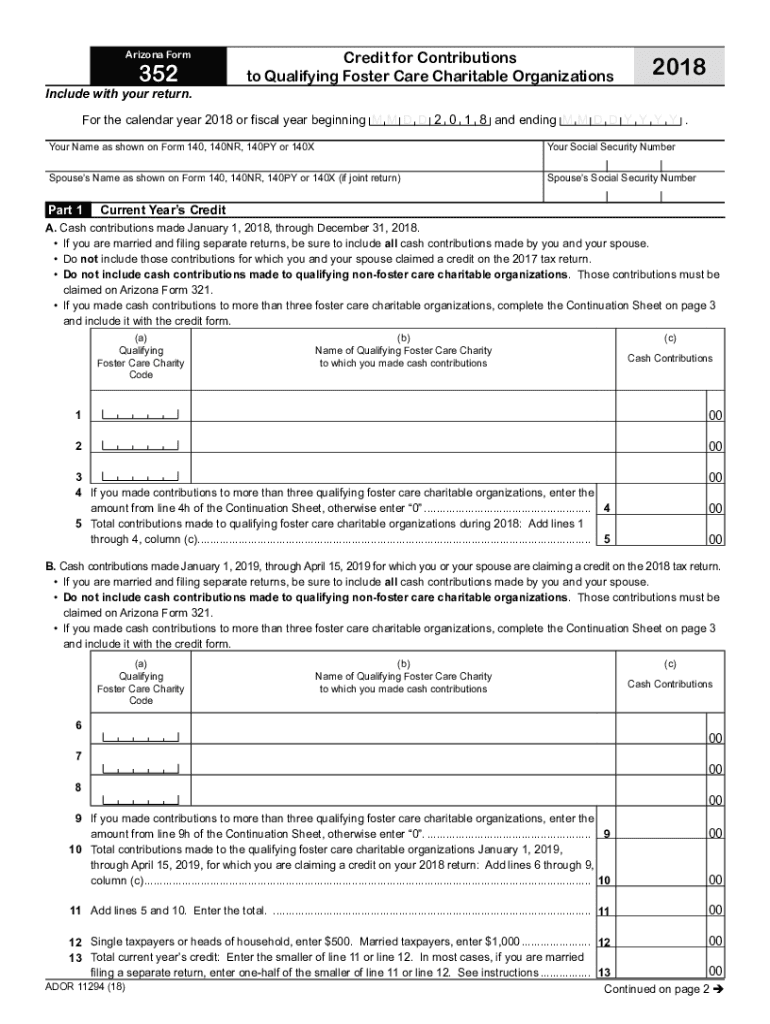
Arizona Form352Credit for Contributions to Qualifying Foster Care Charitable Organizations2018Include with your return. For the calendar year 2018 or fiscal year beginning M M D D 2 0 1 8 and ending.
Loading

Open form follow the instructions

Easily sign the form with your finger

Send filled & signed form or save
How to fill out the AZ Form 352 online
AZ Form 352 is used to claim a credit for contributions made to qualifying foster care charitable organizations. This guide will provide clear steps to help you fill out the form online efficiently and accurately, ensuring you do not miss any important details.
Follow the steps to fill out the AZ Form 352 online:
- Press the ‘Get Form’ button to access the form and open it in the editor.
- Begin with Part 1, Current Year’s Credit. Enter cash contributions made from January 1, 2018, through December 31, 2018, including contributions from both you and your spouse if filing separately. Ensure you do not include contributions claimed on the previous year's tax return.
- In section A, list cash contributions to qualifying foster care charities by providing the charity code, name, and the amount contributed in the designated fields.
- If applicable, complete the Continuation Sheet located on page 3 for contributions made to more than three foster care charities and include the total amount on line 4 of Part 1.
- Move to section B, and enter contributions made from January 1, 2019, through April 15, 2019, again ensuring to include both yours and your spouse's contributions if married filing separately.
- Complete the same process as in step 3 for section B, ensuring to maintain the same format for entries.
- Calculate total contributions made to the qualifying foster care charitable organizations for both periods by adding totals from section A and section B. Record this total on line 11.
- Complete line 12 based on your filing status: enter $500 for single or head of household, or $1,000 for married filing jointly.
- Determine your total current year’s credit by entering the smaller amount of line 11 or line 12 on line 13, keeping in mind special instructions if married filing separately.
- Proceed to Part 2 for Available Credit Carryover if applicable; list previous years’ credits and calculate the total available carryover.
- In Part 3, record the current year’s credit from Part 1, line 13 on line 20 and the available carryover amount on line 21.
- Finally, calculate the Total Available Credit by adding line 20 and line 21, then enter this on the specified line.
- After completing all sections, ensure to save your changes and use the options to download, print, or share the completed form.
Complete your documents online today.
Experience a faster way to fill out and sign forms on the web. Access the most extensive library of templates available.
Related content
For contributions made to non-foster care charitable organization, see Form 321. Form...
Complete, edit or print tax forms instantly. Arizona form 321 for gifts to qcos, and/or...
because it is in liquid form, the dusting hazards associated with dry KMnO4 solids are...
Get answers to your most pressing questions about US Legal Forms API.
What is Arizona New Employment credit?
Taxpayers meeting the qualifications in the chart below may receive an Arizona income or premium tax credit valued at up to $9,000 per each new quality job. Tax credits may be claimed in annual increments of $3,000 each over a period of up to three taxable years.
What is the tax credit for 2023 in Arizona?
PLUS/Switcher tax credit – AZ Form 348: Credit of up to $652 for 2023 ($1,301 for married taxpayers filing a joint income tax return) for Private Learning Uplifting Students (PLUS) contributions to a Certified School Tuition Organization that, like the original Private School Tuition Organization credit, provides ...
What is the working poor tax credit in Arizona?
What is the Arizona Charitable Tax Credit? Arizona allows you to take a dollar-for-dollar credit on your state taxes when you donate up to $421 for single filers, or $841 for married couples filing jointly to a qualified organization. The tax credit was previously known as the Working Poor Tax Credit.
What is the earned income tax credit in Arizona?
For tax year 2023 (filing by April 2024), the EITC ranges from $2 to $7,430, depending on your adjusted gross income and the number of qualifying children in your family.
What is the tax credit for donations in Arizona 2023?
The tax credit is claimed on Form 321. The maximum QCO credit donation amount for 2023: $421 single, married filing separate or head of household; $841 married filing joint.
What charities qualify for Arizona tax credit?
Amanda Hope Rainbow Angels. ... Arizona Cancer Foundation for Children. ... Cancer Support Community Arizona. ... Children's Cancer Network. ... Desert Cancer Foundation of Arizona. ... Pearce Family Foundation. ... Ronald McDonald House Charities of Central and Northern Arizona. ... Ronald McDonald House Charities of Southern Arizona.
What is Arizona tax credit 352?
Arizona taxpayer's donors may claim their donation to Hope & A Future under the Arizona Foster Care Tax Credit. By claiming the credit, the taxpayer can reduce their Arizona tax dollar-for-dollar up to $526 for singles and up to $1,051 for married couples. To claim the credit, taxpayers must complete Arizona Form 352.
What is the Arizona tax credit Program?
The Arizona Charitable Tax Credit allows taxpayers to make a charitable contribution to an eligible nonprofit and receive a dollar-for- dollar tax credit against their AZ state taxes.
Use professional pre-built templates to fill in and sign documents online faster. Get access to thousands of forms.
If you believe that this page should be taken down, please follow our DMCA take down process here.