Loading
Get Sba Wbc Projected Milestones Chart 2017-2026
How it works
-

Open form follow the instructions
-

Easily sign the form with your finger
-

Send filled & signed form or save
How to fill out the SBA WBC Projected Milestones Chart online
The SBA WBC Projected Milestones Chart is a critical tool for planning and assessing the effectiveness of your program. This guide will walk you through the essential steps to complete the form online with ease and confidence.
Follow the steps to successfully complete the SBA WBC Projected Milestones Chart.
- Click ‘Get Form’ button to download and access the SBA WBC Projected Milestones Chart.
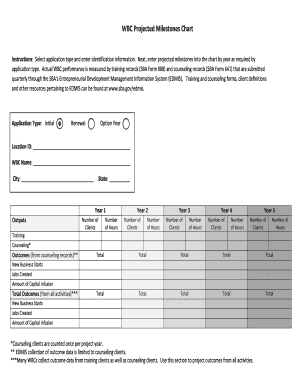
- Select the applicable application type from 'Initial,' 'Renewal,' or 'Option Year' and enter the required identification information in the designated fields.
- Fill in the Location ID, WBC Name, City, and State in the corresponding sections.
- For each year (Year 1 to Year 5), enter the projected outputs in the chart. Specify the 'Number of Clients' and 'Number of Hours' for each year as required.
- In the outcomes section, outline the projected outcomes from counseling records. Input the total values for 'New Business Starts,' 'Jobs Created,' and 'Amount of Capital Infusion' based on your program's activities.
- Ensure all fields are completed accurately. Review your entries to confirm correctness.
- Once you have filled out the chart, save your changes and choose the option to download, print, or share the completed form as needed.
Complete your SBA WBC Projected Milestones Chart online today to ensure a successful program implementation.