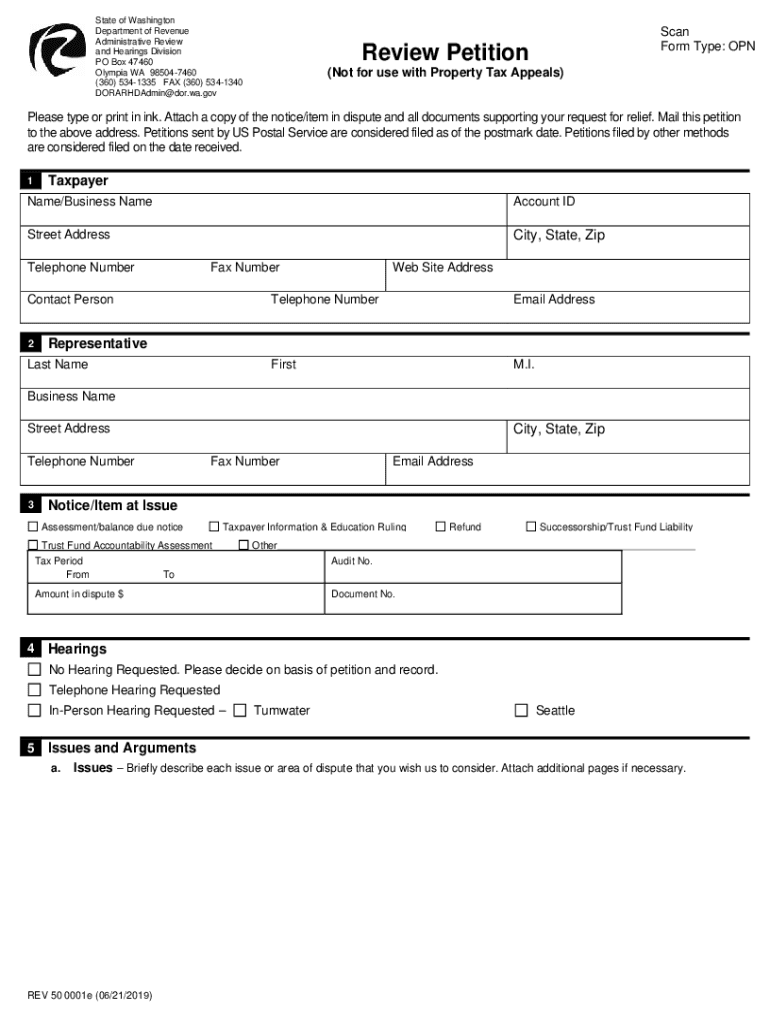
N Review Petition (Not for use with Property Tax Appeals) Reset This Form Please type or print in ink. Attach a copy of the notice/item in dispute and all documents supporting your request for relief. Mail this petition to the above address. Petitions sent by US Postal Service are considered filed as of the postmark date. Petitions filed by other methods are considered filed on the date received. 1 Taxpayer Name/Business Name Account ID Street Address City, State, Zip Telephone Number.
Loading

Open form follow the instructions

Easily sign the form with your finger

Send filled & signed form or save
How to fill out the WA 50 0001 online
The WA 50 0001 form is an essential document used for filing a review petition with the Washington State Department of Revenue. This guide provides clear instructions to help you complete the form online accurately and effectively.
Follow the steps to fill out the WA 50 0001 form online.
- Click the ‘Get Form’ button to obtain the form and access it in your online editor.
- Begin by filling in the taxpayer's information. Enter your name or business name, account ID, street address, city, state, zip code, telephone number, and fax number in the designated fields.
- Provide the contact details of your representative if applicable. Include their first name, middle initial, last name, business name, address, city, state, zip code, and their telephone number.
- Specify the notice/item at issue. You can select from options such as assessment notice, Taxpayer Information & Education Ruling, Trust Fund Accountability Assessment, or any other relevant issue. Include the audit number if available, as well as the period of the tax in dispute.
- Indicate the amount in dispute in the appropriate field. Provide an email address for correspondence, if desired.
- Choose whether you are requesting a hearing or not. Select ‘No Hearing Requested’ if you wish for a decision to be made based on the petition alone, or specify if a telephone or in-person hearing is required.
- In the issues and arguments section, briefly describe the issues you wish to address. Attach additional pages if necessary and ensure you clear outline your arguments explaining why each issue should be decided in your favor.
- Complete the signature section. Either the taxpayer or the representative can sign the petition. If you are a representative, ensure there is a Confidential Tax Information Authorization on file to allow for the disclosure of tax information.
- Finalize by clicking the option to save your changes. You can then download, print, or share the completed form as needed.
Start filling out your WA 50 0001 form online today for a seamless submission process.
Experience a faster way to fill out and sign forms on the web. Access the most extensive library of templates available.
Related content
REV 50 0001 (4/2/21). Page 1. Review Petition. (Not for use with Property Tax Appeals)...
The median annual wage for social workers was $55,350 in May 2022. Job Outlook. Overall...
Feb 6, 2012 — form. Half-lives were similar to those in the studies shown in Table...
Use professional pre-built templates to fill in and sign documents online faster. Get access to thousands of forms.
If you believe that this page should be taken down, please follow our DMCA take down process here.