Loading
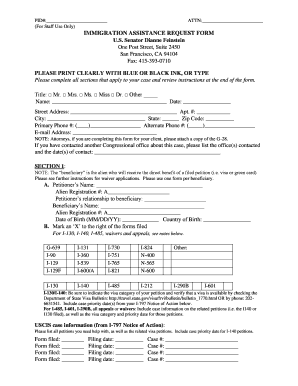
Get Ca Immigration Assistance Request Form 2019-2026
How it works
-

Open form follow the instructions
-

Easily sign the form with your finger
-

Send filled & signed form or save
How to fill out the CA Immigration Assistance Request Form online
Completing the CA Immigration Assistance Request Form online can help streamline your request for assistance with immigration matters. This guide provides step-by-step instructions to ensure you fill out the form accurately and efficiently.
Follow the steps to complete the form accurately.
- Press the ‘Get Form’ button to access the CA Immigration Assistance Request Form and open it in your editing interface.
- Begin filling out the personal information section. Enter your title, name, and date. Ensure your contact information, including street address, city, state, zip code, primary and alternate phone numbers, and email address, are accurate and legible.
- If an attorney is completing the form on your behalf, attach a copy of the G-28 document to this form. If you have contacted another Congressional office regarding your case, provide the names and dates of contact.
- In Section 1, input the petitioner's name and the alien registration number. Specify the relationship between the petitioner and the beneficiary, and complete the beneficiary’s details, including their name, alien registration number, date of birth, and country of birth.
- Indicate the forms you have filed by marking an ‘X’ beside each applicable form listed. Make sure your selections align with the relevant issues in your case.
- Provide detailed information about all petitions requiring assistance, including the form filed, filing date, and case number. Verify that all details align with the information on your I-797 Notice of Action.
- If applicable, complete Section 2 if your case is in process with the National Visa Center and fill out Section 3 if your case has moved to a U.S. Embassy or Consulate. Follow the prompts to provide necessary details.
- In Section 4, please describe any issues you are facing with your case and how you believe Senator Feinstein may assist you. Include any relevant correspondence or evidence supporting your expedite request if necessary.
- Lastly, ensure all required signatures are obtained. The petitioner must sign the form, and additional signatures from the beneficiary may be necessary based on the type of case. E-signatures are not accepted.
- After reviewing all sections for accuracy, you can save your changes. Proceed to download and print the completed form or share it as required, ensuring it is sent to Senator Feinstein’s office via the provided methods.
Get started today by completing your CA Immigration Assistance Request Form online.
PRUCOL means Permanently Residing Under Color of Law, and is a category that was created by courts and is used for public benefits eligibility, including Medicaid. It is not recognized as an immigration status by the US Citizenship and Immigration Services (USCIS).