Loading
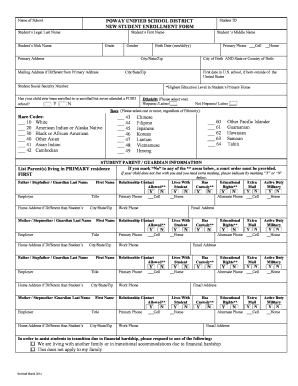
Get Enrollment Form Sample
How it works
-

Open form follow the instructions
-

Easily sign the form with your finger
-

Send filled & signed form or save
How to fill out the Enrollment Form Sample online
Filling out the Enrollment Form Sample online is a straightforward process that ensures your student is properly registered. This guide provides clear instructions to help you navigate through each section of the form effectively.
Follow the steps to complete your Enrollment Form Sample online with ease.
- Press the ‘Get Form’ button to access the enrollment form and open it in your preferred online editor.
- Begin by entering the name of the school in the designated field. Ensure that it is spelled correctly to avoid any confusion during the enrollment process.
- Provide the student's legal last name and first name in their respective fields. If applicable, include the student's nickname to help staff easily identify them.
- Fill in the student's middle name and birth date using the mm/dd/yy format. This information is crucial for accurately verifying the student’s identity.
- Enter the student's grade level and gender. Be sure to review this information for accuracy.
- Complete the primary address section with the student's home address. If the mailing address differs, provide it in the specified area.
- Indicate the city of birth and the state or country of birth. This information may be needed for documentation purposes.
- If the student has recently moved to the U.S. from another country, input the first date in a U.S. school if applicable.
- Fill in the student’s Social Security Number, if available. This information is often required for enrollment.
- Indicate the highest education level attained in the primary household, selecting from the provided options.
- Answer whether the student has ever been enrolled in a Poway Unified School District school by selecting 'Yes' or 'No.'
- For the race and ethnicity sections, select the appropriate codes and categories that apply to the student. This information aids in demographic reporting.
- Continue filling out the parent or guardian information, providing names, titles, contact numbers, and email addresses as required. Make sure to indicate if the guardian has custody or educational rights.
- Complete sections regarding any previously attended schools, special programs, or services the student has received, ensuring all pertinent details are included.
- Once all fields are filled out completely and accurately, review the form carefully for any errors.
- Finally, save your changes, and select the desired option to download, print, or share the form as needed.
Start your enrollment process by filling out your Enrollment Form Sample online today!
Student enrollment refers to the act of signing up for school and/or specific classes or co-curricular activities at that particular school. The enrollment process is completed after a student is granted admission to a particular school.