We use cookies to improve security, personalize the user experience, enhance our marketing activities (including cooperating with our marketing partners) and for other business use.
Click "here" to read our Cookie Policy. By clicking "Accept" you agree to the use of cookies. Read less
Read more
Accept
Loading
Form preview
  • US Legal Forms
  • Form Library
  • More Forms
  • More Multi-State Forms
  • Annuitant Earnings After Retirement Form

Get Annuitant Earnings After Retirement Form

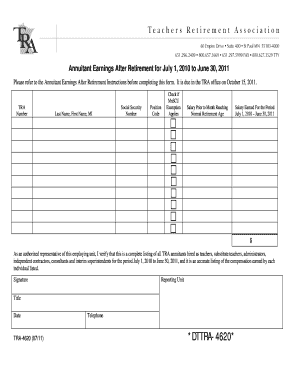
T. A TRA annuitant is a person who has retired and is currently receiving a TRA monthly retirement annuity. Legislation passed in 2009 changed the review period from a calendar to a fiscal year. The review will take place on a fiscal year basis July 1, 2010 to June 30, 2011. The earnings limitation for those under NRA is $46,000.00. Refer to the chart on page 2 for the Social Security Administration s definition of NRA. If a TRA annuitant reached NRA during 2011, the earnings limitation am.

How it works

  1. Open form

    Open form follow the instructions

  2. Easily sign form

    Easily sign the form with your finger

  3. Share form

    Send filled & signed form or save

How to fill out the Annuitant Earnings After Retirement Form online

Filling out the Annuitant Earnings After Retirement Form is essential for TRA annuitants submitting their earnings after retirement. This guide provides step-by-step instructions to help users complete the form accurately and submit it online.

Follow the steps to successfully complete your form online.

  1. Click ‘Get Form’ button to obtain the form and open it in your preferred editor.
  2. Begin by entering the TRA number of the annuitant in the designated field.
  3. Fill in the last name, first name, and middle initial of the annuitant in the appropriate sections. Ensure accuracy to avoid processing delays.
  4. Provide the annuitant's Social Security number in the corresponding field. Protect this information as it is sensitive.
  5. Indicate the position code in the provided section. Use the appropriate letters for the retiree’s role: T for Teacher, A for Administrator, C for Consultant, or S for Interim Superintendent.
  6. If applicable, check the box to indicate if the MnSCU exemption applies to the annuitant.
  7. Report the salary earned specifically for the period from July 1, 2010 to June 30, 2011 in the designated salary field. Only include gross salary that meets the outlined criteria.
  8. If the annuitant worked but did not receive payment, list 'NONE' in the salary earned column, while still providing their TRA number, name, and Social Security number.
  9. If there are more than ten annuitants to report, either make copies of the form or attach a detailed spreadsheet containing the same information.
  10. Affix your signature, date the form, and include your title and telephone number in the relevant fields to verify the information is accurate.
  11. If there were no employed TRA annuitants during the specified period, state 'NONE', sign and return the form as necessary.
  12. Once all fields are filled, review the form for accuracy before saving changes, downloading, printing, or sharing it as needed.

Take action now by completing the Annuitant Earnings After Retirement Form online.

Get form

Experience a faster way to fill out and sign forms on the web. Access the most extensive library of templates available.
Get form

Related content

RI 92-22, 2021 FERS Annuity Supplement Earnings...
Complete and return this form if your allowable earnings were more than $18,960 or if your...
Learn more
opm1496a.pdf
To apply for your annuity, complete the enclosed Application for Deferred Retirement and...
Learn more
2016 Publication 575
Jan 4, 2017 — If you are retired on disability and reporting your disabil- ity pension...
Learn more

Related links form

Mcem Part A Fax Referral Form - Kettering Health Network Consolidated Financial Statements As Of And Texas Health Huguley Hospital Fort Worth South HIPAA NOTICE OF ...

Questions & Answers

Get answers to your most pressing questions about US Legal Forms API.

Contact support

Age and Service Requirements for Voluntary Retirement If your year of birth is…Your Minimum Retirement Age is…Before 194855 years196856 years, 8 months196956 years, 10 monthsAfter 196957 years9 more rows

You have received the FERS Annuity Supplement Survey to determine if you earned more than then exempt amount ($19,560 for 2022) set by the Social Security Administration. If you earned more than the exempt amount, your supplement will be reduced $1 for every $2 you go over the limit.

RI 92-22, Annuity Supplement Earnings Report, is used each year to obtain the earned income of Federal Employees Retirement System (FERS) annuitants receiving an annuity supplement. The annuity supplement is paid to eligible FERS annuitants who are not retired on disability and are not yet age 62.

If the annuitant is rehired by the same employer, or hired by another employer who maintains the same retirement system, the annuitant is exempt from mandatory Social Security coverage only. Beginning April 1, 1986, rehired annuitants are subject to Medicare tax withholding.

You can check your 401(k) balance online, through the account statements you receive, through your employer, or by calling your 401(k) service provider.

Canada or the United States: 1-800-277-9914 All other countries: 613-957-1954 (we accept collect calls) TTY: 1-800-255-4786 Important: Please have your social insurance number ready when you call.

Document current receipt of the income, as verified by one or more of the following: a statement from the organization providing the income, a copy of retirement award letter or benefit statement, a copy of financial or bank account statement, a copy of signed federal income tax return, an IRS W-2 form, or.

To request a new copy of “Your Federal Retirement Benefits”, or to receive a verification of your annuity, contact OPM's Retirement Office at 1-888-767-6738 or retire@opm.gov.

Get This Form Now!

Use professional pre-built templates to fill in and sign documents online faster. Get access to thousands of forms.
Get form
If you believe that this page should be taken down, please follow our DMCA take down processhere.

Industry-leading security and compliance

US Legal Forms protects your data by complying with industry-specific security standards.
  • In businnes since 1997
    25+ years providing professional legal documents.
  • Accredited business
    Guarantees that a business meets BBB accreditation standards in the US and Canada.
  • Secured by Braintree
    Validated Level 1 PCI DSS compliant payment gateway that accepts most major credit and debit card brands from across the globe.
Get Annuitant Earnings After Retirement Form
Get form
Form Packages
Adoption
Bankruptcy
Contractors
Divorce
Home Sales
Employment
Identity Theft
Incorporation
Landlord Tenant
Living Trust
Name Change
Personal Planning
Small Business
Wills & Estates
Packages A-Z
Form Categories
Affidavits
Bankruptcy
Bill of Sale
Corporate - LLC
Divorce
Employment
Identity Theft
Internet Technology
Landlord Tenant
Living Wills
Name Change
Power of Attorney
Real Estate
Small Estates
Wills
All Forms
Forms A-Z
Form Library
Customer Service
Terms of Service
Privacy Notice
Legal Hub
Content Takedown Policy
Bug Bounty Program
About Us
Help Portal
Legal Resources
Blog
Affiliates
Contact Us
Delete My Account
Site Map
Industries
Forms in Spanish
Localized Forms
State-specific Forms
Forms Kit
Legal Guides
Real Estate Handbook
All Guides
Prepared for You
Notarize
Incorporation services
Our Customers
For Consumers
For Small Business
For Attorneys
Our Sites
US Legal Forms
USLegal
FormsPass
pdfFiller
signNow
airSlate WorkFlow
DocHub
Instapage
Social Media
Call us now toll free:
+1 833 426 79 33
As seen in:
  • USA Today logo picture
  • CBC News logo picture
  • LA Times logo picture
  • The Washington Post logo picture
  • AP logo picture
  • Forbes logo picture
© Copyright 1997-2025
airSlate Legal Forms, Inc.
3720 Flowood Dr, Flowood, Mississippi 39232
Form Packages
Adoption
Bankruptcy
Contractors
Divorce
Home Sales
Employment
Identity Theft
Incorporation
Landlord Tenant
Living Trust
Name Change
Personal Planning
Small Business
Wills & Estates
Packages A-Z
Form Categories
Affidavits
Bankruptcy
Bill of Sale
Corporate - LLC
Divorce
Employment
Identity Theft
Internet Technology
Landlord Tenant
Living Wills
Name Change
Power of Attorney
Real Estate
Small Estates
Wills
All Forms
Forms A-Z
Form Library
Customer Service
Terms of Service
Privacy Notice
Legal Hub
Content Takedown Policy
Bug Bounty Program
About Us
Help Portal
Legal Resources
Blog
Affiliates
Contact Us
Delete My Account
Site Map
Industries
Forms in Spanish
Localized Forms
State-specific Forms
Forms Kit
Legal Guides
Real Estate Handbook
All Guides
Prepared for You
Notarize
Incorporation services
Our Customers
For Consumers
For Small Business
For Attorneys
Our Sites
US Legal Forms
USLegal
FormsPass
pdfFiller
signNow
airSlate WorkFlow
DocHub
Instapage
Social Media
Call us now toll free:
+1 833 426 79 33
As seen in:
  • USA Today logo picture
  • CBC News logo picture
  • LA Times logo picture
  • The Washington Post logo picture
  • AP logo picture
  • Forbes logo picture
© Copyright 1997-2025
airSlate Legal Forms, Inc.
3720 Flowood Dr, Flowood, Mississippi 39232