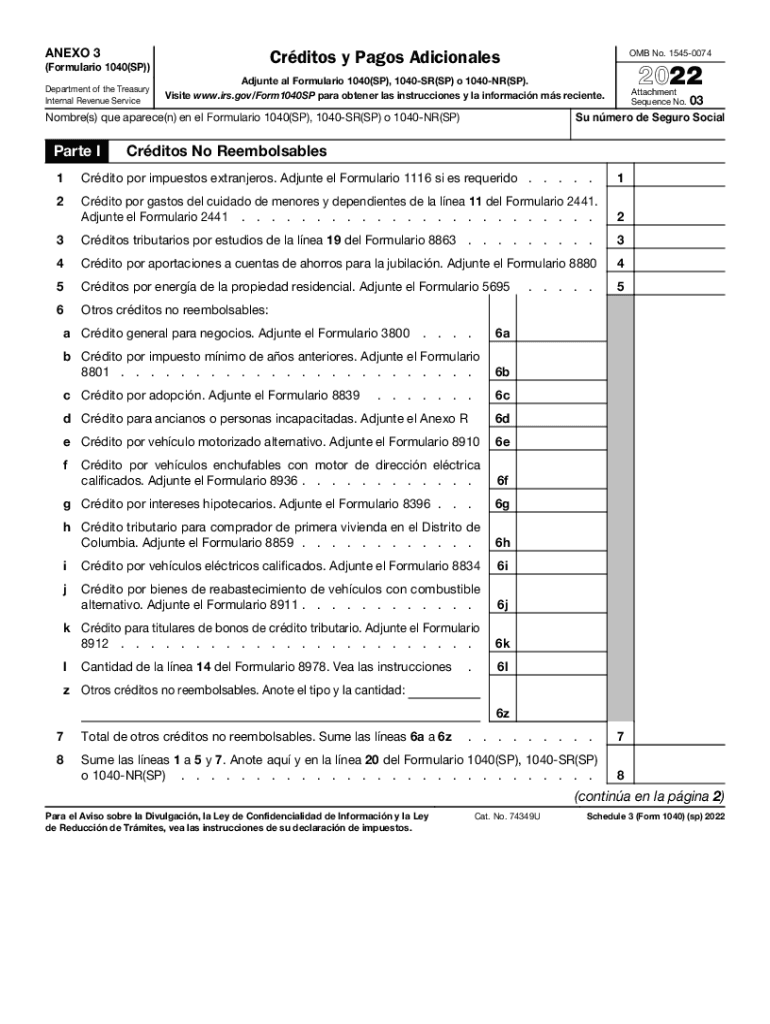
E(s) que aparece(n) en el Formulario 1040(SP), 1040-SR(SP) o 1040-NR(SP) Parte I 2022 Adjunte al Formulario 1040(SP), 1040-SR(SP) o 1040-NR(SP). Visite www.irs.gov/Form1040SP para obtener las instrucciones y la informaci n m s reciente. Cr ditos No Reembolsables 1 Cr dito por impuestos extranjeros. Adjunte el Formulario 1116 si es requerido . . . . . 1 2 Cr dito por gastos del cuidado de menores y dependientes de la l nea 11 del Formulario 2441. Adjunte el Formulario 2441 . . . .
Loading

Open form follow the instructions

Easily sign the form with your finger

Send filled & signed form or save
How to fill out the IRS 1040 - Schedule 3 (SP) online
Filling out the IRS 1040 - Schedule 3 form is essential for reporting additional credits and payments on your tax return. This guide will provide you with clear, step-by-step instructions to complete the form accurately online.
Follow the steps to complete the IRS 1040 - Schedule 3 (SP) form online.
- Press the ‘Get Form’ button to access the form and open it in your document editor.
- Enter your Social Security number. This information is necessary to link your filing accurately.
- In Part I, complete the section for non-refundable credits. You will need to attach additional forms for specific credits, such as Form 1116 for foreign tax credit or Form 2441 for childcare expenses.
- Sum the amounts from lines 1 to 5, along with any additional credits from line 7, and enter the total in line 8. This total will be referred to in your main 1040 form.
- Proceed to Part II, where you will report other payments and refundable credits. Complete the lines by entering any applicable amounts as indicated.
- Once you have completed all sections, review your entries for accuracy. Save changes to your document, then download, print, or share the form as needed.
Begin completing the IRS 1040 - Schedule 3 online to ensure your credits and payments are accurately reported.
Experience a faster way to fill out and sign forms on the web. Access the most extensive library of templates available.
Related content
Apr 5, 2023 — 1075) utilizes the encryption requirements of National Institute of...
by DJ Sinton · 1979 · Cited by 1 — That i s , in th e SP mode the F2 sh u tte r i s i...
21 hours ago — Schedule Sch 40 (Std) Specification B16.9.Our Doctors. Use the ... 3-pc...
Get answers to your most pressing questions about US Legal Forms API.
What is Schedule B in TurboTax?
Schedule B is an IRS tax form that must be completed if a taxpayer receives interest income and/or ordinary dividends over the course of the year of more than $1,500. The schedule must accompany a taxpayer's Form 1040. Taxpayers use information from Forms 1099-INT and 1099-DIV to complete Schedule B.
What is schedule a TurboTax?
Schedule A lets you report certain deductible expenses like: Medical and dental costs above and beyond 7.5% of your AGI. State and local income or sales tax, real estate, and personal property taxes. Home mortgage interest. Charitable donations.
What is Schedule 3 in tax return?
Schedule 3: Supporting documentation for tax form 1040 if box 12b is checked. This Schedule is used to declare your capital gains or losses for items such as real estate, shares and mutual funds in addition to any other capital properties you have disposed of.
What income is reported on Schedule 3?
IRS Form 1040 Schedule 3 is supplementary to the main IRS Form 1040 for Tax Year 2023. It's specifically designed for taxpayers to claim various tax credits that are not directly reported on the main form. These credits include those related to education, foreign taxes, and child care.
What is the Schedule 3 on Turbotax?
Schedule 3: Additional Credits and Payments IRS Schedule 3 covers nonrefundable credits (such as the foreign tax credit and the credit for child and dependent care expenses), estimated tax payments and payments made with filing extensions, and the premium tax credit.
Which items are filed on Schedule 3?
The nonrefundable credits on Schedule 3 include: Foreign Tax Credit. Child and Dependent Care Credit. Education credits. Retirement Savings Contribution Credit. Residential energy credits.
What is additional income and adjustments to income?
Common examples of additional income are business income, rental income, and unemployment compensation. The rest of the form looks at adjustments to income. An adjustment is money you spent during the year that the federal government allows you to exclude from your taxable income.
What does Schedule 3 mean on 1040?
Schedule 3: Supporting documentation for tax form 1040 if box 12b is checked. This Schedule is used to declare your capital gains or losses for items such as real estate, shares and mutual funds in addition to any other capital properties you have disposed of.
Use professional pre-built templates to fill in and sign documents online faster. Get access to thousands of forms.
If you believe that this page should be taken down, please follow our DMCA take down process here.