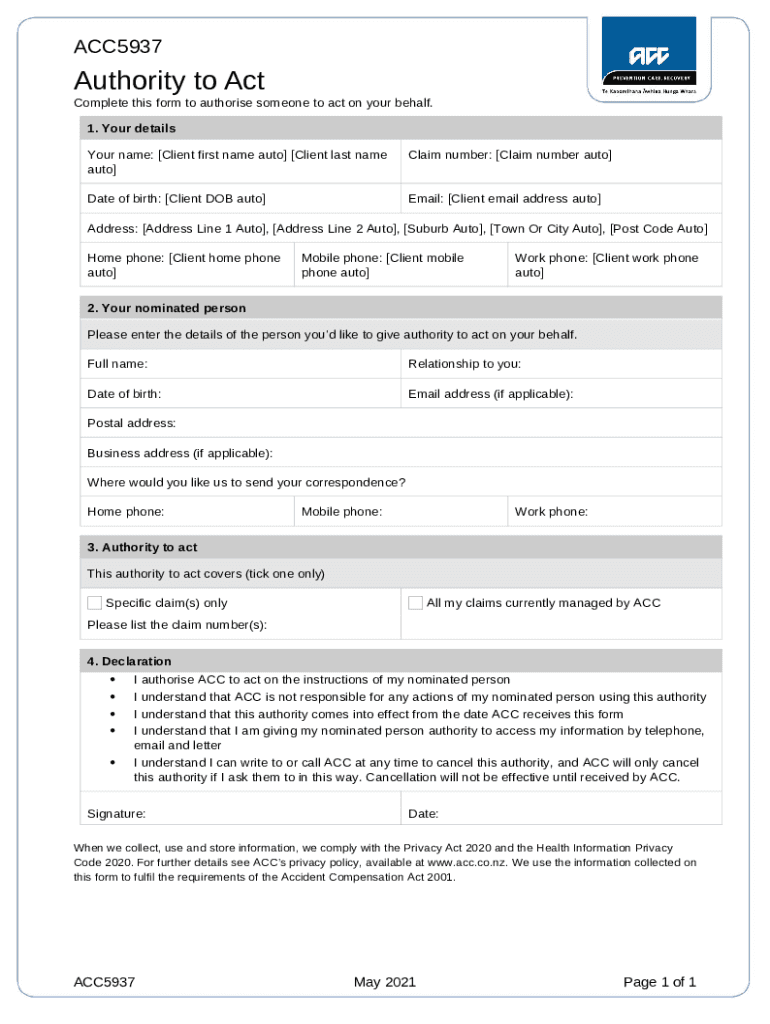
O Date of birth: Client DOB auto Email: Client email address auto Address: Address Line 1 Auto , Address Line 2 Auto , Suburb Auto , Town Or City Auto , Post Code Auto Home phone: Client home phone auto Mobile phone: Client mobile phone auto Work phone: Client work phone auto 2. Your nominated person Please enter the details of the person you d like to give authority to act on your behalf. Full name: Relationship to you: Date of birth: Email address (if applicable):.
Loading

Open form follow the instructions

Easily sign the form with your finger

Send filled & signed form or save
How to fill out the ACC5937 Authority To Act Form. Client Rights online
Filling out the ACC5937 Authority To Act Form empowers someone to act on your behalf regarding your claims with ACC. This guide offers a clear, step-by-step approach to complete the form effectively and accurately.
Follow the steps to fill out the form accurately.
- Click ‘Get Form’ button to obtain the form and open it in the editor.
- Fill in your details in Section 1. This includes your name, claim number, date of birth, email address, address, and phone numbers. Ensure that all auto-filled fields are correct and complete. Verify your contact information for accuracy.
- In Section 2, provide the details of the person you wish to authorize. Enter their full name, relationship to you, date of birth, email address (if applicable), postal address, business address (if applicable), and phone numbers. This person will be representative for your claims, so provide accurate information.
- Move to Section 3 where you specify the authority granted. You can choose to authorize for specific claim(s) or all claims managed by ACC. If applicable, list any claim numbers you are referring to.
- In Section 4, read and understand the declaration statements. By signing, you acknowledge that you authorize ACC to act on the instructions of the nominated person and understand that you can cancel this authority at any time. Sign and date the form at the bottom to indicate your agreement.
- Once you have completed all sections and verified your information, save your changes. You can choose to download the form, print it for mailing, or share it as needed.
Complete your documents online easily and ensure your claims are managed properly.
Experience a faster way to fill out and sign forms on the web. Access the most extensive library of templates available.
Get answers to your most pressing questions about US Legal Forms API.
How do I claim compensation from ACC?
How to get weekly compensation Visit your doctor. Your doctor will send us a medical certificate. Your doctor will provide us with as much detail about your injury as they can. ... Register to join MyACC. ... Tell your employer about your injury. ... We'll let you know our decision.
What is the most common ACC claim?
Most claims are for straight-forward injuries where we only pay for treatment. These kinds of injuries currently make up 93% of our claims.
What is an acc45?
You claim by lodging an ACC 45 Injury Claim Form. The form must always be completed by a treatment provider such as a doctor, physiotherapist or ambulance driver. Usually they will send the form to ACC for you. This is often done electronically. Making a claim and dealing with ACC - Community Law communitylaw.org.nz https://communitylaw.org.nz › test › making-a-claim-and... communitylaw.org.nz https://communitylaw.org.nz › test › making-a-claim-and...
Can I make my own ACC claim?
Making an ACC claim The form must always be completed by a treatment provider such as a doctor, physiotherapist or ambulance driver.
How do I start an ACC sensitive claim?
To lodge a sensitive claim: use the Read code SN571 (Sexual Abuse), or use 'Z' and add any other relevant injury codes as needed. write 'sensitive claim' in the accident description field. There's no need to describe what happened.
How do I make an ACC sensitive claim?
To lodge a sensitive claim: use the Read code SN571 (Sexual Abuse), or use 'Z' and add any other relevant injury codes as needed. write 'sensitive claim' in the accident description field. There's no need to describe what happened. Lodging a claim for a patient - ACC acc.co.nz https://.acc.co.nz › for-providers › lodging-a-claim-... acc.co.nz https://.acc.co.nz › for-providers › lodging-a-claim-...
Use professional pre-built templates to fill in and sign documents online faster. Get access to thousands of forms.
If you believe that this page should be taken down, please follow our DMCA take down process here.