Loading
Get Irs 2106 2022
How it works
-

Open form follow the instructions
-

Easily sign the form with your finger
-

Send filled & signed form or save
How to fill out the IRS 2106 online
This guide provides clear and supportive instructions on filling out the IRS 2106 form online. Designed for individuals claiming employee business expenses, the following steps will help streamline your submission process.
Follow the steps to complete the IRS 2106 online effectively.
- Press the ‘Get Form’ button to retrieve the IRS 2106 form and open it in your preferred digital editor.
- Begin by entering your name and social security number at the top of the form. Ensure that the occupation in which you incurred expenses is accurately stated.
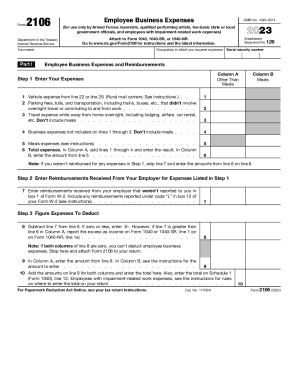
- In Part I, list your employee business expenses. Start with vehicle expenses from the specified lines and fill in costs for parking, travel, and other relevant expenses, making sure to exclude meals initially.
- Complete line 6 by adding the totals from lines 1 through 4 and entering the result. Enter any meal expenses in Column B.
- In Step 2, document any reimbursements received from your employer on line 7. If your expenses were not reimbursed, proceed to the next step without completing this line.
- For Step 3, subtract the reimbursement amount from your total expenses on line 6 and fill in line 8 accordingly. If this value is zero or less, report -0- on the form.
- Enter the amounts from line 8 into Column A and the appropriate information in Column B as guided by the instructions.
- Finally, complete line 10 by adding the amounts from line 9 for both columns and entering the total, which will also be reported on Schedule 1 of your tax return.
- For Part II, if claiming vehicle expenses, complete Section A with details such as mileage and vehicle usage. Follow the instructions for Section B or C based on your chosen method.
- Review all entries for accuracy, then save your changes, download a copy, or print the completed form for submission.
Complete your IRS forms online to ensure a hassle-free filing experience.
Get form
Experience a faster way to fill out and sign forms on the web. Access the most extensive library of templates available.
Key Takeaways. Form 2106-EZ was used by employees to deduct job-related expenses, including meals, hotels, airfare, and vehicle expenses. This form was discontinued after 2018 after the Tax Cuts and Jobs Act repealed all unreimbursed employee expense deductions.
Get This Form Now!
Use professional pre-built templates to fill in and sign documents online faster. Get access to thousands of forms.
Industry-leading security and compliance
US Legal Forms protects your data by complying with industry-specific security standards.
-
In businnes since 199725+ years providing professional legal documents.
-
Accredited businessGuarantees that a business meets BBB accreditation standards in the US and Canada.
-
Secured by BraintreeValidated Level 1 PCI DSS compliant payment gateway that accepts most major credit and debit card brands from across the globe.