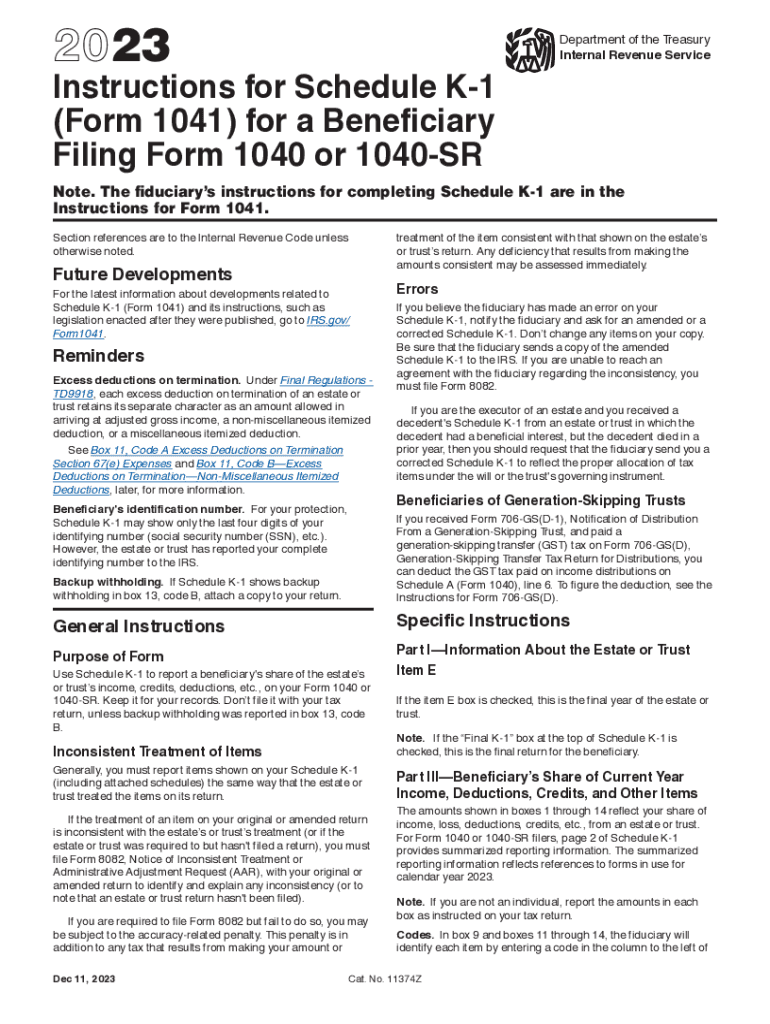
2023Instructions for Schedule K1 (Form 1041) for a Beneficiary Filing Form 1040 or 1040SRDepartment of the Treasury Internal Revenue ServiceNote. The fiduciarys instructions for completing Schedule.

Open form follow the instructions

Easily sign the form with your finger

Send filled & signed form or save
How to fill out the IRS Instructions 1041 - Schedule K-1 online
Filling out the IRS Instructions 1041 - Schedule K-1 online can seem overwhelming, but with the right guidance, you can navigate through each section with confidence. This comprehensive guide provides clear and detailed steps to help you successfully complete the form.
Follow the steps to effectively fill out your Schedule K-1 online.
- Click ‘Get Form’ button to obtain the form and open it in your chosen editor.
- Begin by entering information about the estate or trust in Part I. Fill in the name of the estate or trust, its employer identification number, and other required details.
- In Part II, provide your identification details as a beneficiary, including your name, address, and identification number if applicable.
- Proceed to Part III to report income, deductions, credits, and other items. Fill out boxes 1 through 14 based on the information provided to you by the estate or trust regarding your distributive share.
- Review the form for any backup withholding information in box 13. If applicable, ensure you attach a copy of Schedule K-1 when filing your Form 1040 or 1040-SR.
- Once you have filled out all necessary sections and verified your entries, save your changes. You can then download, print, or share your completed Schedule K-1 as needed.
Get started on completing your forms online for a smoother filing experience.
Experience a faster way to fill out and sign forms on the web. Access the most extensive library of templates available.
Related content
Compute the AGI of an estate or a non-grantor trust by subtracting the following from...
Schedule K-1 (Form 1041). See Line 24k under Instructions for. Schedule 1 in the...
9 hours ago — The estate or trust is responsible for filing Schedule K-1 for each listed...
Get answers to your most pressing questions about US Legal Forms API.
How do I know if I need to file a 1041?
If the estate generates more than $600 in annual gross income, you are required to file Form 1041, U.S. Income Tax Return for Estates and Trusts. An estate may also need to pay quarterly estimated taxes. See Form 1041 instructions for information on when to file quarterly estimated taxes.
What are the codes for Box 14 on a 1041 k1?
Schedule K-1 (Form 1041) Other Information (Box 14) Code A - Tax-Exempt Interest. Code F - Gross Farming and Fishing Income = Partial entry required. Code H - Net Investment Income or Deduction Adjustment - Unsupported. Code I - Qualified Business Income Deduction.
Where do I report Schedule K-1 income?
A partnership then files Form 1065, the partnership tax return that contains the activity on each partner's K-1. An S corporation reports activity on Form 1120-S. Trusts and estates report the K-1 form activity on Form 1041.
Do I need to attach Schedule K-1 to my tax return?
Don't file it with your tax return, unless backup withholding was reported in box 13, code B. Generally, you must report items shown on your Schedule K-1 (including attached schedules) the same way that the estate or trust treated the items on its return.
Do distributions show up on 1041 K-1?
Reporting Taxable Trust Distributions When a trust distributes income to one or more beneficiaries, the trust takes a deduction using Form 1041. It then issues a K-1 Trust Distribution Form to each beneficiary. This form shows the amount that was distributed and how much was attributed to income versus principal.
Do I need to file k1 with 1041?
Schedule K-1 (Form 1041) is used to report a beneficiary's share of an estate, including income, credits, deductions and profits. Beneficiaries of an inheritance should receive a K-1 tax form inheritance statement for the 2023 tax year by the end of 2023, or shortly thereafter in January for some rare cases.
Does Schedule K-1 need to be filed with 1041?
You then provide each beneficiary a copy of their K-1, and attach copies of all of the K-1s for all of the beneficiaries to Form 1041 when you file the tax return with the Internal Revenue Service.
What is a Schedule K-1 instructions?
Purpose. The estate or trust uses Schedule K-1 (541) to report your share of the estate's or trust's income, deductions, credits, etc. Your name, address, and tax identification number, as well as the estate's or trust's name, address, and tax identification number, should be entered on the Schedule K-1 (541).
Use professional pre-built templates to fill in and sign documents online faster. Get access to thousands of forms.
If you believe that this page should be taken down, please follow our DMCA take down process here.