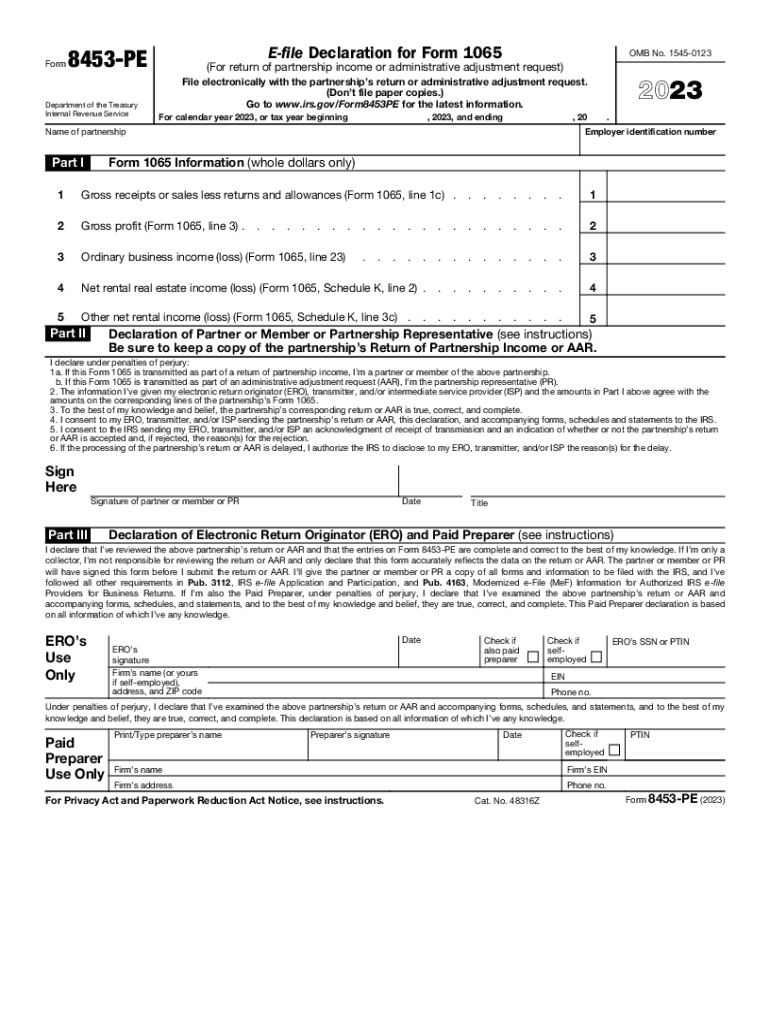
FormEfile Declaration for Form 1065OMB No. 15450123File electronically with the partnerships return or administrative adjustment request. (Dont file paper copies.) Go to www.irs.gov/Form8453PE for.
Loading

Open form follow the instructions

Easily sign the form with your finger

Send filled & signed form or save
How to fill out the IRS 8453-PE online
Filling out the IRS 8453-PE form is a crucial step for partnerships submitting their electronic return or administrative adjustment request. This guide provides a clear, step-by-step instruction on how to complete the form accurately and efficiently.
Follow the steps to complete the IRS 8453-PE online.
- Click ‘Get Form’ button to obtain the form and open it for editing.
- Enter the employer identification number (EIN) of the partnership in the designated space.
- Print or type the name of the partnership clearly in the name field.
- Complete Part I by filling in the whole dollar amounts for Gross receipts or sales, Gross profit, Ordinary business income (loss), Net rental real estate income (loss), and Other net rental income (loss) as specified.
- In Part II, declare the information by signing the declaration of partner, member, or partnership representative, ensuring that your signature aligns with the role you are representing.
- In Part III, if applicable, the Electronic Return Originator (ERO) or paid preparer must sign the declaration, ensuring completeness and accuracy of the entries on Form 8453-PE.
- Review all entered information to confirm its accuracy before proceeding to file.
- Once completed, save the form, and prepare it for submission with the electronically filed return or AAR.
Complete your IRS forms online and ensure timely filing.
Experience a faster way to fill out and sign forms on the web. Access the most extensive library of templates available.
Related content
E-file Declaration for Form 1065. (For return of partnership income or administrative...
All publicly distributed Iowa tax forms can be found on the Iowa Department of Revenue's...
Aug 21, 2023 — Information about Form 8453-PE, U.S. Partnership Declaration for an IRS...
Get answers to your most pressing questions about US Legal Forms API.
What is form 8453 Corp used for?
Form FTB 8453-C, California e-file Return Authorization for Corporations, is the signature document for corporation e-file returns. By signing this form, the corporation, electronic return originator (ERO), and paid preparer declare that the return is true, correct, and complete.
What is form 8453 PE used for?
Use this form to: Authenticate an electronic Form 1065, U.S. Return of Partnership Income; Authorize the ERO, if any, to transmit via a third-party transmitter; and. Authorize the intermediate service provider to transmit via a third-party transmitter if you are filing online. About Form 8453-PE, U.S. Partnership Declaration for an IRS e-file Return irs.gov https://.irs.gov › forms-pubs › about-form-8453-pe irs.gov https://.irs.gov › forms-pubs › about-form-8453-pe
Why is form 8453 required?
If you need to submit certain forms (or attachments) with your return, you are still able to e-file. However, you will need to complete and mail in Form 8453 U.S. Individual Income Tax Transmittal for an IRS e-file Return along with the forms or attachments. Form 8453 - Attachments - TaxAct taxact.com https://.taxact.com › support › form-8453-attachme... taxact.com https://.taxact.com › support › form-8453-attachme...
What is the difference between form 8879 and 8453?
For an Individual (1040): The form 8453 is used to allow the preparer to mail documents to the IRS; However, the form 8879 will still be generated and will need to be signed and retained for three (3) years. How do I generate a Form 8453, 8453-PE or 8453-FE using ... CCH Support https://support.cch.com › solution CCH Support https://support.cch.com › solution
What is 8453 EMP form used for?
Use this form to: authenticate an electronic employment tax return; authorize an electronic return originator (ERO) or an intermediate service provider (ISP) to transmit via a third party; and. authorize an electronic funds withdrawal for payment of federal taxes owed.
Do I need to send form 8453 to IRS?
If you are filing your tax return using an online provider, mail Form 8453 to the IRS within 3 business days after you have received acknowledgement from your intermediate service provider (ISP) and/or transmitter that the IRS has accepted your electronically filed tax return.
What is IRS form 8453 PE?
Use this form to: Authenticate an electronic Form 1065, U.S. Return of Partnership Income; Authorize the ERO, if any, to transmit via a third-party transmitter; and. Authorize the intermediate service provider to transmit via a third-party transmitter if you are filing online.
What is tax form il 8453?
IL-8453. Illinois Individual Income Tax Electronic Filing Declaration. Electronic Filing Forms - Illinois Department of Revenue illinois.gov https://tax.illinois.gov › forms › misc › electronicfiling illinois.gov https://tax.illinois.gov › forms › misc › electronicfiling
Use professional pre-built templates to fill in and sign documents online faster. Get access to thousands of forms.
If you believe that this page should be taken down, please follow our DMCA take down process here.
This form is available in several versions. Select the version you need from the drop-down list below.