Loading
Form preview
  • US Legal Forms
  • Other Templates
  • More Forms
  • More Multi-State Forms
  • Irs 990 Or 990-ez - Schedule N 2022

Get Irs 990 Or 990-ez - Schedule N 2022-2026

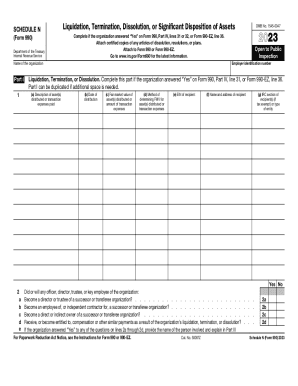
SCHEDULE N (Form 990) Department of the Treasury Internal Revenue ServiceLiquidation, Termination, Dissolution, or Significant Disposition of Assets12023Complete if the organization answered Yes on.

How it works

  1. Open form

    Open form follow the instructions

  2. Easily sign form

    Easily sign the form with your finger

  3. Share form

    Send filled & signed form or save

How to use or fill out the IRS 990 Or 990-EZ - Schedule N online

Filling out the IRS 990 Or 990-EZ - Schedule N is essential for organizations reporting significant asset dispositions or going out of existence. This guide provides straightforward, step-by-step instructions to help you complete the form accurately and efficiently online.

Follow the steps to successfully fill out the form online.

  1. Click ‘Get Form’ button to obtain the form and open it in the editor.
  2. Begin by completing Part I if your organization has dissolved, liquidated, or terminated its operations. In this part, list the assets distributed or transaction expenses paid. Include the description, date of distribution, fair market value, method of determining the value, EIN and name of the recipient, and the IRC section applicable to tax-exempt recipients.
  3. Answer the questions in line 2 regarding any officers, directors, or key employees who may have connections with successor organizations. Indicate ‘Yes’ or ‘No’ and provide the necessary details in Part III.
  4. Proceed to Part II if your organization has disposed of more than 25% of its assets. Repeat similar steps in Part I: provide descriptions, dates of distribution, fair market values, and other pertinent details for each transaction.
  5. Utilize Part III to give any supplemental information required for Parts I and II. Include explanations for any ‘Yes’ responses regarding asset dispersal and compliance with state laws.
  6. Once all sections are completed, carefully review the entries for accuracy. You can then save changes, download the form, print it, or share it as needed.

Start filling out your IRS 990 Or 990-EZ - Schedule N online today!

Get form

Experience a faster way to fill out and sign forms on the web. Access the most extensive library of templates available.
Get form

Related content

2023 Schedule N (Form 990)
Part I Liquidation, Termination, or Dissolution. Complete this part if the organization...
Learn more
Annual Electronic Filing Requirement for Small...
An organization eligible to submit Form 990-N can instead choose to file Form 990 or Form...
Learn more
2023 Popeyes academy create account is may...
36 minutes ago — This organization is required to file an IRS Form 990 or 990-EZ. Sign...
Learn more

Related links form

Penndot Senior Registration Discount Form - Get Free Coupons Now Download Form MV-904 Mv 11 Wv New Hire

Questions & Answers

Get answers to your most pressing questions about US Legal Forms API.

Contact support

To check the status of your electronic filing, log into the Form 990 Electronic Filing System (e-Postcard) and go to the “Manage Form 990-N Submission” page. You'll see the status for each Form 990-N you submitted - indicating whether your form was accepted or rejected.

The 990-EZ is considered the short-form return (as compared to the full Form 990), although it is more in-depth than the 990-N postcard. This four-page return is required of organizations with annual gross receipts between $50,000 and $200,000.

Schedule B, the Schedule of Contributors is used to provide information on the contributions of over $5,000 or more than 2% of revenues from any one of the contributors. Organizations that need to report the contribution received for the year must file and attach Schedule B along with the Form 990 or Form 990-EZ.

Most small tax-exempt organizations whose annual gross receipts are normally $50,000 or less are required to electronically submit Form 990-N, also known as the e-Postcard, by the 15th day of the 5th month after the close of your tax year.

Form 990-N is for smaller organizations with gross receipts of $50,000 or less, whereas Form 990-EZ is for organizations with gross receipts <$200,000 and assets <$500,000. It's important to note that the organizations that are eligible to file Form 990-N can choose to file 990-EZ voluntarily.

If the organization answered “Yes” on Form 990, Part IV, line 32, or Form 990-EZ, line 36, it must complete Part II of Schedule N. This section asks various questions on whether the organization sold, exchanged, disposed of, or transferred more than 25% of its net assets during the tax year.

How do I convert an exempt organization tax return from Form 990 to Form 990-EZ or vice versa, using worksheet view? Return information cannot be automatically converted from one return type to another within the same tax year. The data must be manually input in the appropriate worksheet.

Form 990-EZ is an annual information return required to be filed with the IRS by many organizations exempt from income tax under section 501(a), and certain political organizations and nonexempt charitable trusts.

Get This Form Now!

Use professional pre-built templates to fill in and sign documents online faster. Get access to thousands of forms.
Get form
If you believe that this page should be taken down, please follow our DMCA take down processhere.
Get IRS 990 Or 990-EZ - Schedule N
Get form
  • Adoption
  • Bankruptcy
  • Contractors
  • Divorce
  • Home Sales
  • Employment
  • Identity Theft
  • Incorporation
  • Landlord Tenant
  • Living Trust
  • Name Change
  • Personal Planning
  • Small Business
  • Wills & Estates
  • Packages A-Z
  • Affidavits
  • Bankruptcy
  • Bill of Sale
  • Corporate - LLC
  • Divorce
  • Employment
  • Identity Theft
  • Internet Technology
  • Landlord Tenant
  • Living Wills
  • Name Change
  • Power of Attorney
  • Real Estate
  • Small Estates
  • Wills
  • All Forms
  • Forms A-Z
  • Other Templates
  • Legal Hub
  • About Us
  • Help Portal
  • Legal Resources
  • Blog
  • Affiliates
  • Contact Us
  • Delete My Account
  • Site Map
  • Industries
  • Forms in Spanish
  • Localized Forms
  • State-specific Forms
  • Forms Kit
  • Real Estate Handbook
  • All Guides
  • Notarize
  • Incorporation services
  • For Consumers
  • For Small Business
  • For Attorneys
  • USLegal
  • FormsPass
  • pdfFiller
  • signNow
  • altaFlow
  • DocHub
  • Instapage
Form Packages
  • Adoption
  • Bankruptcy
  • Contractors
  • Divorce
  • Home Sales
  • Employment
  • Identity Theft
  • Incorporation
  • Landlord Tenant
  • Living Trust
  • Name Change
  • Personal Planning
  • Small Business
  • Wills & Estates
  • Packages A-Z
Form Categories
  • Affidavits
  • Bankruptcy
  • Bill of Sale
  • Corporate - LLC
  • Divorce
  • Employment
  • Identity Theft
  • Internet Technology
  • Landlord Tenant
  • Living Wills
  • Name Change
  • Power of Attorney
  • Real Estate
  • Small Estates
  • Wills
  • All Forms
  • Forms A-Z
  • Other Templates
Customer Service
  • Legal Hub
  • About Us
  • Help Portal
  • Legal Resources
  • Blog
  • Affiliates
  • Contact Us
  • Delete My Account
  • Site Map
  • Industries
  • Forms in Spanish
  • Localized Forms
  • State-specific Forms
  • Forms Kit
Legal Guides
  • Real Estate Handbook
  • All Guides
Prepared for you
  • Notarize
  • Incorporation services
Our Customers
  • For Consumers
  • For Small Business
  • For Attorneys
Our Sites
  • USLegal
  • FormsPass
  • pdfFiller
  • signNow
  • altaFlow
  • DocHub
  • Instapage
Social Media
Call us now toll free:
+1 833 426 79 33
As seen in:
© Copyright 1999-2026 airSlate Legal Forms, Inc. 17 Station Street, Ste. 203, Brookline, MA 02445
  • Your Privacy Choices
  • Terms of Service
  • Privacy Notice
  • Content Takedown Policy
  • Bug Bounty Program