Loading
Form preview
  • US Legal Forms
  • Other Templates
  • More Forms
  • More Multi-State Forms
  • Form Ct-399 Depreciation Adjustment Schedule ... - Tax.ny.gov

Get Form Ct-399 Depreciation Adjustment Schedule ... - Tax.ny.gov

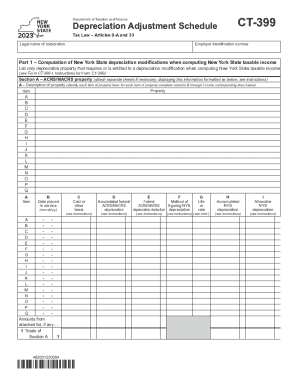
Department of Taxation and FinanceDepreciation Adjustment ScheduleCT399Tax Law Articles 9A and 33Legal name of corporationEmployer identification numberPart 1 Computation of New York State depreciation.

How it works

  1. Open form

    Open form follow the instructions

  2. Easily sign form

    Easily sign the form with your finger

  3. Share form

    Send filled & signed form or save

How to use or fill out the Form CT-399 Depreciation Adjustment Schedule ... - Tax.NY.gov online

Filling out the Form CT-399 Depreciation Adjustment Schedule is essential for accurately reporting depreciation adjustments for New York State income tax purposes. This guide provides a clear, step-by-step approach to help users navigate and fill out the form online with confidence.

Follow the steps to accurately complete the form.

  1. Use the ‘Get Form’ button to access the form and open it in your preferred editor.
  2. Provide the legal name of the corporation and the employer identification number at the top of the form. This information is crucial for identification purposes.
  3. In Part 1, begin with the computation of New York State depreciation modifications. List only the property that requires a depreciation modification for tax calculations. Make sure to refer to the instructions for specifics.
  4. In Section A, for ACRS/MACRS property, identify each item of property. Fill in the details, such as the description, date placed in service, cost or other basis, method of figuring NYS depreciation, and life or rate.
  5. Continue to Section B to provide details of property qualified under IRC section 168(k)(2). Follow a similar process as in Section A, ensuring accurate completion of each column.
  6. If you have disposed of any property, complete Parts 2 and 3 to make the necessary disposition adjustments. Record the federal depreciation deduction compared to the New York State depreciation deduction, entering results in the corresponding columns.
  7. In Part 3, summarize your adjustments to New York State taxable income. The totals from previous sections will be crucial for this calculation.
  8. Once you have filled in all sections of the form, you can save changes, download the completed document, print a copy, or share it if needed.

Complete your Form CT-399 online today for accurate and efficient tax reporting!

Get form

Experience a faster way to fill out and sign forms on the web. Access the most extensive library of templates available.
Get form

Related content

Form CT-399 Depreciation Adjustment Schedule ......
Part 1 – Computation of New York State depreciation modifications when computing New...
Learn more
Connecticut Resident Income Tax
Jan 15, 2021 — Enter the amount from Form CT-1040, Schedule 3 - Property Tax Credit...
Learn more
Form CT-399:2013:Depreciation Adjustment ......
Depreciation Adjustment Schedule. Tax Law — Articles 9-A, 32, and 33. Legal ... List...
Learn more

Related links form

Ronkonkoma Soccer Club EMTN B2008b Supplement To The Base ProspectusFINAL AMF Bb - EDF Report To Determine Liability. Rulebook 07 Revised Ncui 604

Questions & Answers

Get answers to your most pressing questions about US Legal Forms API.

Contact support

These changes continue to be in effect for 2023 and when used together may allow businesses to deduct up to 100% of capital purchases. However, it will only be 100% if the amount of the equipment is under the phase-out threshold and can be expensed solely under Section 179.

Even though the federal income doesn't change by the increased bonus depreciation deduction, you are required to add it back for NY State purposes as if it had been deducted. This would increase NY State adjusted gross income and NY State income tax.

New York Form CT-399, Depreciation Adjustment Schedule – Support.

For California purposes, the maximum IRC Section 179 expense deduction allowed is $25,000. This amount is reduced if the cost of all IRC Section 179 property placed in service during the taxable year is more than $200,000. California does not allow IRC Section 179 expense election for off-the-shelf computer software.

You can now elect to expense the cost of any section 179 property and deduct it in the year the property is placed in service. Improvements made to a business property now qualify as a deduction.

The Section 179 Deduction covers new and used equipment. The bonus depreciation covers only new equipment. The equipment must be for business purposes more than 50% of the time to qualify. You cannot claim this credit if you have claimed state tax credits for your equipment.

For property (except for property classified as IRC section 280F property) placed in service outside New York State for tax years beginning after 1984, but before 1994, New York did not allow ACRS or MACRS depreciation under IRC section 168.

In 2023 (taxes filed in 2024), the maximum Section 179 deduction is $1,160,000. Office furniture, certain vehicles, computers and off-the-shelf software are typically considered deductible expenses.

Get This Form Now!

Use professional pre-built templates to fill in and sign documents online faster. Get access to thousands of forms.
Get form
If you believe that this page should be taken down, please follow our DMCA take down processhere.
Get Form CT-399 Depreciation Adjustment Schedule ... - Tax.NY.gov
Get form
  • Adoption
  • Bankruptcy
  • Contractors
  • Divorce
  • Home Sales
  • Employment
  • Identity Theft
  • Incorporation
  • Landlord Tenant
  • Living Trust
  • Name Change
  • Personal Planning
  • Small Business
  • Wills & Estates
  • Packages A-Z
  • Affidavits
  • Bankruptcy
  • Bill of Sale
  • Corporate - LLC
  • Divorce
  • Employment
  • Identity Theft
  • Internet Technology
  • Landlord Tenant
  • Living Wills
  • Name Change
  • Power of Attorney
  • Real Estate
  • Small Estates
  • Wills
  • All Forms
  • Forms A-Z
  • Other Templates
  • Legal Hub
  • About Us
  • Help Portal
  • Legal Resources
  • Blog
  • Affiliates
  • Contact Us
  • Delete My Account
  • Site Map
  • Industries
  • Forms in Spanish
  • Localized Forms
  • State-specific Forms
  • Forms Kit
  • Real Estate Handbook
  • All Guides
  • Notarize
  • Incorporation services
  • For Consumers
  • For Small Business
  • For Attorneys
  • USLegal
  • FormsPass
  • pdfFiller
  • signNow
  • altaFlow
  • DocHub
  • Instapage
Form Packages
  • Adoption
  • Bankruptcy
  • Contractors
  • Divorce
  • Home Sales
  • Employment
  • Identity Theft
  • Incorporation
  • Landlord Tenant
  • Living Trust
  • Name Change
  • Personal Planning
  • Small Business
  • Wills & Estates
  • Packages A-Z
Form Categories
  • Affidavits
  • Bankruptcy
  • Bill of Sale
  • Corporate - LLC
  • Divorce
  • Employment
  • Identity Theft
  • Internet Technology
  • Landlord Tenant
  • Living Wills
  • Name Change
  • Power of Attorney
  • Real Estate
  • Small Estates
  • Wills
  • All Forms
  • Forms A-Z
  • Other Templates
Customer Service
  • Legal Hub
  • About Us
  • Help Portal
  • Legal Resources
  • Blog
  • Affiliates
  • Contact Us
  • Delete My Account
  • Site Map
  • Industries
  • Forms in Spanish
  • Localized Forms
  • State-specific Forms
  • Forms Kit
Legal Guides
  • Real Estate Handbook
  • All Guides
Prepared for you
  • Notarize
  • Incorporation services
Our Customers
  • For Consumers
  • For Small Business
  • For Attorneys
Our Sites
  • USLegal
  • FormsPass
  • pdfFiller
  • signNow
  • altaFlow
  • DocHub
  • Instapage
Social Media
Call us now toll free:
+1 833 426 79 33
As seen in:
© Copyright 1999-2026 airSlate Legal Forms, Inc. 17 Station Street, Ste. 203, Brookline, MA 02445
  • Your Privacy Choices
  • Terms of Service
  • Privacy Notice
  • Content Takedown Policy
  • Bug Bounty Program