Loading
Get About Form 8582-cr, Passive Activity Credit Limitations
How it works
-

Open form follow the instructions
-

Easily sign the form with your finger
-

Send filled & signed form or save
How to fill out the About Form 8582-CR, Passive Activity Credit Limitations online
This guide provides clear and concise instructions on how to complete the About Form 8582-CR, which addresses passive activity credit limitations. Follow these steps to ensure accurate and efficient completion of the form.
Follow the steps to fill out the form correctly
- Use the ‘Get Form’ button to access the form and open it in your editor.
- Begin by entering your identifying details, including the name(s) as shown on your return.
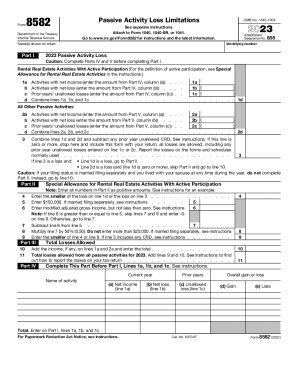
- Proceed to Part I, where you will enter details regarding your 2023 passive activity loss, including net income and losses from rental real estate activities with active participation. Ensure to complete Parts IV and V before this section.
- Next, input the activities with net income, net loss, and unallowed losses from previous years, and summarize the totals for this section in line 1d.
- In Part II, provide the necessary data to assess passive activity loss limitations. This includes entering the loss amounts and calculating your modified adjusted gross income.
- Ensure that you complete all calculations as prescribed, particularly when determining special allowances for rental activities with active participation.
- After finishing Part II, check for any potential losses by combining the figures from earlier parts and continue with any necessary calculations.
- Finally, review all sections for accuracy. Once completed, you can save your changes, download, print, or share the form as required.
Start filling out your documents online today for a smoother tax process.
Under the passive activity rules you can deduct up to $25,000 in passive losses against your ordinary income (W-2 wages) if your modified adjusted gross income (MAGI) is $100,000 or less.