Loading
Form preview
  • US Legal Forms
  • Other Templates
  • More Forms
  • More Multi-State Forms
  • Form 8915-f (rev. January 2024)

Get Form 8915-f (rev. January 2024)

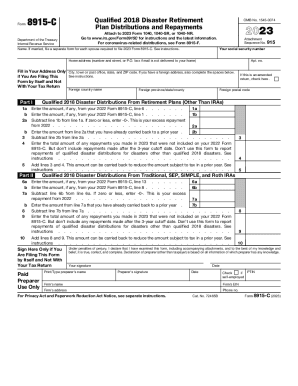
Form8915CDepartment of the Treasury Internal Revenue ServiceQualified 2018 Disaster Retirement Plan Distributions and RepaymentsOMB No. 154500742023Attach to 2023 Form 1040, 1040SR, or 1040NR. Go.

How it works

  1. Open form

    Open form follow the instructions

  2. Easily sign form

    Easily sign the form with your finger

  3. Share form

    Send filled & signed form or save

How to fill out the Form 8915-F (Rev. January 2024) online

Filling out Form 8915-F is essential for reporting qualified disaster retirement plan distributions. This guide provides a step-by-step approach to assist users in completing the form accurately and efficiently online.

Follow the steps to fill out Form 8915-F seamlessly online.

  1. Click ‘Get Form’ button to obtain the form and open it for editing.
  2. Enter your social security number in the designated field.
  3. Provide your name as it appears on your tax return; if married, ensure to file a separate form for each spouse.
  4. Fill in your home address, including street number and name or P.O. box, followed by your city, state, and ZIP code. If applicable, include your foreign address.
  5. Indicate if you are filing this form by itself or with your tax return by checking the appropriate box.
  6. In Part I, report the qualified disaster distributions from retirement plans excluding IRAs. Fill out lines 1a, 1b, and compute the excess repayment according to the instructions provided.
  7. Continue to Part II, where you will report qualified disaster distributions from Traditional, SEP, SIMPLE, and Roth IRAs. Complete lines 6a, 6b, and calculate any excess repayments.
  8. Add lines 3 and 4 from Part I and lines 8 and 9 from Part II to find total amounts that can be carried back.
  9. Before finalizing, sign and date the declaration, if filing this form by itself.
  10. Once completed, save your changes, and choose to download or print the form for your records.

Take the next step and complete your forms online for a seamless filing experience.

Get form

Experience a faster way to fill out and sign forms on the web. Access the most extensive library of templates available.
Get form

Related content

Form 8915-F (Rev. January 2024)
Major Disaster Declarations at www.FEMA.gov/disaster/declarations provides the only...
Learn more
2022 Publication 519
payments, see Form 8915-F, Qualified Disaster. Retirement Plan Distributions ... due...
Learn more
Samling af malerier fra Hermitage Museum...
Disse lister er tvivlsomme, fordi nogle værker præsenteres under forskellige titler, så...
Learn more

Related links form

Lpa 7354 Form PingFederate Upgrade Utility User Guide - Product Documentation Food License Florida Pa Barta Transportation Services Documents

Questions & Answers

Get answers to your most pressing questions about US Legal Forms API.

Contact support

IRS Form 8915-F for tax year 2022 has been available in TurboTax since March 9, 2023. Does anyone know when Form 8915-F will be available on ... intuit.com https://ttlc.intuit.com › community › taxes › discussion intuit.com https://ttlc.intuit.com › community › taxes › discussion

Go to Wages & Income at the top of the screen (or Personal > Personal Income) Click I'll choose what I work on. Scroll to the bottom of the section without making any changes and click Done with Income. Continue moving forward until you see a question about whether you took a disaster distribution in 2020 and select ' ...

IRS Form 8915-F for tax year 2022 has been available in TurboTax since March 9, 2023. Did you really take a distribution in 2021 due to a non-covid disaster? If so, which disaster in 2021? If you did not take a disaster distribution in 2021 due to a non-covid disaster then you should answer NO and continue.

Open or continue your return in TurboTax. In the left menu, select "Tax Tools" and then "Tools". In the pop-up window Tool Center, select "Delete a form". Select "Delete" next to "Form 8915-F" and "Qualified 2020 Disaster Retirement Distr" and follow the instructions. Solved: Is Form 8915-F available for tax year 2022 in TurboTax? - Page 12 intuit.com https://ttlc.intuit.com › community › taxes › discussion intuit.com https://ttlc.intuit.com › community › taxes › discussion

Income for prior years from IRA retirement plan qualified disaster distributions - from 2021 Form 8915-F Line 22- Report one third of the qualifying distribution you made during 2021 or the full distribution if you elected not to distribute it over three years. How do I complete Form 8915-F for Qualified Disaster ... TaxSlayer https://support.taxslayer.com › en-us › articles › 4421... TaxSlayer https://support.taxslayer.com › en-us › articles › 4421...

Please follow these steps to delete the "Qualified 2020 Disaster Retirement Distribution and Repayment Worksheet" (8915E wks) in TurboTax Desktop (this will remove Form 8915-F): Switch to Forms mode on the top. Scroll down and select "8915E wks" Click "delete" and confirm the deletion.

Sign in to TurboTax and open your return by selecting Continue or Pick up where you left off. In the left menu, select Tax Tools and then Tools. In the pop-up window Tool Center, choose Delete a form.

Use Form 8915-F if you were adversely impacted by the coronavirus or affected by a qualified 2020 or later disaster. It replaces Form 8915-E beginning in 2021. About Form 8915-F, Qualified Disaster Retirement Plan Distributions ... - IRS irs.gov https://.irs.gov › forms-pubs › about-form-8915-f irs.gov https://.irs.gov › forms-pubs › about-form-8915-f

Get This Form Now!

Use professional pre-built templates to fill in and sign documents online faster. Get access to thousands of forms.
Get form
If you believe that this page should be taken down, please follow our DMCA take down processhere.
Get Form 8915-F (Rev. January 2024)
Get form
  • Adoption
  • Bankruptcy
  • Contractors
  • Divorce
  • Home Sales
  • Employment
  • Identity Theft
  • Incorporation
  • Landlord Tenant
  • Living Trust
  • Name Change
  • Personal Planning
  • Small Business
  • Wills & Estates
  • Packages A-Z
  • Affidavits
  • Bankruptcy
  • Bill of Sale
  • Corporate - LLC
  • Divorce
  • Employment
  • Identity Theft
  • Internet Technology
  • Landlord Tenant
  • Living Wills
  • Name Change
  • Power of Attorney
  • Real Estate
  • Small Estates
  • Wills
  • All Forms
  • Forms A-Z
  • Other Templates
  • Legal Hub
  • About Us
  • Help Portal
  • Legal Resources
  • Blog
  • Affiliates
  • Contact Us
  • Delete My Account
  • Site Map
  • Industries
  • Forms in Spanish
  • Localized Forms
  • State-specific Forms
  • Forms Kit
  • Real Estate Handbook
  • All Guides
  • Notarize
  • Incorporation services
  • For Consumers
  • For Small Business
  • For Attorneys
  • USLegal
  • FormsPass
  • pdfFiller
  • signNow
  • altaFlow
  • DocHub
  • Instapage
Form Packages
  • Adoption
  • Bankruptcy
  • Contractors
  • Divorce
  • Home Sales
  • Employment
  • Identity Theft
  • Incorporation
  • Landlord Tenant
  • Living Trust
  • Name Change
  • Personal Planning
  • Small Business
  • Wills & Estates
  • Packages A-Z
Form Categories
  • Affidavits
  • Bankruptcy
  • Bill of Sale
  • Corporate - LLC
  • Divorce
  • Employment
  • Identity Theft
  • Internet Technology
  • Landlord Tenant
  • Living Wills
  • Name Change
  • Power of Attorney
  • Real Estate
  • Small Estates
  • Wills
  • All Forms
  • Forms A-Z
  • Other Templates
Customer Service
  • Legal Hub
  • About Us
  • Help Portal
  • Legal Resources
  • Blog
  • Affiliates
  • Contact Us
  • Delete My Account
  • Site Map
  • Industries
  • Forms in Spanish
  • Localized Forms
  • State-specific Forms
  • Forms Kit
Legal Guides
  • Real Estate Handbook
  • All Guides
Prepared for you
  • Notarize
  • Incorporation services
Our Customers
  • For Consumers
  • For Small Business
  • For Attorneys
Our Sites
  • USLegal
  • FormsPass
  • pdfFiller
  • signNow
  • altaFlow
  • DocHub
  • Instapage
Social Media
Call us now toll free:
+1 833 426 79 33
As seen in:
© Copyright 1999-2026 airSlate Legal Forms, Inc. 17 Station Street, Ste. 203, Brookline, MA 02445
  • Your Privacy Choices
  • Terms of Service
  • Privacy Notice
  • Content Takedown Policy
  • Bug Bounty Program