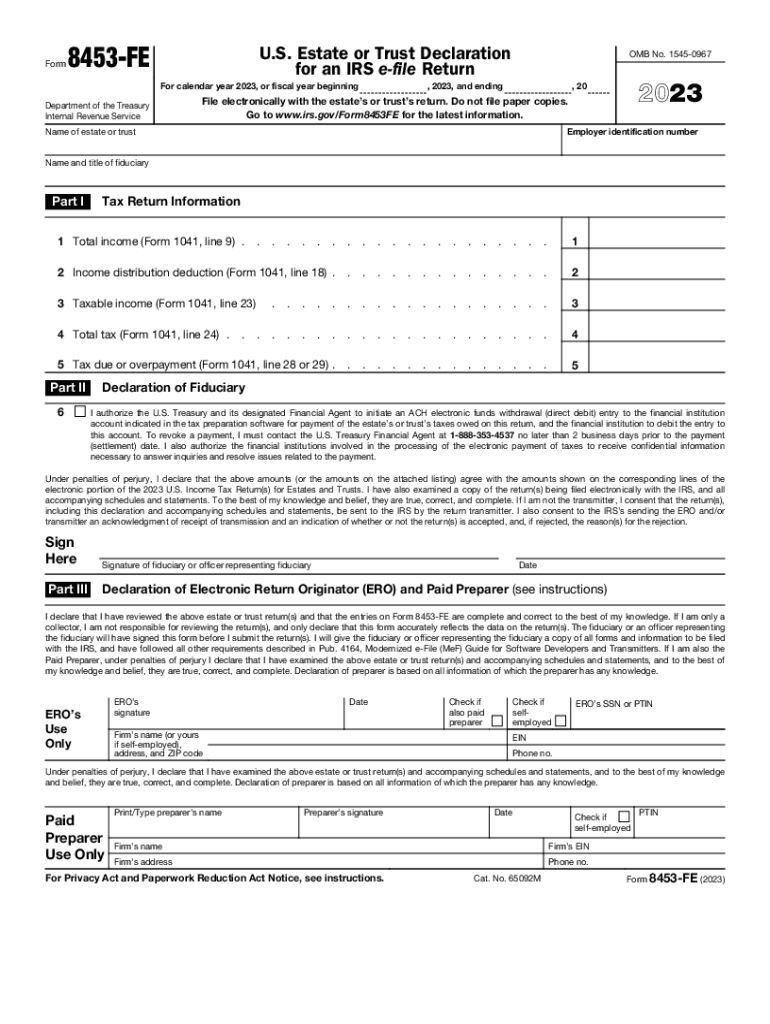
And ending , 20 File electronically with the estate s or trust s return. Do not file paper copies. Go to www.irs.gov/Form8453FE for the latest information. 2023 Employer identification number Name of estate or trust Name and title of fiduciary Part I Tax Return Information 1 Total income (Form 1041, line 9) . . . . . . . . . . . . . . . . 1 2 Income distribution deduction (Form 1041, line 18) . . . . . . . . . . . . . . . 2 3 Taxable income (Form 104.

Open form follow the instructions

Easily sign the form with your finger

Send filled & signed form or save
How to fill out the IRS 8453-FE online
Filling out the IRS Form 8453-FE online is an important step for estates and trusts to authenticate their electronic tax returns. This guide provides clear and methodical steps to assist users in completing the form accurately.
Follow the steps to complete the IRS 8453-FE online.
- Click ‘Get Form’ button to access the form and open it in the appropriate digital editor.
- Enter the employer identification number of the estate or trust in the designated field.
- Fill in the name of the estate or trust as well as the name and title of the fiduciary responsible.
- In Part I, accurately complete the tax return information. Begin by entering the total income from Form 1041, line 9 in the first field.
- Next, continue filling out the income distribution deduction from Form 1041, line 18 in the second field.
- Proceed to fill in taxable income as reported on Form 1041, line 23 in the subsequent field.
- Input the total tax from Form 1041, line 24 in the fourth field.
- Complete the fifth field with the amount due or overpayment as reported on Form 1041, line 28 or 29.
- In Part II, check the box if you authorize an ACH electronic funds withdrawal for payment of federal taxes owed.
- Sign and date the form in the section labeled 'Declaration of Fiduciary'. Ensure the signature belongs to either the fiduciary or the officer representing them.
- If there is an Electronic Return Originator (ERO), complete Part III with the required information, including their signature and details.
- Review all entries for accuracy, then save changes, download, print, or share the completed form as necessary.
Complete your documents online today for a smooth filing experience.
Experience a faster way to fill out and sign forms on the web. Access the most extensive library of templates available.
Related content
Use Form 8453-FE to: • Authenticate the electronic Form 1041, U.S. Income Tax Return...
See instructions. If you are going to make an electronic funds withdrawal (direct debit)...
Aug 21, 2023 — Use this form to: Authenticate the electronic Form 1041, U.S. Income Tax...
Get answers to your most pressing questions about US Legal Forms API.
What is form 8453 C used for?
Form FTB 8453-C, California e-file Return Authorization for Corporations, is the signature document for corporation e-file returns. By signing this form, the corporation, electronic return originator (ERO), and paid preparer declare that the return is true, correct, and complete.
What is the difference between form 8453 FE and 8879 F?
The form 8453 is used to allow the preparer to mail documents to the IRS; However, the form 8879 will still be generated and will need to be signed and retained for three (3) years.
Can you email form 8453 to IRS?
If you received a request to submit Form 8453 (US Individual Income Tax Transmittal for an IRS e-file return), you need to mail some forms to the IRS that can't be e-filed. TurboTax creates Form 8453 for you, and it serves as a cover page for your additional documentation.
What is form 8453 EMP used for?
Use this form to: authenticate an electronic employment tax return; authorize an electronic return originator (ERO) or an intermediate service provider (ISP) to transmit via a third party; and. authorize an electronic funds withdrawal for payment of federal taxes owed.
What is IRS form 8453 used for?
Taxpayers and Electronic Return Originators (EROs) use this form to send any required paper forms or supporting documentation listed next to the checkboxes on the front of the form. Form 8453 is used solely to transmit the forms listed on the front of the form. Do not send Forms W-2, W-2G, or 1099-R.
Why do I need to file form 8453?
You'll need to file this federal tax signature form if you're attaching the following forms and documents: Form 1098-C, Contributions of Motor Vehicles, Boats, and Airplanes. Form 2848, Power of Attorney and Declaration of Representative.
What is form 8453 FE for?
Use this form to: Authenticate the electronic Form 1041, U.S. Income Tax Return for Estates and Trusts; Authorize the electronic filer to transmit via a third-party transmitter; and. Authorize an electronic funds withdrawal for payment of federal taxes owed.
What is the difference between 8879 F and 8453 Fe?
The form 8453 is used to allow the preparer to mail documents to the IRS; However, the form 8879 will still be generated and will need to be signed and retained for three (3) years. Note: The Form 8453 will be automatically produced only if any of the allowed supporting documents are being attached to the return.
Use professional pre-built templates to fill in and sign documents online faster. Get access to thousands of forms.
If you believe that this page should be taken down, please follow our DMCA take down process here.