Loading
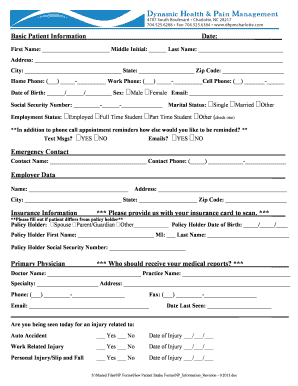
Get Basic Patient Information
How it works
-

Open form follow the instructions
-

Easily sign the form with your finger
-

Send filled & signed form or save
How to fill out the Basic Patient Information online
Filling out the Basic Patient Information form online is an essential step in ensuring that your healthcare provider has the correct information to assist you effectively. This guide will walk you through each section of the form, providing you with clear instructions to facilitate the process.
Follow the steps to complete your Basic Patient Information form with ease.
- Click the 'Get Form' button to obtain the form and open it in your online editor.
- Begin by entering the date of completion in the designated field at the top of the form. This helps establish a timeline for your medical records.
- Enter your first name, middle initial (if applicable), and last name in the corresponding fields. Make sure to check for spelling accuracy.
- Fill in your complete address, including street, city, state, and zip code. Providing a current address ensures that any correspondence reaches you promptly.
- Input your home, work, and cell phone numbers in the spaces provided. Choose the phone number where you can be most readily contacted.
- Provide your date of birth in the requested format. Indicate your sex by selecting either 'Male' or 'Female'.
- Include your email address in the designated field, which will facilitate electronic communication and appointment reminders.
- Enter your Social Security Number by following the format shown. Ensure the number is accurate to avoid any delays in processing.
- Select your marital status from the options provided and indicate your employment status by choosing the appropriate option.
- Answer the question regarding your preferred method of receiving appointment reminders. Indicate 'Yes' or 'No' for both text messages and emails.
- Fill in the emergency contact information, including the name and phone number of the individual listed.
- Complete the employer data section by providing the name and address of your employer.
- For the insurance information section, note that you must provide your insurance card for scanning, and complete information regarding the policy holder if different from you.
- Fill out your primary physician's information, including their name, practice name, specialty, address, phone number, and email. This section is vital for your medical records.
- Indicate if your visit is related to any injury type by selecting 'Yes' or 'No' and completing the date of injury fields as necessary.
- Complete the treatment authorization, consent to treat a minor (if applicable), and acknowledgment of receipt. Ensure all signatures are collected as this may be crucial for your treatment.
- Finally, review all the information for accuracy, make any necessary updates, and then save your changes. You will have options to download, print, or share the completed form.
Start filling out your Basic Patient Information form online today for seamless healthcare access.
Examples of PHI: Billing information from your doctor. Email to your doctor's office about a medication or prescription you need. Appointment scheduling note with your doctor's office. An MRI scan. Blood test results. Phone records.