Loading
Form preview
  • US Legal Forms
  • Other Templates
  • More Forms
  • More Multi-State Forms
  • Irs 1099-patr 2022

Get Irs 1099-patr 2022-2026

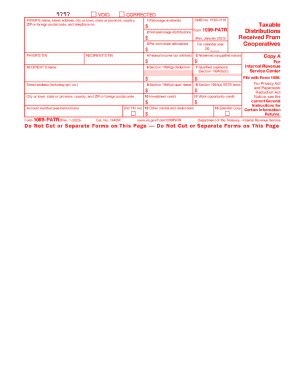
Attention: Copy A of this form is provided for informational purposes only. Copy A appears in red, similar to the official IRS form. The official printed version of Copy A of this IRS form is scannable,.

How it works

  1. Open form

    Open form follow the instructions

  2. Easily sign form

    Easily sign the form with your finger

  3. Share form

    Send filled & signed form or save

How to fill out the IRS 1099-PATR online

Filling out the IRS 1099-PATR online is an essential process for reporting taxable distributions received from cooperatives. This guide provides step-by-step instructions to help users complete this form accurately and efficiently.

Follow the steps to accurately complete the IRS 1099-PATR online.

  1. Click ‘Get Form’ button to obtain the form and open it in the editor.
  2. Locate the payer's information section. Enter the payer’s name, street address, city, state, and ZIP code. Also, include the payer's telephone number.
  3. In the next section, fill in the recipient's information by entering their name and taxpayer identification number (TIN). Make sure the TIN is accurate to avoid complications.
  4. Complete the section for the year of the distributions by selecting the appropriate calendar year.
  5. Proceed to fill out the boxes for various types of distributions: Box 1 for patronage dividends, Box 2 for nonpatronage distributions, and Box 3 for per-unit retain allocations. Ensure you accurately reflect the amounts received.
  6. If applicable, provide information for federal income tax withheld in Box 4 and any section 199A(g) deductions in Box 6.
  7. Continue with Box 7 for qualified payments, Boxes 8 and 9 for section 199A qualified items, and Boxes 10 through 13 for other credits and deductions relevant to the recipient.
  8. Review all entered information carefully for accuracy. Once confirmed, save changes to your document.
  9. Finally, users can download, print, or share the completed form as necessary, taking care to use the appropriate copies for recipients and for filing with the IRS.

Take action now to file your IRS 1099-PATR online accurately.

Get form

Experience a faster way to fill out and sign forms on the web. Access the most extensive library of templates available.
Get form

Related content

2022 Form 1099-PATR
To complete Form 1099-PATR, use: • The 2022 General Instructions for Certain...
Learn more
Form 1099 Information Returns∗
Form 1099 is used to report various forms of income other than wages, salaries, and tips...
Learn more
2022 Instructions for Form 1099-PATR
Sep 27, 2021 — Report on Form 1099-PATR only items of income, expenses, and credits that...
Learn more

Related links form

BYLAWS OF A BUSINESS CORPORATION: General Form Of ... Shareholder Services Agreement - SEC.gov Bruma Finance Online Application Warren County Armory Rental Agreement Form

Questions & Answers

Get answers to your most pressing questions about US Legal Forms API.

Contact support

Distributions you received from a cooperative may be included in your income. Report any amounts shown in boxes 1, 2, 3, and 5 as income, on Schedule F, Schedule C, or Form 4835 (Farm Rental Income and Expenses).

Go to the Income/Deductions > Farm / 4835 worksheet. Click section 1 - General. Input line 9 - Farm rental. Click section 3 - Income. Input line 4 - Distributions received from cooperatives. Input line 5 - Distributions received from cooperatives - taxable amount. Calculate the return.

To report Form 1099-PATR on Schedule F: From within your TaxAct return (Online or Desktop), click Federal (on smaller devices, click in the top left corner of your screen, then click Federal). Click the Business Income dropdown, then click Farming income or loss.

Taxpayers who earned at least $10 in patronage dividends and other distributions from a cooperative are sent a 1099-PATR. A 1099-PATR is often used to report dividends associated with farms. A 1099-PATR can also be issued to taxpayers if they had federal income tax withheld in connection with a cooperative.

Box 7. For specified agricultural and horticultural cooperatives only, enter the qualified payments paid to the patron. You are required to provide this information whether or not you pass any of the section 199A(g) deduction through to the patrons.

Reporting Patronage Dividends If the recipient is a business, the patronage dividends will be reported on Schedule C. Farmers usually report patronage dividends on Schedule F. However, patronage dividends received from purchases of personal or family items are not required to be reported.

The 1099-PATR income should be shown as Other Income reported on Form 1040, Schedule 1, Part I, Line 8z. You should report it as “1099-PATR profits from” your co-op and list the co-op's Taxpayer Identification Number (TIN).

Inside TurboTax, search for 1099-PATR (be sure to include the dash) and then select the Jump to link in the search results. Follow the instructions to enter info about your farm. When you get to Your Farming Income and Expenses, you will enter your 1099-PATR info in Livestock, grain, produce, custom work, co-ops.

Get This Form Now!

Use professional pre-built templates to fill in and sign documents online faster. Get access to thousands of forms.
Get form
If you believe that this page should be taken down, please follow our DMCA take down processhere.
Get IRS 1099-PATR
Get form
  • Adoption
  • Bankruptcy
  • Contractors
  • Divorce
  • Home Sales
  • Employment
  • Identity Theft
  • Incorporation
  • Landlord Tenant
  • Living Trust
  • Name Change
  • Personal Planning
  • Small Business
  • Wills & Estates
  • Packages A-Z
  • Affidavits
  • Bankruptcy
  • Bill of Sale
  • Corporate - LLC
  • Divorce
  • Employment
  • Identity Theft
  • Internet Technology
  • Landlord Tenant
  • Living Wills
  • Name Change
  • Power of Attorney
  • Real Estate
  • Small Estates
  • Wills
  • All Forms
  • Forms A-Z
  • Other Templates
  • Legal Hub
  • About Us
  • Help Portal
  • Legal Resources
  • Blog
  • Affiliates
  • Contact Us
  • Delete My Account
  • Site Map
  • Industries
  • Forms in Spanish
  • Localized Forms
  • State-specific Forms
  • Forms Kit
  • Real Estate Handbook
  • All Guides
  • Notarize
  • Incorporation services
  • For Consumers
  • For Small Business
  • For Attorneys
  • USLegal
  • FormsPass
  • pdfFiller
  • signNow
  • altaFlow
  • DocHub
  • Instapage
Form Packages
  • Adoption
  • Bankruptcy
  • Contractors
  • Divorce
  • Home Sales
  • Employment
  • Identity Theft
  • Incorporation
  • Landlord Tenant
  • Living Trust
  • Name Change
  • Personal Planning
  • Small Business
  • Wills & Estates
  • Packages A-Z
Form Categories
  • Affidavits
  • Bankruptcy
  • Bill of Sale
  • Corporate - LLC
  • Divorce
  • Employment
  • Identity Theft
  • Internet Technology
  • Landlord Tenant
  • Living Wills
  • Name Change
  • Power of Attorney
  • Real Estate
  • Small Estates
  • Wills
  • All Forms
  • Forms A-Z
  • Other Templates
Customer Service
  • Legal Hub
  • About Us
  • Help Portal
  • Legal Resources
  • Blog
  • Affiliates
  • Contact Us
  • Delete My Account
  • Site Map
  • Industries
  • Forms in Spanish
  • Localized Forms
  • State-specific Forms
  • Forms Kit
Legal Guides
  • Real Estate Handbook
  • All Guides
Prepared for you
  • Notarize
  • Incorporation services
Our Customers
  • For Consumers
  • For Small Business
  • For Attorneys
Our Sites
  • USLegal
  • FormsPass
  • pdfFiller
  • signNow
  • altaFlow
  • DocHub
  • Instapage
Social Media
Call us now toll free:
+1 833 426 79 33
As seen in:
© Copyright 1999-2026 airSlate Legal Forms, Inc. 17 Station Street, Ste. 203, Brookline, MA 02445
  • Your Privacy Choices
  • Terms of Service
  • Privacy Notice
  • Content Takedown Policy
  • Bug Bounty Program