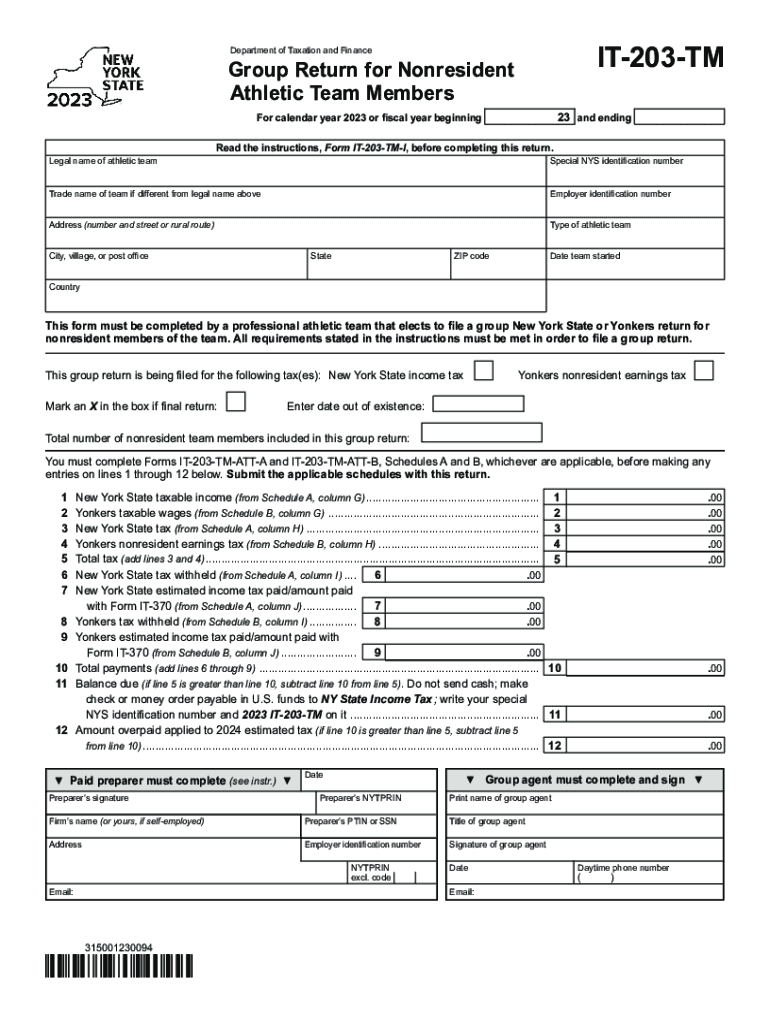
IT203TMDepartment of Taxation and FinanceGroup Return for Nonresident Athletic Team Members23and endingFor calendar year 2023 or fiscal year beginningRead the instructions, Form IT203TMI, before completing.
Loading

Open form follow the instructions

Easily sign the form with your finger

Send filled & signed form or save
How to fill out the NY IT-203-TM online
This guide provides detailed instructions on how to accurately complete the NY IT-203-TM, the form for professional athletic teams filing a group return for nonresident team members. Following these steps will help ensure compliance with New York State regulations and make the filing process more manageable.
Follow the steps to complete your NY IT-203-TM online
- Press the ‘Get Form’ button to access the NY IT-203-TM form and open it for editing.
- Fill in the legal name of the athletic team in the appropriate field.
- Enter the special New York State identification number next to the legal name.
- If applicable, input the trade name of the team that differs from the legal name.
- Provide the employer identification number associated with the athletic team.
- Complete the address section, including the number and street or rural route, city, state, ZIP code, and country.
- Indicate the type of athletic team from the provided options.
- Specify the date the team started in the designated field.
- Mark an 'X' in the box if filing a final return, and if applicable, enter the date the team went out of existence.
- Enter the total number of nonresident team members included in this group return.
- Before filling in lines 1 through 12, ensure that Forms IT-203-TM-ATT-A and IT-203-TM-ATT-B are completed as needed.
- Input the New York State taxable income from Schedule A, column G on line 1.
- Record the Yonkers taxable wages from Schedule B, column G on line 2.
- Enter the New York State tax from Schedule A, column H on line 3.
- Input the Yonkers nonresident earnings tax from Schedule B, column H on line 4.
- Calculate the total tax by adding lines 3 and 4, and enter the result on line 5.
- Record the New York State tax withheld from Schedule A, column I on line 6.
- Include the New York State estimated income tax paid from Schedule A, column J on line 7.
- Enter the Yonkers tax withheld from Schedule B, column I on line 8.
- Input the Yonkers estimated income tax paid from Schedule B, column J on line 9.
- Calculate the total payments by adding lines 6 through 9, and write the total on line 10.
- If line 5 is greater than line 10, calculate the balance due by subtracting line 10 from line 5, and enter it on line 11.
- If line 10 is greater than line 5, calculate the amount overpaid to apply to 2024 estimated tax by subtracting line 5 from line 10, and enter it on line 12.
- Have the paid preparer complete their section, including signature and identifying numbers.
- Lastly, review the completed form for accuracy before saving, downloading, printing, or sharing the document.
Take the first step in your filing process by completing your NY IT-203-TM online today.
Experience a faster way to fill out and sign forms on the web. Access the most extensive library of templates available.
Related content
This form must be completed by a professional athletic team that elects to file a group...
2023 Alzheimer's Disease Facts and Figures is a statistical resource for U.S. data related...
IT-203-D claim the New York itemized deduction. IT-1099-R report NYS, NYC, or Yonkers tax...
Get answers to your most pressing questions about US Legal Forms API.
Do I have to file NY state tax return for nonresident?
You must file Form IT-203, Nonresident and Part-Year Resident Income Tax Return, if you: were not a resident of New York State and received income during the tax year from New York State sources, or. moved into or out of New York State during the tax year.
Do I need to file taxes as a non resident?
Who Must File. You must file a return if you are a nonresident alien engaged or considered to be engaged in a trade or business in the United States during the year.
Do I have to file New York non resident tax return?
ing to Form IT-203-I, you must file a New York part-year or nonresident return if: You have any income from a New York source and your New York AGI exceeds your New York State standard deduction. You want to claim a refund for any New York State, New York City, or Yonkers taxes that were withheld from your pay.
What is NY tax form 203?
New York Resident, Nonresident, and Part-Year Resident Itemized Deductions. Used by nonresident and part-year resident (Form IT-203) filers who need to report other New York State or New York City taxes, and tax credits other than those reported directly on Form IT-203.
Who is required to file a New York State tax return?
Generally, you must file a New York State income tax return if you are a New York State resident and are required to file a federal return. You may also have to file a New York State return if you are a nonresident of New York and you have income from New York State sources.
What happens if I file an extension and owe money?
An extension gives you extra time to file, but not extra time to pay. After you file an extension, if you owe taxes when you file your return, you might also have to pay penalties and interest on the tax due.
What is an IT-203 B form?
Desktop: New York Form IT-203-B Nonresident and Part-Year Resident Income Allocation. New York Form IT-203-B is used to allocate income to the state during the period of the taxpayer's (and spouse's) period of nonresidency and to indicate where in the state the taxpayer and/or spouse maintained living quarters, if any.
Do I have to pay NY taxes if I don't live there?
As a nonresident, you only pay tax on New York source income, which includes earnings from work performed in New York State, and income from real property located in the state.
Use professional pre-built templates to fill in and sign documents online faster. Get access to thousands of forms.
If you believe that this page should be taken down, please follow our DMCA take down process here.