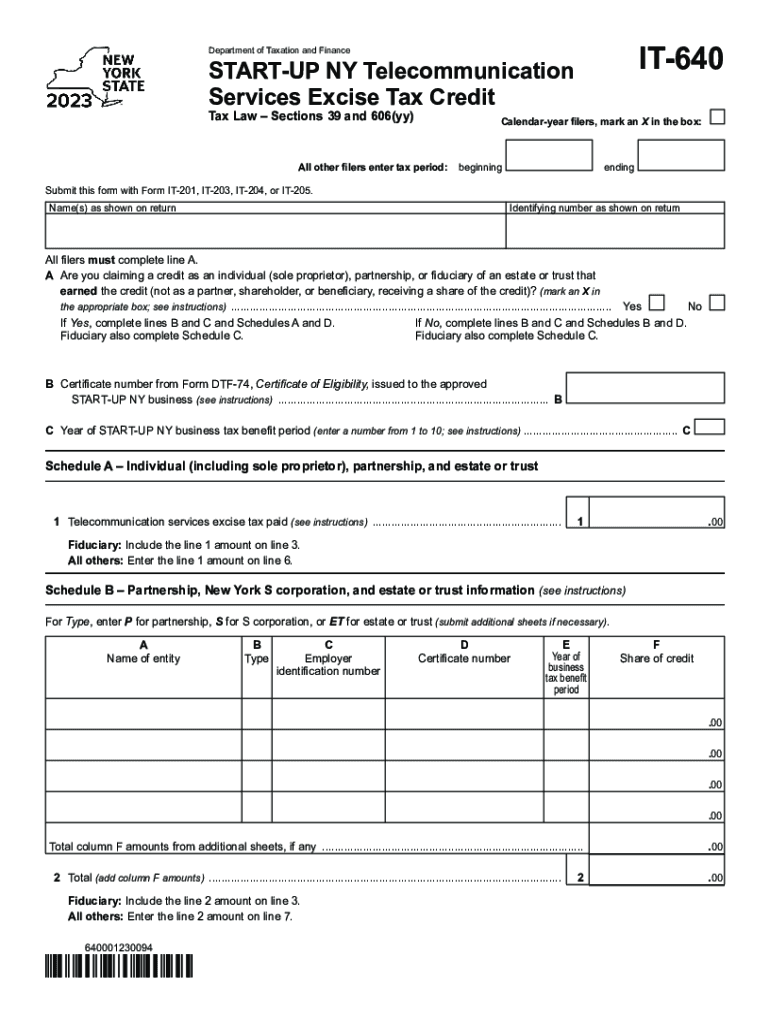
IT640Department of Taxation and FinanceSTARTUP NY Telecommunication Services Excise Tax Credit Tax Law Sections 39 and 606(yy)Calendaryear filers, mark an X in the box:All other filers enter tax.
Loading

Open form follow the instructions

Easily sign the form with your finger

Send filled & signed form or save
How to fill out the NY IT-640 online
Filling out the NY IT-640 form online can be a straightforward process when you follow the right steps. This guide provides comprehensive instructions to ensure you successfully complete the Telecommunication Services Excise Tax Credit application.
Follow the steps to fill out the NY IT-640 online.
- Use the ‘Get Form’ button to access the NY IT-640 form and open it in your preferred editor.
- Indicate whether you are a calendar-year filer by marking an X in the appropriate box. If you are not, please enter your tax period's beginning and ending dates.
- Provide your name(s) as shown on your tax return along with your identifying number.
- In line A, confirm if you are claiming a credit as an individual, partnership, or fiduciary by marking an X in the corresponding box. If your answer is 'Yes', proceed to complete lines B and C, as well as Schedules A and D. If 'No', complete lines B and C and Schedules B and D.
- If applicable, enter the certificate number from Form DTF-74 in line B. For line C, specify the year of your START-UP NY business tax benefit period, using a number from 1 to 10.
- Complete Schedule A if you are an individual, partnership, or estate or trust by reporting the telecommunication services excise tax paid in line 1.
- If you are a fiduciary, include the amount from line 1 on line 3. If not, enter the amount from line 1 on line 6.
- Proceed to Schedule B to provide information regarding partnerships, New York S corporations, and estates or trusts, ensuring that you include the name of the entity, type, employer identification number, certificate number, year of business tax benefit period, and share of credit.
- Add any relevant amounts from column F and report the total on line 2.
- If you are a fiduciary, include the line 2 amount on line 3. Otherwise, enter the amount on line 7.
- Complete Schedule C to report the sharing of credit among beneficiaries and fiduciaries.
- Lastly, fill out Schedule D by entering amounts from lines 1, 2, and 5 to compute the total credit and ensure all calculations are accurate. Save your changes, and you can also opt to download, print, or share the completed form.
Begin completing your NY IT-640 form online today!
Experience a faster way to fill out and sign forms on the web. Access the most extensive library of templates available.
Related content
This program provides tax benefits to approved businesses that locate in vacant space or...
Jun 6, 2022 — This catalog governs the academic year 2022–2023. It supersedes all...
IT-640. Department of Taxation and Finance. START-UP NY Telecommunication. Services Excise...
Use professional pre-built templates to fill in and sign documents online faster. Get access to thousands of forms.
If you believe that this page should be taken down, please follow our DMCA take down process here.