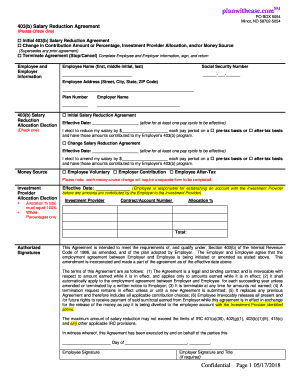
Get Ct 403(b) Salary Reduction Agreement 2018-2026
How it works
-

Open form follow the instructions
-

Easily sign the form with your finger
-

Send filled & signed form or save
How to fill out the CT 403(b) Salary Reduction Agreement online
Filling out the CT 403(b) Salary Reduction Agreement is a crucial step in managing your retirement savings. This guide will provide clear and detailed instructions on how to competently complete the form online, ensuring that your contributions are accurately processed.
Follow the steps to successfully complete your Salary Reduction Agreement.
- Click ‘Get Form’ button to obtain the form and open it in the editor.
- Identify the type of agreement you are completing by checking one of the options: Initial 403(b) Salary Reduction Agreement, Change in Contribution Amount or Percentage, or Terminate Agreement. This will inform the processing of your request.
- Complete the Employee and Employer Information section. Enter your full name, social security number, and address accurately.
- In the 403(b) Salary Reduction Allocation Election section, select a plan number and provide your employer’s name. Specify the amount you wish to contribute per pay period and indicate whether the contribution will be on a pre-tax or after-tax basis.
- If you are amending a previous Salary Reduction Agreement, ensure to fill out the Change Salary Reduction Agreement section, including the effective date and amended amount.
- Indicate the Money Source by checking the appropriate box for Employee Voluntary, Employer Contribution, or Employee After-Tax. Note that changes in money sources require a separate form.
- Complete the Investment Provider Allocation Election by listing the investment provider, contract/account number, and the allocation percentage. Ensure that your total allocation equals 100% in whole percentages only.
- Sign the form in the Authorized Signatures section. Ensure both employee and employer signatures are obtained if required.
- Review your completed form for accuracy. Once confirmed, you can save changes, download, print, or share the form as necessary.
Take control of your financial future today by completing your CT 403(b) Salary Reduction Agreement online.
When you leave a job, your CT 403(b) plan typically remains intact. You can choose to leave the funds in the account, roll them over into your new employer’s plan, or transfer them to an IRA. Each option has different implications for taxes and future growth, so it's crucial to evaluate what works best for your situation. Consider seeking advice from a financial expert to make the best decision for your retirement savings.