Loading
Get Disabled Students' Allowances 2013/14 Application Form
How it works
-

Open form follow the instructions
-

Easily sign the form with your finger
-

Send filled & signed form or save
How to fill out the Disabled Students' Allowances 2013/14 Application Form online
The Disabled Students' Allowances (DSA) application form is designed to assist students with disabilities, long-term health conditions, mental health conditions, or learning difficulties. This guide will provide you with clear, step-by-step instructions on how to complete the form online.
Follow the steps to successfully complete your application
- Click the ‘Get Form’ button to access the Disabled Students' Allowances 2013/14 Application Form online.
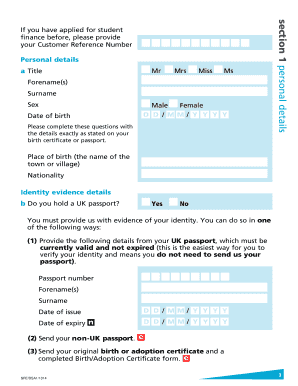
- Provide your personal details in Section 1. This includes your title, forename(s), surname, sex, date of birth, place of birth, nationality, and identity evidence details. Be sure to use the names exactly as they appear on official documents.
- In Section 2, indicate any other financial support, such as bursaries or awards you may be eligible for. If you answer ‘Yes’ to any of these questions, you may not qualify for DSAs.
- Complete Section 3 regarding your residence. You will answer questions about your nationality, residence status, and any time spent living outside the UK in the three years before the start of your course.
- Section 4 requires details about your university or college and the specific course you are enrolling in. Fill in your university or college name, course name, course start and end dates, and expected qualification.
- Section 5 must be filled out by your university or college, confirming your study status. If you prefer not to disclose your disability information to them, follow the specific guidance provided in this section.
- In Section 6, provide comprehensive details of your disability, mental health condition, long-term health condition, or specific learning difficulty. This section is critical for establishing your eligibility for support.
- Fill out Section 7 with your bank or building society account details. Ensure the account is in your name to facilitate any necessary direct payments.
- Read through the Student Declaration carefully. Sign and date this declaration before submitting the form.
- Review the checklist at the back of the form. Ensure that you have answered all relevant questions, that your university has completed the necessary section, and that you include all required evidence.
- Once all sections are complete and signed, submit your application form by returning it to the specified address.
Complete your application for Disabled Students' Allowances online today.
Common Barriers to Participation Experienced by People with Disabilities a physical environment that is not accessible, lack of relevant assistive technology (assistive, adaptive, and rehabilitative devices), negative attitudes of people towards disability,
Industry-leading security and compliance
US Legal Forms protects your data by complying with industry-specific security standards.
-
In businnes since 199725+ years providing professional legal documents.
-
Accredited businessGuarantees that a business meets BBB accreditation standards in the US and Canada.
-
Secured by BraintreeValidated Level 1 PCI DSS compliant payment gateway that accepts most major credit and debit card brands from across the globe.