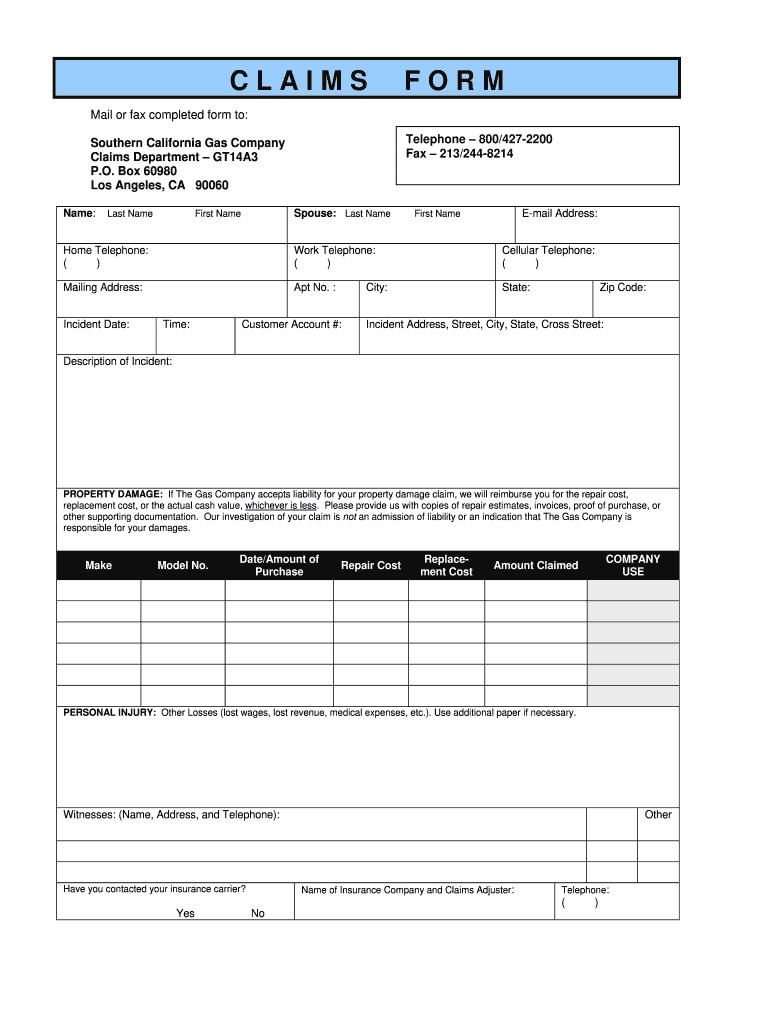
: Last Name Spouse: Last Name First Name E-mail Address: First Name Home Telephone: ( ) Work Telephone: ( ) Cellular Telephone: ( ) Mailing Address: Apt No. : State: Incident Date: Time: City: Customer Account #: Zip Code: Incident Address, Street, City, State, Cross Street: Description of Incident: PROPERTY DAMAGE: If The Gas Company accepts liability for your property damage claim, we will reimburse you for the repair cost, replacement cost, or the actual cash value, whichev.

Open form follow the instructions

Easily sign the form with your finger

Send filled & signed form or save
How to fill out the CA SoCalGas Claims Form online
This guide provides a step-by-step approach to completing the CA SoCalGas Claims Form online. By following these instructions, you can ensure that you accurately submit your claim for review and potential reimbursement.
Follow the steps to complete the claims form with ease.
- Click ‘Get Form’ button to access the CA SoCalGas Claims Form and open it in your preferred editing tool.
- Begin by entering your name in the designated fields, including your last name and the last name of your partner, if applicable. Then input your first name and email address.
- Provide your home, work, and cellular telephone numbers in the appropriate sections. Make sure to format the numbers correctly.
- Fill out your mailing address, including the apartment number (if applicable), city, state, and zip code.
- Specify the date and time of the incident you are claiming, along with the incident address, which should include the street, city, state, and nearest cross street.
- Complete the customer account number section with your relevant account information.
- In the ‘Description of Incident’ section, clearly describe what occurred during the incident.
- If you are claiming property damage, provide the make, model number, date of purchase, and the amounts related to repair and replacement costs. Additionally, attach any supporting documentation such as estimates or invoices.
- For personal injury claims or other losses, document the details and include any necessary additional paper for expanded explanations.
- Include any witnesses' information in the specified section, including their name, address, and telephone number.
- Indicate whether you have contacted your insurance carrier by selecting 'Yes' or 'No' and provide the name of your insurance company and claims adjuster, along with their contact telephone number.
- Review your entries for accuracy and completeness. Acknowledge your understanding of the review process and certify that the information provided is true and correct, then enter your name and the date in the prepared by section.
- Once all fields are completed, you can save changes, download, print, or share the form as necessary.
Begin your claims process today by filling out the CA SoCalGas Claims Form online.
Experience a faster way to fill out and sign forms on the web. Access the most extensive library of templates available.
Related content
Sep 19, 2022 — NOTE: After electronically filing a PDF copy of this Intervenor...
May 30, 2019 — This case concerns a massive, months-long leak from a natural gas storage...
There are claims such as that the installation of the two infrastructures is redundant and...
Get answers to your most pressing questions about US Legal Forms API.
What number is 1 800 427 2200?
The number 1 800 427 2200 is the customer service hotline for SoCalGas. You can use this number to report emergencies, ask questions about your service, or seek assistance with your CA SoCalGas Claims Form. Having quick access to this hotline can be vital for resolving any issues you may encounter with your gas service. Keep this number handy for immediate support.
What does SoCalGas cover?
SoCalGas offers various services related to gas supply, installations, and maintenance for residential and commercial customers. Coverage typically includes gas leaks, appliance issues, and any damages directly caused by their operations. Reviewing the CA SoCalGas Claims Form can give you insights into what specific incidents may be eligible for claims. Always stay informed about your rights and protections as a customer.
How do I file a claim with SoCalGas?
Filing a claim with SoCalGas begins by gathering relevant documentation related to your issue. Once you have your information ready, you can complete the CA SoCalGas Claims Form, either online or by requesting a paper form. This form guides you through the necessary steps to provide the details of your claim. Lastly, make sure to submit it to SoCalGas for review.
What if I smell gas at SoCalGas?
If you smell gas near your SoCalGas installation, it is crucial to act quickly. Evacuate the area immediately and avoid using any electrical devices or open flames, as these can trigger an explosion. Once you are in a safe location, contact SoCalGas’s emergency hotline. Reporting the smell of gas will help ensure that necessary safety measures are taken.
How to get SoCalGas credit back?
To receive a SoCalGas credit, you should first ensure you meet the eligibility criteria outlined by the company. After confirming your eligibility, complete the necessary CA SoCalGas Claims Form available on their website or through customer service. Submitting this form accurately will expedite the processing of your credit request. Moreover, keeping an eye on your account statements can help you track the progress of your credit.
How do I talk to someone at SoCalGas?
To talk to someone at SoCalGas, call their customer service number where dedicated representatives are ready to assist you. Describe your issue clearly to expedite the process, especially if it relates to the CA SoCalGas Claims Form. They can guide you through any complex concerns you may have.
Where is my SoCalGas bill?
You can view your SoCalGas bill online by logging into your account on their website. If you can't find your bill, Southern California Gas provides customer service to help you locate it. This may also be beneficial if you need to refer to your bill while completing the CA SoCalGas Claims Form.
How do I talk to someone at Southern California Gas?
You can reach Southern California Gas by calling their customer service hotline. Customer representatives are available to assist you with any questions or concerns, including help with the CA SoCalGas Claims Form. Ensure you have your account information ready to streamline the process.
Is the gas company the same as SoCalGas?
Yes, SoCalGas is the main gas company serving Southern California. It handles the distribution and delivery of natural gas to residential and commercial customers. If you are looking for information about your gas service, such as billing or claims, the CA SoCalGas Claims Form is an essential resource.
Does the gas company check for gas leaks?
Yes, the gas company actively checks for gas leaks as part of their safety protocols. If you suspect a leak, it's essential to report it immediately. You can submit a CA SoCalGas Claims Form to document your concerns and ensure prompt action. The company prioritizes safety and conducts regular inspections, keeping customers informed throughout the process.
Use professional pre-built templates to fill in and sign documents online faster. Get access to thousands of forms.
If you believe that this page should be taken down, please follow our DMCA take down process here.