Loading
Get Btelecom Formb Last Revision 51611 - Acwiklik - Available On Webpage
How it works
-

Open form follow the instructions
-

Easily sign the form with your finger
-

Send filled & signed form or save
How to fill out the BTelecom Formb Last Revision 51611 - Acwiklik - Available On Webpage online
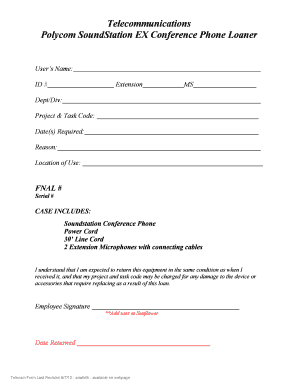
Filling out the BTelecom Formb Last Revision 51611 online is a straightforward process that helps ensure you properly request the loan of a Polycom SoundStation EX conference phone. This guide provides step-by-step instructions to assist you in completing the form accurately.
Follow the steps to fill out the form completely and correctly.
- Click the ‘Get Form’ button to obtain the form and open it in the editor.
- Begin by entering your name in the 'User’s Name' field. Ensure that your name is spelled correctly to avoid any issues with identification.
- Input your ID number in the corresponding field. This typically helps in verifying your identity within the organization.
- Fill out the 'Extension' field with your telephone extension number to facilitate communication.
- Specify your department or division in the 'Dept/Div' field to indicate which area you belong to.
- Use the 'Project & Task Code' field to denote the specific project you are working on that requires the phone.
- Indicate the dates you require the equipment in the 'Date(s) Required' section. This assists in tracking loan periods.
- Provide a brief explanation for the reason you need the loaner phone in the 'Reason' field. Be clear and concise.
- Describe the location where you will be using the equipment in the 'Location of Use' field.
- Input the FNAL number in the designated field if applicable, which may relate to billing or project tracking.
- Record the serial number of the SoundStation conference phone to ensure proper identification of the equipment.
- Review the case items listed, confirming that you understand the items you will receive, including the phone, power cord, line cord, and microphones.
- Acknowledge your agreement to return the equipment in its original condition by signing in the 'Employee Signature' section.
- Enter the date you are returning the equipment to complete the form.
- Finally, ensure all information is correct, then save any changes you made, download a copy of the completed form, print it for your records, or share it as needed.
Complete your BTelecom Formb online today to ensure you have the necessary equipment for your project.
Industry-leading security and compliance
US Legal Forms protects your data by complying with industry-specific security standards.
-
In businnes since 199725+ years providing professional legal documents.
-
Accredited businessGuarantees that a business meets BBB accreditation standards in the US and Canada.
-
Secured by BraintreeValidated Level 1 PCI DSS compliant payment gateway that accepts most major credit and debit card brands from across the globe.