Loading
Form preview
  • US Legal Forms
  • Other Templates
  • More Forms
  • More Multi-State Forms
  • Irs 990 - Schedule R 2022

Get Irs 990 - Schedule R 2022-2026

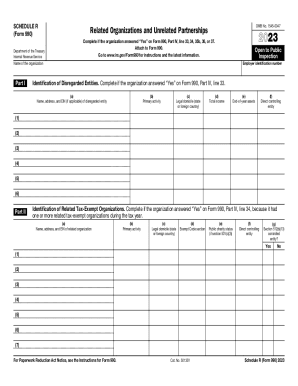
SCHEDULE R (Form 990) Department of the Treasury Internal Revenue ServiceOMB No. 15450047Related Organizations and Unrelated Partnerships2023Complete if the organization answered Yes on Form 990,.

How it works

  1. Open form

    Open form follow the instructions

  2. Easily sign form

    Easily sign the form with your finger

  3. Share form

    Send filled & signed form or save

How to fill out the IRS 990 - Schedule R online

The IRS 990 - Schedule R is a critical document for organizations to report their related organizations and partnerships. This guide provides a clear, step-by-step approach to filling out the form online, ensuring users understand each component and requirement.

Follow the steps to accurately complete Schedule R.

  1. Press the ‘Get Form’ button to retrieve the IRS 990 - Schedule R form and open it in your editor.
  2. Begin with Part I, where you will need to identify any disregarded entities. Fill out the requested information such as name, address, and Employer Identification Number (EIN) if applicable, along with details about primary activity and financials.
  3. Move to Part II, which focuses on identifying related tax-exempt organizations. Enter the necessary information for each organization, including EIN and primary activities, while also specifying their legal domicile and exempt code section.
  4. Proceed to Part III, where you will identify related organizations that are taxable as partnerships. This part requires comprehensive reporting of the organization’s activities and their financial contributions.
  5. In Part IV, continue with organizations that are taxable as corporations or trusts. Similar to previous sections, provide the relevant details, including their activities and financial stakes.
  6. Skip to Part V to disclose transactions with related organizations. Indicate any transactions that occurred during the year and provide the name of the related organization involved along with the transaction type and amounts.
  7. Complete Part VI if applicable, which requires information about unrelated organizations that are taxed as partnerships. Provide details on these entities, their primary activities, and income.
  8. Finally, fill out Part VII for any supplemental information that might clarify responses in earlier sections. Be thorough and clear.
  9. Once all sections are completed, save your changes. You can then download, print, or share the completed form as needed.

Start filling out the IRS 990 - Schedule R online to ensure your organization complies with federal reporting requirements.

Get form

Experience a faster way to fill out and sign forms on the web. Access the most extensive library of templates available.
Get form

Related content

2023 Instructions for Schedule R (Form 990)
Schedule R (Form 990) is used by an organization that files Form 990 to provide...
Learn more
2008 Form 990 (Schedule R)
by R SCHEDULE · Cited by 3 — Internal Revenue Service. Employer identification number...
Learn more
Reason Alliance in 2017
If "Yes," Form 990 and Schedule R may need to be completed instead of Form ... Go to...
Learn more

Related links form

Refund Wire Transfer Form 0213.indd - Scotiabank Scotiabank Wire Transfer Form Eft Form PRELIMINARY PAYROLL AUTHORIZATION FORM

Questions & Answers

Get answers to your most pressing questions about US Legal Forms API.

Contact support

Purpose of Schedule Schedule R (Form 990) is used by an organization that files Form 990 to provide information on related organizations, on certain transactions with related organizations, and on certain unrelated partnerships through which the organization conducts significant activities.

Introduction. Use Schedule R (Form 1040) to figure the credit for the elderly or the disabled. Future developments. For the latest information about developments related to Schedule R (Form 1040) and its instructions, such as legislation enacted after they were published, go to IRS.gov/ScheduleR.

Abstract: Form 941 is used by employers to report payments made to employees subject to income and social security/Medicare taxes and the amounts of these taxes. Form 941-PR is used by employers in Puerto Rico to report social security and Medicare taxes only.

Employers use Form 941 to: Report income taxes, Social Security tax, or Medicare tax withheld from employee's paychecks. Pay the employer's portion of Social Security or Medicare tax.

The Schedule R (Form 941) will provide the IRS with client-specific information to support the totals reported on an aggregate Form 941. It includes an allocation line for each client showing a breakdown of their wages and employment tax liability for the tax period.

Schedule R is an additional form that accompanies Form 940 and is used to calculate the FUTA tax credit for certain state unemployment taxes paid.

Schedule A (Form 990) is used by an organization that files Form 990, Return of Organization Exempt From Income Tax, or Form 990-EZ, Short Form Return of Organization Exempt From Income Tax, to provide the required information about public charity status and public support.

Get This Form Now!

Use professional pre-built templates to fill in and sign documents online faster. Get access to thousands of forms.
Get form
If you believe that this page should be taken down, please follow our DMCA take down processhere.
Get IRS 990 - Schedule R
Get form
  • Adoption
  • Bankruptcy
  • Contractors
  • Divorce
  • Home Sales
  • Employment
  • Identity Theft
  • Incorporation
  • Landlord Tenant
  • Living Trust
  • Name Change
  • Personal Planning
  • Small Business
  • Wills & Estates
  • Packages A-Z
  • Affidavits
  • Bankruptcy
  • Bill of Sale
  • Corporate - LLC
  • Divorce
  • Employment
  • Identity Theft
  • Internet Technology
  • Landlord Tenant
  • Living Wills
  • Name Change
  • Power of Attorney
  • Real Estate
  • Small Estates
  • Wills
  • All Forms
  • Forms A-Z
  • Other Templates
  • Legal Hub
  • About Us
  • Help Portal
  • Legal Resources
  • Blog
  • Affiliates
  • Contact Us
  • Delete My Account
  • Site Map
  • Industries
  • Forms in Spanish
  • Localized Forms
  • State-specific Forms
  • Forms Kit
  • Real Estate Handbook
  • All Guides
  • Notarize
  • Incorporation services
  • For Consumers
  • For Small Business
  • For Attorneys
  • USLegal
  • FormsPass
  • pdfFiller
  • signNow
  • altaFlow
  • DocHub
  • Instapage
Form Packages
  • Adoption
  • Bankruptcy
  • Contractors
  • Divorce
  • Home Sales
  • Employment
  • Identity Theft
  • Incorporation
  • Landlord Tenant
  • Living Trust
  • Name Change
  • Personal Planning
  • Small Business
  • Wills & Estates
  • Packages A-Z
Form Categories
  • Affidavits
  • Bankruptcy
  • Bill of Sale
  • Corporate - LLC
  • Divorce
  • Employment
  • Identity Theft
  • Internet Technology
  • Landlord Tenant
  • Living Wills
  • Name Change
  • Power of Attorney
  • Real Estate
  • Small Estates
  • Wills
  • All Forms
  • Forms A-Z
  • Other Templates
Customer Service
  • Legal Hub
  • About Us
  • Help Portal
  • Legal Resources
  • Blog
  • Affiliates
  • Contact Us
  • Delete My Account
  • Site Map
  • Industries
  • Forms in Spanish
  • Localized Forms
  • State-specific Forms
  • Forms Kit
Legal Guides
  • Real Estate Handbook
  • All Guides
Prepared for you
  • Notarize
  • Incorporation services
Our Customers
  • For Consumers
  • For Small Business
  • For Attorneys
Our Sites
  • USLegal
  • FormsPass
  • pdfFiller
  • signNow
  • altaFlow
  • DocHub
  • Instapage
Social Media
Call us now toll free:
+1 833 426 79 33
As seen in:
© Copyright 1999-2026 airSlate Legal Forms, Inc. 17 Station Street, Suite 303, Brookline, MA 02445
  • Your Privacy Choices
  • Terms of Service
  • Privacy Notice
  • Content Takedown Policy
  • Bug Bounty Program