Loading
Form preview
  • US Legal Forms
  • Form Library
  • More Forms
  • More Multi-State Forms
  • Monthly Value-added Tax 2550m

Get Monthly Value-added Tax 2550m

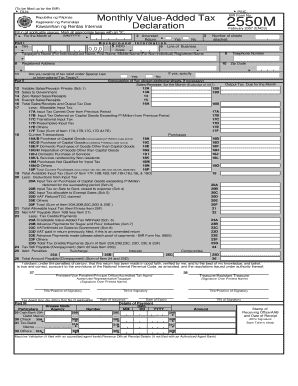
E spaces. Mark all appropriate boxes with an X . 1 (MM/YYYY) For the Month of Part I 4 TIN 3 2 Amended Return Yes No Information 6 Line of Business 7 Background 5 RDO Code Taxpayer's Name (For Individual)Last Name, First Name, Middle Name/(For Non-individual) Registered Name 9 Registered Address 11 18 19 20 21 22 23 24 25 26 Number of sheets attached 8 10 Telephone Number Zip Code If yes, specify Are you availing of tax relief under Special Law or International Tax Treaty?.

How it works

  1. Open form

    Open form follow the instructions

  2. Easily sign form

    Easily sign the form with your finger

  3. Share form

    Send filled & signed form or save

How to fill out the Monthly Value-Added Tax 2550M online

Filling out the Monthly Value-Added Tax (VAT) 2550M form online can seem complex, but this guide will walk you through each section. With clear instructions, you will be able to complete your form confidently and accurately.

Follow the steps to complete the form effectively.

  1. Press the ‘Get Form’ button to access the Monthly Value-Added Tax 2550M form and open it in your online editor.
  2. In the first section, provide the required information including your Taxpayer Identification Number (TIN), the month and year of the declaration, and your Registered Name or Taxpayer's Name. Make sure to indicate whether this is an amended return by checking 'Yes' or 'No'.
  3. Fill out the background information, including your Revenue District Office (RDO) code and registered address. Ensure your telephone number and zip code are also included.
  4. Continue to Part II, where you will compute tax. Record your sales/receipts for the month, categorized as vat-able, sales to government, zero-rated, and exempt sales. Tally the total sales and output tax due.
  5. Next, fill in the allowable input tax, specifying any input tax carried over from previous periods, deferred input tax, and other relevant categories. Calculate the total input tax available.
  6. Identify deductions from input tax, detailing any adjustments based on your purchases and their respective amounts.
  7. Calculate the net VAT payable or determine if there is an overpayment based on the input and output tax calculations.
  8. Sign the declaration, providing the title and TIN of the signatory. Ensure all entries are correct and complete before submitting.
  9. Finally, save changes, and download, print, or share the completed form as necessary.

Complete your Monthly Value-Added Tax 2550M form online today to stay compliant with tax regulations.

Get form

Experience a faster way to fill out and sign forms on the web. Access the most extensive library of templates available.
Get form

Related content

TAX GUIDE FOR PROFESSIONALS
Business tax rates may either be: 2.3.1 Value Added Tax (VAT)-. 12% if gross ... Value...
Learn more
(DOC) LIST OF BIR FORMS | Alyssa In Wonderland
For VAT Withholding - This Certificate is to be attached to the Monthly VAT Declaration...
Learn more
Certificates - Bureau of Internal Revenue / NJ-WT...
For VAT Withholding - Those Certificate is in be attached to the Month VAT Declaration...
Learn more

Related links form

Industrial Automation Circuit Design And Components Passen Pdf Declaration Of Originality Form - University Of Glasgow Swot Analysis Of General Insurance Company PEST ANALYSIS - Renewable Energy Sector In Greece

Questions & Answers

Get answers to your most pressing questions about US Legal Forms API.

Contact support

Under the Tax Reform for Acceleration and Inclusion (TRAIN) Law, VAT registered taxpayers are no longer required to file the Monthly VAT Declaration (BIR Form 2550M) but will instead file the corresponding Quarterly VAT Return (BIR Form 2550Q).

If making payments on account and submitting quarterly VAT returns does not suit your business you can choose to make VAT returns and payments monthly. To make the change to monthly returns you can either: apply online to change your registration details. fill in form VAT 484 and send it to the address on the form.

VAT returns must be filed once every month or quarter (depending on turnover or the state).

The effectivity of TRAIN Law repealed the monthly filing of the VAT returns (BIR Form No. 2550M) starting January 1, 2023, but retained the filing of the quarterly VAT returns (BIR Form No. 2550Q).

If making payments on account and submitting quarterly VAT returns does not suit your business you can choose to make VAT returns and payments monthly. To make the change to monthly returns you can either: apply online to change your registration details. fill in form VAT 484 and send it to the address on the form.

How often do I have to pay my VAT bill? You must submit VAT returns electronically every three months, unless you have special dispensation to file your returns manually.

You can consider the following options if you are unable to pay VAT: HMRC may allow you to make outstanding VAT payments by way of a series of monthly instalments across a maximum of 12 months. Closure options - Company Voluntary Arrangement (CVA) or Creditors' Voluntary Liquidation (CVL). I can't pay the VAT – what are my options? Real Business Rescue https://.realbusinessrescue.co.uk › Tax HMRC Real Business Rescue https://.realbusinessrescue.co.uk › Tax HMRC

The Monthly Value-Added Tax Declaration or BIR Form 2550m is used simply to file monthly VAT. Individuals who may get their hands on this form are those who are VAT-registered in selling or leasing goods or services. These individuals must have an actual gross sales/receipts exceeding up to P3,000,000.

Get This Form Now!

Use professional pre-built templates to fill in and sign documents online faster. Get access to thousands of forms.
Get form
If you believe that this page should be taken down, please follow our DMCA take down processhere.
Get Monthly Value-Added Tax 2550M
Get form
  • Adoption
  • Bankruptcy
  • Contractors
  • Divorce
  • Home Sales
  • Employment
  • Identity Theft
  • Incorporation
  • Landlord Tenant
  • Living Trust
  • Name Change
  • Personal Planning
  • Small Business
  • Wills & Estates
  • Packages A-Z
  • Affidavits
  • Bankruptcy
  • Bill of Sale
  • Corporate - LLC
  • Divorce
  • Employment
  • Identity Theft
  • Internet Technology
  • Landlord Tenant
  • Living Wills
  • Name Change
  • Power of Attorney
  • Real Estate
  • Small Estates
  • Wills
  • All Forms
  • Forms A-Z
  • Form Library
  • Legal Hub
  • About Us
  • Help Portal
  • Legal Resources
  • Blog
  • Affiliates
  • Contact Us
  • Delete My Account
  • Site Map
  • Industries
  • Forms in Spanish
  • Localized Forms
  • State-specific Forms
  • Forms Kit
  • Real Estate Handbook
  • All Guides
  • Notarize
  • Incorporation services
  • For Consumers
  • For Small Business
  • For Attorneys
  • USLegal
  • FormsPass
  • pdfFiller
  • signNow
  • altaFlow
  • DocHub
  • Instapage
Form Packages
  • Adoption
  • Bankruptcy
  • Contractors
  • Divorce
  • Home Sales
  • Employment
  • Identity Theft
  • Incorporation
  • Landlord Tenant
  • Living Trust
  • Name Change
  • Personal Planning
  • Small Business
  • Wills & Estates
  • Packages A-Z
Form Categories
  • Affidavits
  • Bankruptcy
  • Bill of Sale
  • Corporate - LLC
  • Divorce
  • Employment
  • Identity Theft
  • Internet Technology
  • Landlord Tenant
  • Living Wills
  • Name Change
  • Power of Attorney
  • Real Estate
  • Small Estates
  • Wills
  • All Forms
  • Forms A-Z
  • Form Library
Customer Service
  • Legal Hub
  • About Us
  • Help Portal
  • Legal Resources
  • Blog
  • Affiliates
  • Contact Us
  • Delete My Account
  • Site Map
  • Industries
  • Forms in Spanish
  • Localized Forms
  • State-specific Forms
  • Forms Kit
Legal Guides
  • Real Estate Handbook
  • All Guides
Prepared for you
  • Notarize
  • Incorporation services
Our Customers
  • For Consumers
  • For Small Business
  • For Attorneys
Our Sites
  • USLegal
  • FormsPass
  • pdfFiller
  • signNow
  • altaFlow
  • DocHub
  • Instapage
Social Media
Call us now toll free:
+1 833 426 79 33
As seen in:
© Copyright 1999-2026 airSlate Legal Forms, Inc. 17 Station Street, Suite 303, Brookline, MA 02445
  • Your Privacy Choices
  • Terms of Service
  • Privacy Notice
  • Content Takedown Policy
  • Bug Bounty Program